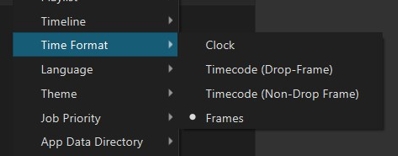
I noticed that if you change the Time Format from “Clock” to “Frames”, the Current Position and Total Duration fields update immediately to show frames, but the timeline time bar doesn’t update to frames, until you restart Shotcut. Is this a bug or intended?
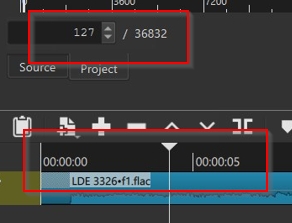
This is by design. The timeline ruler is not a timecode or clock format thing. It is always in Hours1:Minutes:Seconds (notice no frames).
1 Like
Well, in the latest version at least, for me, only frames are showing in the timeline ruler. But only on restarting SC. Steps to reproduce:
Change Settings>Time format> from Clock to Frames.
Close then open Shotcut.
Only Frames appear in the timeline:

Oh ok I vaguely recall changing that
1 Like
Thanks @shotcut. Having frames showing in the timeline ruler is useful in Frames mode. I just wondered if they should be updating immediately, without having to perform a restart?
That would be nice, but you do not need to restart. All you need to do is something that affects it such as zoom or any edit action that changes total duration. I will accept it.
Oh yes, I see, that works - as long as the total duration is changed (eg dragging out a clip’s duration at the end of the timeline).
Thanks for accepting it. I hope it’s a relatively easy fix for you to make.
This is fixed for the version 26.04
2 Likes
Gosh, that was quick. Thanks. Dan!