I’m fairly new to Shotcut. I had to watch a YT video to see how the Markers setup actually worked. It’s effective but a little convoluted.
I could make a case for how to streamline the UI to make it work in a more logical manner.
For example, being able to generate the YT Video chapter information automatically into the Project Notes area rather than a file. Then it can be copied and pasted over.
Maybe it does work that way already but at the moment I haven’t seen it.
In fact, why stop there. The chapter-markers could be set up before as a Production Design task within the “Storyboarding” Production phase. Then left there. In the final Edit, just move the Markers to where they actually need to be.
I’ll be using the Notes section within Shotcut to write the Script for each video in the Industry Standard Script format.
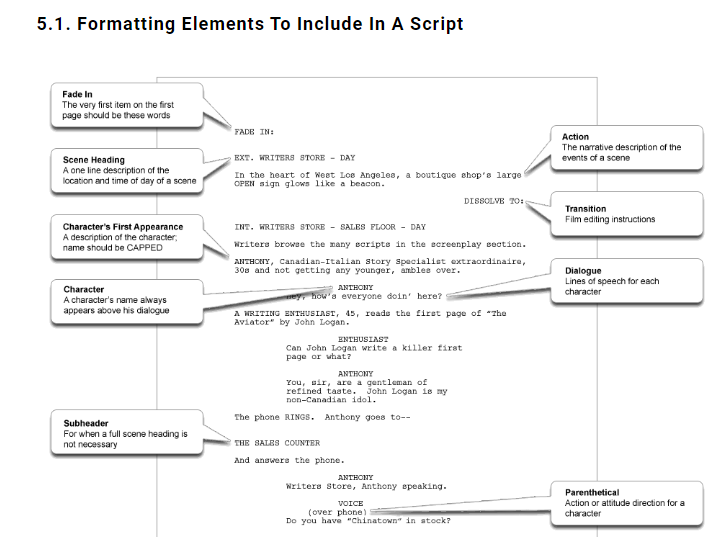
So, if you have the Script, you already have something that can be parsed by the Computer Software to get the list of Markers that you need. You only need to adjust where the Markers sit.
Here’s some more about Script Formatting:
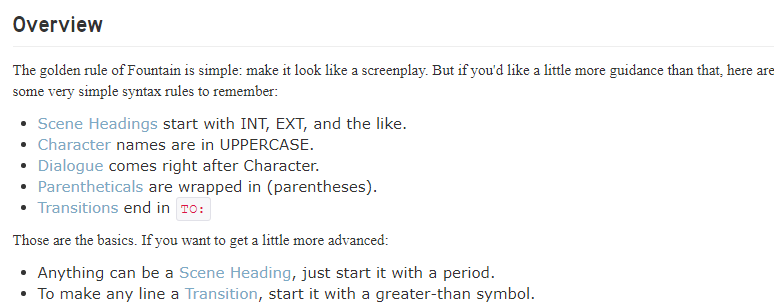
Since there is massive downsizing happening in the Film/Video Sectors, there are many people already trained in how to write in the Industry Standard Script writing style. That style already includes Scene/Chapter Markers so it’s just duplication of work to have to repeat it again in Editing if you’ve already done it when you wrote the Script for the video in the first place.