The gamma display in Shotcut is much brighter and incorrect

Bonjour,
Windows 10 et Windows 11.

L’affichage du gamma de la video dans shotcut
ne correspond pas
au vrai gamma bien plus sombre visible et plus realiste
dans VLC et a la TV.

L’affichage du gamma dans shotcut est bien plus clair et est faux.
Quelle que soit les versions
de shotcut

traitement de la video en CPU.

Hello,
Windows 10 and Windows 11.

The gamma displayed in Shotcut for the video
does not correspond
to the true gamma, which is much darker and more realistic
in VLC and on TV.

The gamma display in Shotcut is much brighter and incorrect.

Regardless of the version of Shotcut

Video processing is done on the CPU.

Not sure if you’re talking about using the Gamma setting in the Levels filter, or the general display in the Preview panel.

But I compared an image opened in both Shotcut and Photoshop.
They pretty much look the same to me with or without a gamma levels adjustment.

C’est l’affichage general, pas le filtre niveaux.

Et c’est surtout dans les parties sombres de la video que cela se voit.

Lorsque je regarde le resultat dans VLC ou a la TV la difference est tres nette.

It’s the overall display, not the levels filter. And it’s especially noticeable in the darker parts of the video. When I watch the result in VLC or on TV, the difference is very clear.

We need a lot more details.

What processing mode is Shotcut using? 8-bit, 10-bit, linear, native, CPU, GPU, etc

What are the source clips? HDR? BT.2020? Is the color range correctly detected on the clips?

8 bits natif, CPU, BT 709
La plage de couleurs : diffusion limitée, a l’affichage general

Lorsque je choisis le traitement lineaire 8 bits ou 10 bits, le gamma est plus sombre et correspond d’avantage a la video apres exportation.
Le traitement en natif 8 ou 10 bits, est plus clair.

L’exportation

onglet Video :
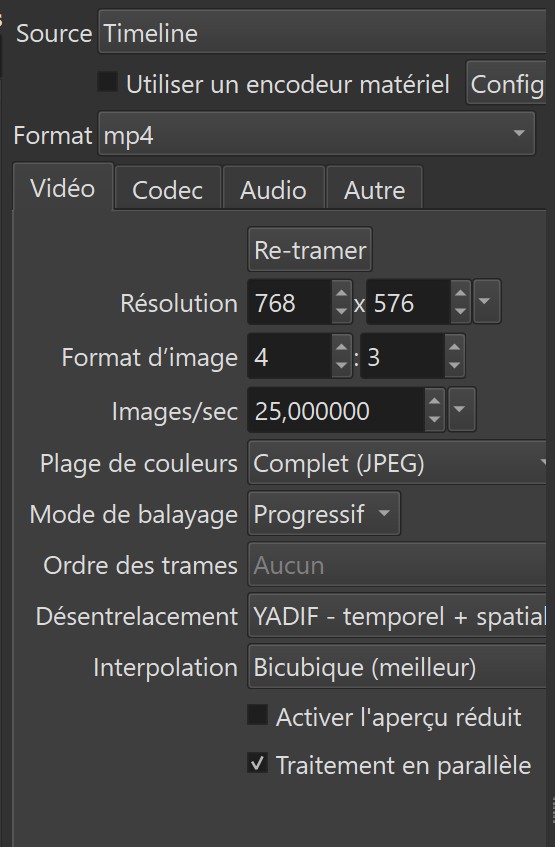
1920 x 1080, 16.9, Img Sec 25

plage de couleurs : Complet Jpeg

Yadif -temporel + spatial

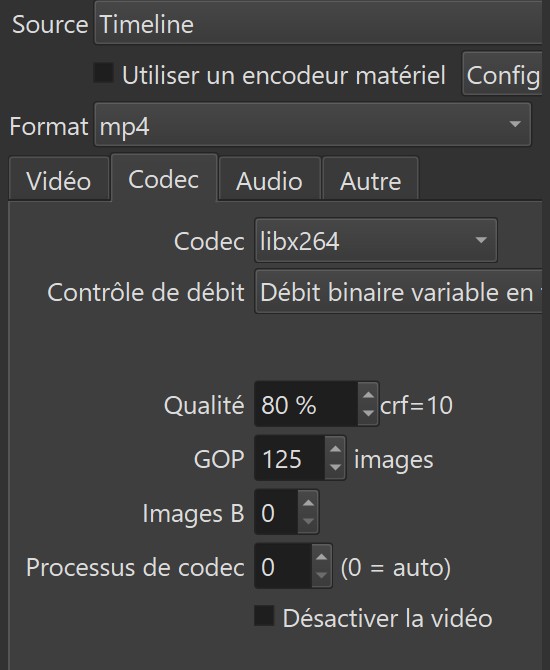
onglet Codec
libx264
debit variable, Gop 125, Image B 0, processus de codec 0

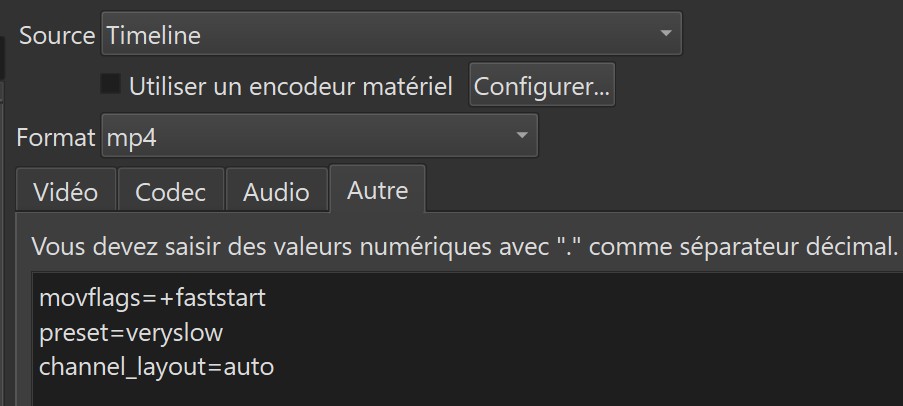
Onglet Autre :
preset=veryslow
vprofile=high
movflags=+faststart
channel_layout=auto

Native 8-bit, CPU BT 709
Color range: limited broadcast, for general display

When I choose linear 8-bit or 10-bit processing, the gamma is darker and more closely matches the video after export. Native 8-bit or 10-bit processing is brighter.

Infos video par mediaInfo :

Général
Nom complet : C:\Users\Utilisateur\Desktop\FILMS INTERNET\Planète interdite (1956) (1).mp4
Format : MPEG-4
Format, Profil : Base Media
Identifiant du codec : isom (isom/iso2/avc1/mp41)
Taille du fichier : 986 Mio
Durée : 1 h 38 min
Type de débit global : Variable
Débit global : 1 400 kb/s
Débit im/s : 25,000 im/s
Application utilisée : Lavf58.76.100

Vidéo
ID : 1
Format : AVC
Format/Infos : Advanced Video Codec
Format, Profil : Main@L3.2
Paramètres du format : CABAC / 4 Ref Frames
Paramètres du format, CABAC : Oui
Paramètres du format, Recadrer : 4 images
Identifiant du codec : avc1
Identifiant du codec/Infos : Advanced Video Coding
Durée : 1 h 38 min
Durée de la source : 1 h 38 min
Type de débit : Variable
Débit : 1 207 kb/s
Débit maximum : 3 750 kb/s
Largeur : 1 712 pixels
Hauteur : 720 pixels
Facteur de forme l/h : 2,40:1
Type de débit im/s : Débit im/s constant
Débit im/s : 25,000 im/s
Espace de couleurs : YUV
Sous-échantillonnage de la chrominance : 4:2:0
Profondeur binaire : 8 bits
Type de balayage : Progressif
Bits/(Pixel*Image) : 0.039
Taille du flux : 851 Mio (86%)
Taille du flux source : 891 Mio (90%)
Gamme de couleurs : Limited
Coordonnées de chromaticité : BT.709
Caractéristiques du transfert : BT.709
Coefficients de la matrice : BT.709
mdhd_Duration : 5910206
Configuration des codecs : avcC

Audio
ID : 2
Format : AAC LC
Format/Infos : Advanced Audio Codec Low Complexity
Identifiant du codec : mp4a-40-2
Durée : 1 h 38 min
Type de débit : Constant
Débit : 128 kb/s
Canal(aux) : 2 canaux
Agencement des canaux : L R
Échantillonnage : 44,1 kHz
Débit im/s : 43,066 im/s (1024 SPF)
Mode de compression : Avec perte
Taille du flux : 90,2 Mio (9%)
Par défaut : Oui
Groupe alternatif : 1
In MLT :

    <property name="shotcut:hash">e2eb7c385f3dcbe06dc8219f6b0ca46e</property>
    <property name="shotcut:skipConvert">1</property>
    <property name="shotcut:caption">Planète interdite (1956) (1).mp4</property>
    <property name="shotcut:producer">avformat</property>
    <property name="xml">was here</property>
    <property name="meta.media.top_field_first">0</property>
    <property name="meta.media.progressive">1</property>
    <filter id="filter0" out="01:38:30.320">
      <property name="mlt_service">avfilter.vibrance</property>
      <property name="av.intensity">1.22</property>
      <property name="av.rbal">0.6</property>
      <property name="av.gbal">0.4</property>
      <property name="av.bbal">1.1</property>
    </filter>
    <filter id="filter1" out="01:38:30.320">
      <property name="version">0.2</property>
      <property name="mlt_service">frei0r.sharpness</property>
      <property name="0">0.5</property>
      <property name="1">1</property>
      <property name="disable">0</property>
    </filter>
    <filter id="filter2" out="01:38:30.320">
      <property name="version">0.2</property>
      <property name="mlt_service">frei0r.sharpness</property>
      <property name="0">0.395</property>
      <property name="1">1</property>
      <property name="disable">0</property>
    </filter>
  </chain>
</mlt>

Planete interdite 4K.mlt (11.2 KB)

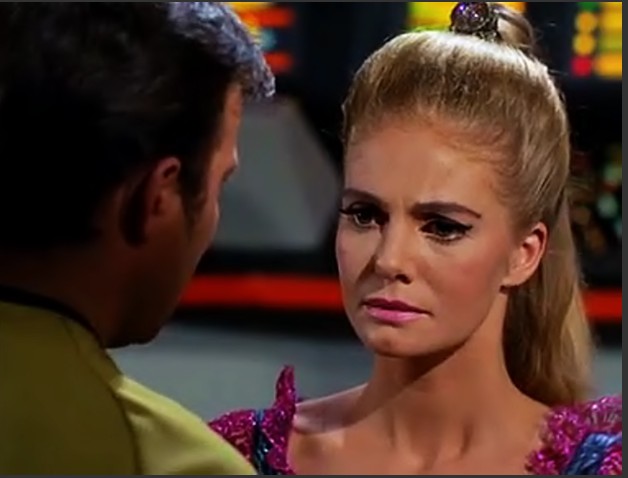
Before export

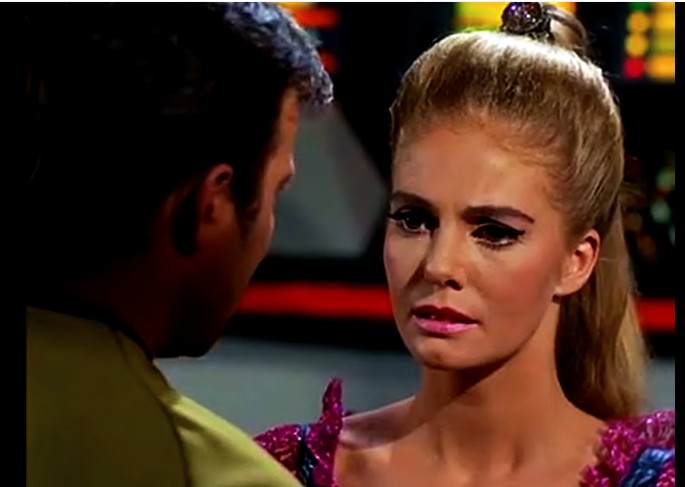
After export

Le signe de Gédéon.mlt (12.6 KB)

In your original post you wrote more than once “display in Shotcut.” That means something very specific to most readers, and it is not export. Then, in later posts you provide details about export. Yes, the two could be both affected, but I thought only preview since the first post never mentions export. This is why we ask for steps.

Also, your export is changing the color range from limited to full.

What are the pictures of exactly? Which player or utility to export a frame?

Your video mode also plays a role. I assume from the resolution that is SD PAL.

And remove the filters to reduce confusion.

Pour preciser :

dans l’affichage, la video ( n’importe laquelle ) a la bonne luminosité, par rapport a l’original,

mais apres ajout de filtres,

et surtout, apres exportation, mais lu par VLC et la TV la video est nettement plus sombre.

Cependant, si je lis la video exportée, par Shotcut, la video reste a une bonne luminosité.

Seul, la TV et VLC me montre une video plus sombre.

Apres retrait de tout filtres,

Je remarque que si je converti la video ( n’importe laquelle ) celle ci reste cette fois, a la bonne luminosité apres exportation, elle n’est pas sombre, de meme dans VLC ou a la TV.

Pour la plage de couleur limité a export, je la regle manuellement a plage de couleur complete, c’est mon reglage que je choisis pour ne pas trop assombrir les videos a l’exportation.

To clarify: In the display, the video (any video) has the correct brightness compared to the original, but after adding filters, and especially after exporting, when played through VLC and on TV, the video is noticeably darker. However, if I play the exported video through Shotcut, the video remains at a good brightness level. Only the TV and VLC show me a darker video. After removing all filters, I notice that if I convert the video (any video), it remains at the correct brightness level after export; it is not dark, and the same is true in VLC and on TV. Regarding the limited color range for export, I manually set it to full color range. This is my preferred setting to avoid excessively darkening the exported videos.

Je crois avoir trouvé le probleme,

cela viendrait d’une accumulation de fichier MLT pour une meme video et ceux ci peuvent provoquer du desordre dans les filtres.

En faisant attention a l’enregistrement sur le meme fichier MLT a chaque modification, je n’ai plus ce probleme de decalage de luninosité vers le sombre.

Tout semble etre revenu a la normale.

Desolé pour tout ces problemes que je vous ai emmenés.

I think I’ve found the problem. It seems to be caused by an accumulation of MLT files for the same video, and these can cause problems with the filters. By being careful to save to the same MLT file after each edit, I no longer have this issue of the brightness shift towards darker areas. Everything seems to be back to normal. Sorry for all the trouble I’ve caused you.

Je reviens sur ce probleme de luminosité plus basse apres exportation, toujours non visible a l’affichage general dans Shotcut, apres exportation, sauf sur VLC et la TV.

Il semble que le filtre vibrance en soit la cause, car sans celui ci, la luminosité reste bonne apres l’exportation dans shotcut et correspond aussi a celle de VLC et la TV.

I’m revisiting this issue of lower brightness after export, which is still not visible in the general display in Shotcut after export, except in VLC and on TV.

It seems the vibrance filter is the cause, because without it, the brightness remains good after export in Shotcut and also matches that of VLC and TV.

Two possible things could be happening:

If the Shotcut project is in BT.601 color space, then the Vibrance filter may cause slight distortions. The Vibrance filter has properties to set luma coefficients, which are not visible to the user in the Shotcut interface, which means they default to BT.709 coefficients. BT.709 color math applied to BT.601 footage could skew the results.

The second thing that could be happening is a color space detection issue. Normally, a video file has a flag to indicate if it is BT.601 (SD) or BT.709 (HD). If the flag is missing, Shotcut makes a guess based on the video’s resolution. Normally, this works pretty well.

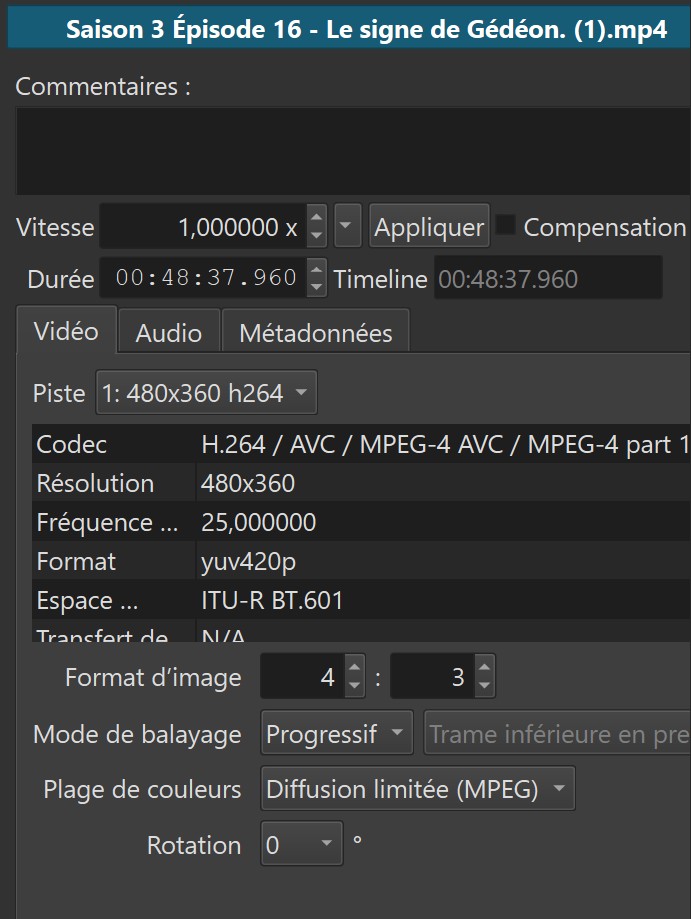
In your case, your MediaInfo output says the file is BT.709, but your first properties screenshot says Shotcut is detecting it as BT.601. I’m not sure why the tools are not agreeing, but it does suggest that color space is the culprit in one way or another.

Here is a test:

  • Create a new Shotcut project with the Video Mode set to any BT.709 profile. Don’t use Automatic mode or the SD PAL mode.
  • Bring in a problematic video clip, maybe 10 seconds worth.
  • Split the clip in the middle.
  • Add a Vibrance filter to the second half with default settings.
  • Export.

Ideally, there will be no visible change between the first and second half of the clip when played back, because all color math is forced into BT.709. Curious to know what actually happens in your case.

An alternative test is to put two copies of a problematic clip on the timeline, stacked on top of each other (V1 and V2 tracks). Put the Vibrance filter on the V2 clip. Toggle the visibility (eyeball icon) of the V2 track to see if there is a change in the preview as it changes between showing V1 and V2.

Propriétés de la video par shotcut

espace BT601

transfert de BT709

J’ai mis la meme video sur 2 pistes differente,

sur la V1 j’ai teinte, luminosité et saturation

et sur la V2 j’ai mis vibrance,

effectivement vibrance assombri la video.

Shotcut video properties BT601 space BT709 transfer

I put the same video on two different tracks.
On track 1, I adjusted hue, brightness, and saturation.
And on track 2, I adjusted vibrance. Indeed, vibrance darkened the video.

Track 1 should have no filters. We are trying to verify that the Vibrance filter with default settings looks identical to the original clip.

This combination makes no sense and will produce color errors. I’m not sure why this is happening, but it is probably contributing to the problem.

MediaInfo

General
Unique ID : 107060243740225160168512252257894167473 (0x508B0D8CA43BE50946FFD893C9CC73B1)
Complete name : C:\Users\Utilisateur\Desktop\FILMS INTERNET\Zoulou_-1964-_vf.mkv
Format : Matroska
Format version : Version 4
File size : 712 MiB
Duration : 2 h 12 min
Overall bit rate : 750 kb/s
Frame rate : 25.000 FPS
Writing application : Lavf62.6.100
Writing library : Lavf62.6.100
ErrorDetectionType : Per level 1

Video
ID : 1
Format : AVC
Format/Info : Advanced Video Codec
Format profile : Main@L3
Format settings : CABAC / 3 Ref Frames
Format settings, CABAC : Yes
Format settings, Reference frames : 3 frames
Codec ID : V_MPEG4/ISO/AVC
Duration : 2 h 12 min
Width : 854 pixels
Height : 358 pixels
Display aspect ratio : 2.39:1
Frame rate mode : Constant
Frame rate : 25.000 FPS
Color space : YUV
Chroma subsampling : 4:2:0
Bit depth : 8 bits
Scan type : Progressive
Title : ISO Media file produced by Google Inc.
Default : Yes
Forced : No
Color range : Limited
Color primaries : BT.601 PAL
Transfer characteristics : BT.709
Matrix coefficients : BT.601
VENDOR_ID : [0][0][0][0]

Audio
ID : 2
Format : Opus
Codec ID : A_OPUS
Duration : 2 h 12 min
Channel(s) : 2 channels
Channel layout : L R
Sampling rate : 48.0 kHz
Bit depth : 32 bits
Compression mode : Lossy
Delay relative to video : 7 ms
Language : French
Default : Yes
Forced : No

Netteté

n’assombrit pas la video lorsqu’elle est en BT 601,

Mais si la video est en TB601 et mode de tranfert BT 709

la video s’assombrit un peu avec sharpen, visible a l’affichage general.

Sharpen does not darken the video when it is in BT 601, But if the video is in TB601 and BT 709 transfer mode, the video darkens slightly with Sharpen, visible in the general display.