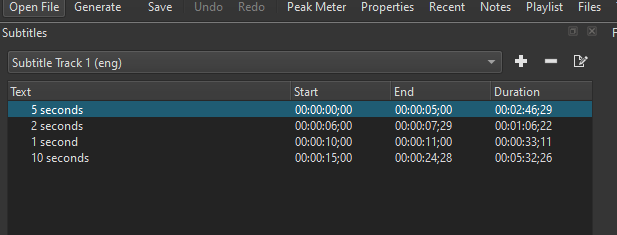
26.8.1 / Windows 10
I made a ffmpeg.exe → ffmpeg copy to have working subtitles but I noticed there’s an issue with the subtitle duration in the panel (this is on a blank project with manually added sub line).
Same project shows correct values in 26.6.25
The subtitles seem correct in the exported file, this is just the output in the panel that’s wrong.
It was caused by a fix for this bug report
opened 08:18PM - 08 Jul 26 UTC
This tracker is for defects only! For feature requests, see [our discussion foru… m](https://forum.shotcut.org/).
OS and Version (please complete the following information):
Operating System: Windows 11 24H2
Shotcut Version: 26.06.25
Describe the bug
Using **Generate Text on Timeline progressively** shifts the generated text clips away from the original subtitle timing.
The original subtitles displayed through **the Subtitle filter** are perfectly synchronized with the video. However, after using **Generate Text on Timeline**, the generated text clips gradually drift over time.
The drift is cumulative. At the beginning of the video the timing is correct, but near the end the generated clips are approximately 400 ms out of sync.
This only affects the generated timeline text. The Subtitle filter itself remains correctly synchronized.
The issue is reproducible with my project.
**Steps To Reproduce**
Start Shotcut.
Create a new project (tested with both PAL 25 fps and HD 1080p 25 fps).
Import a 25 fps CFR H.264 video.
Add subtitles using the Subtitle filter.
Verify that subtitle timing is correct during playback.
Select Generate Text on Timeline.
Compare the generated text clips with the original subtitle timing.
Expected behavior
The generated text clips should preserve exactly the same timing as the Subtitle filter.
There should be no cumulative timing drift between the generated timeline text and the original subtitles.
**Screenshots**
<img width="2560" height="1528" alt="Image" src="https://github.com/user-attachments/assets/3963924d-856c-46b3-85af-d1c08c23124a" />
<img width="2560" height="1528" alt="Image" src="https://github.com/user-attachments/assets/4018316e-c6f8-4fc7-b3c3-21d1b0267ef7" />
I found it and fixed for the next version 26.9