Text to Speech, for example, converts the text “Hello, my name is Heart. What do you want me to say?” to audio:
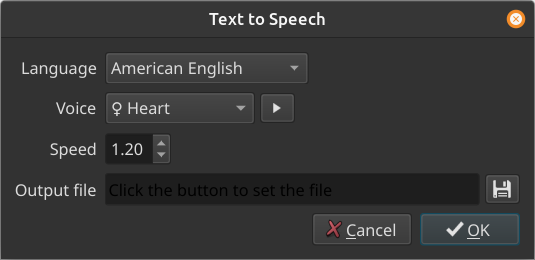
It is available since version 25.10 in the Notes panel as well as Subtitles. Choosing it opens this dialog:
Unless, you do not yet have Docker installed on your computer. Then, it shows a dialog about Docker:
This feature requires Docker, which provides an installer, and the automatic download of an 13.2 GB Docker image.
If you already installed Docker it could not be found at the expected location:
Click OK to continue and locate the
dockerprogram on your system.
Click the > button next to the Voice to hear a preview of it. The symbol  or
or  at the beginning of the voice name indicates gender.
Clicking OK opens a file save dialog if you did not yet specify the output file name. Then, it creates a job in the Jobs panel. It can take quite a long time especially if you have not yet downloaded the large Docker image. The first time you use this in an app session it always generates a “docker pull” job to get the latest version. But that goes quickly if there are no updates (it rarely updates). The first time ever it will take a long time to download that much data, and it is normal and expected that the progress % appears stuck because docker is not able to show a good progression. Finally, a second job to actually do the conversion runs, and that is not very fast either. When, it completes, Shotcut opens the generated WAV file in the Source player.
- This uses Docker like a plugin framework. The engine for this is Kokorodoki, and the model is Kokoro–both of which are not made by us. Do not ask us for more languages or voices.
- There are Docker installers for Windows and macOS from docker.com. For Linux, it is usually preferable to get it from your distribution but ensure you get the real docker and not podman or the desktop icon dock bar. On Debian-based systems, it is the
docker.iopackage. - Docker has an engine (service) that must be running to use this feature. If you are on Windows or macOS, this might not be running after a reboot. Open the Docker Desktop app where you can turn it on, and in its Settings there is an option Start Docker when you sign in to your computer. On Linux, it is usually automatically started unless you or something disabled it in systemd.
- The quality with subtitles is heavily dependent upon the timing and duration of each item. If it sounds choppy or cut-off, you either need to increase the speech speed and/or the item durations. Also, multi-line subtitle items are discouraged because that introduces a pause as it thinks it is like a new paragraph.
- This is not available in the Linux Flatpak.