owai
September 11, 2025, 6:31am
1
Hello,
I try to stabilize a night sky video, that night was windy and the telescope moved in X Y (translation).
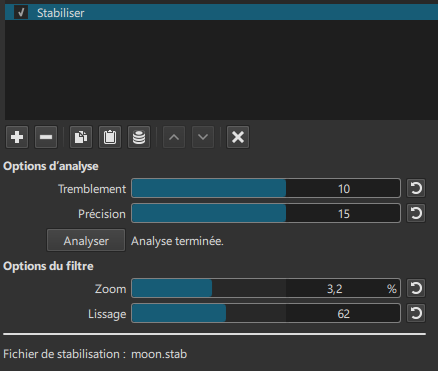
btw, what is the meaning of the different parameters? i found no help.
thank you
owai
SergeC
September 12, 2025, 10:44am
2
Hi @owai ,Vous pouvez consulter ces tutos:
After rendering a video project countless times with low & high settings of each scale, then closely studying the results, this is what I believe each setting does. The higher the setting, the more it does what is described.
Shakiness seems to average out the frame movements instead of each frame migrating too much compared to the previous/next frame. Max recommended.
Accuracy seems to prefer keeping the main point-of-reference figure stabilized instead of the moving background (this was for…
[Shotcut Stabilization Parameter Tutorial 1]
In contrast to earlier Shotcut Versions a too high Shakiness factor seems to have here no negative effects.
It is very clear to see that the smoothing factor makes the most difference.
owai
September 12, 2025, 5:25pm
3
Thank you! Exactly what I was searching for… I will try this soon!
owai
October 2, 2025, 2:38pm
4
the links are good to explain the settings…
but i didn’t get my answer about the “roll” (rotate) stabilization.
so i guess it’s not possible to “keep the north to the north” ?
thanks