What is your operating system?
Windows 11 Pro
9800x3d
RTX 4090
32GB RAM
What is your Shotcut version?
25.12.31
Can you repeat the problem? If so, what are the steps?
- Edit 4K 60FPS 10 Bit
- Using Size, Position, & Rotate filter, zoom in quite far (at least 400%) to the image (I have captured gameplay, and need to zoom quite far in on text chat within the game window in order to highlight it)
- Export using HEVC 10 profile (Full color in advanced settings, colorspace=2020, color_trc=smpte2084). Export will proceed normally until reaching % that corresponds with zoom filter in timeline. GPU and CPU usage drop to baseline levels, export % stops increasing, memory (RAM) shows around 20gb in use, and it remains like this until I stop the export and remove the Size, Position, & Rotate filter.
Shotcut gives no error or indication that anything is wrong. Memory usage remains steady and does not error out. Nothing of note (as far as I can tell, anyways) appears in the log. I have attempted changing many settings, including parallel processing and hardware encoding. The only thing that allows export to proceed is removing the zoom entirely. The video looks great, and it seems this filter is the only one I am having this issue with. It plays fine when viewing in the preview window.
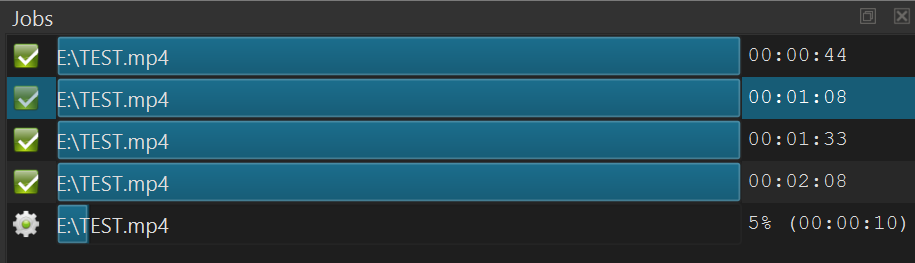
Ran test with 8 second video. Export time increases as zoom increases - locks up at 500% zoom and export no longer progresses:
100% Zoom: 0:44
200% Zoom: 1:08
300% Zoom: 1:33
400% Zoom: 2:08
500% Zoom: Infinite (stops at 5%)
What is your free system memory looking like when the export is stuck like this? Is your whole computer slow because it is swapping at this point?
Yes, this filter is heavy and gets heavier as you zoom. Please test using Settings > Processing Mode > 10-bit Linear GPU/CPU along with the Size and Position GPU filter in a new project.
The RAM in use fluctuates from 20-28gb max (out of 32gb), but trends between 20-25 mostly during export.
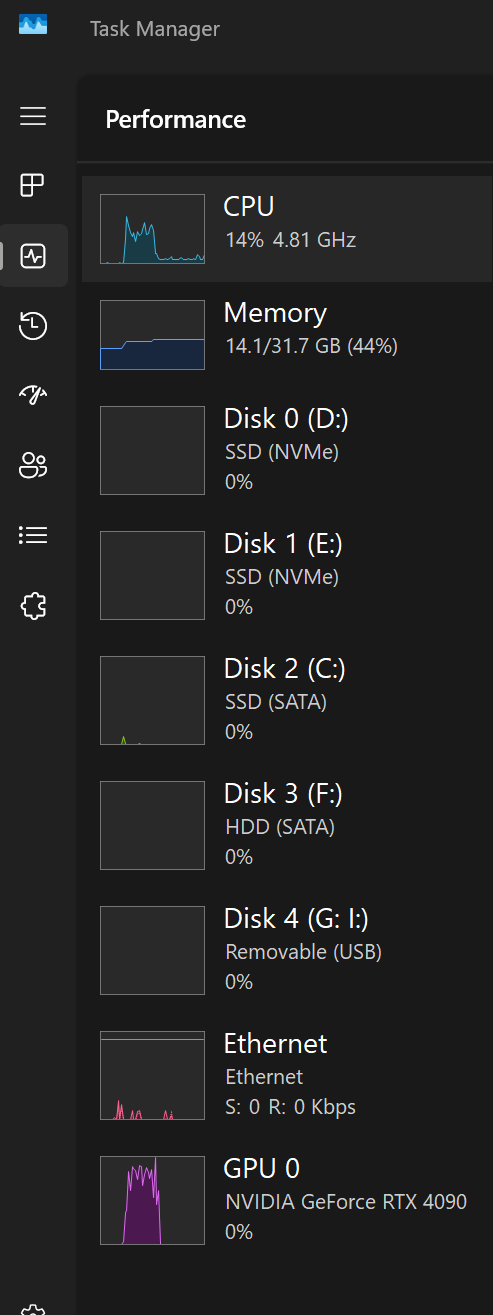
The GPU and CPU usage drop dramatically when reaching the zoom in the timeline (I will get a screenshot when I get home) - CPU drops from highly fluctuating usage (20-60%) to baseline (around 2-5%) and GPU usage goes from 90-100% to baseline (0-2%). The computer is not slow at all, though I am not performing other tasks while exporting - but when I move the mouse around there is no latency or stutter. RAM usage stays constant at around 20gb at this point, and everything remains in this state until stopping the export.
Thank you for the suggestion, I will try the linear setting tonight when I get home from work!
Tests complete. I re-ran an 8 second video with 4 seconds of video without zoom and 4 seconds where 500% zoom applies. You can see the initial spike when export begins and then the dropoff when it reaches the zoom filter at around 50%.
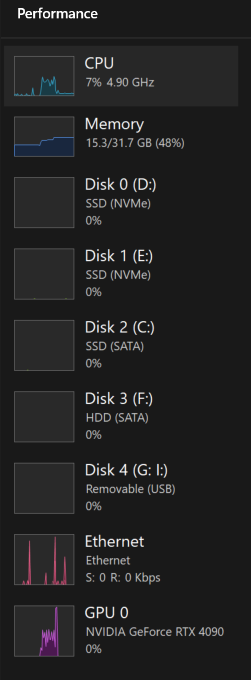
I then started a new project with the experimental Linear 10-bit CPU/GPU setting and attempted to export. Same result - posted below:
Both exports halted at 50% at the same time as the CPU and GPU usage dropoff.
EDIT: Additional note, the computer is not slow at all when this happens. I can open programs and use my pc without any noticeable latency or issue.
You would need to use the GPU Size and Position filter in this case. Otherwise, it is not a big difference. The filters do not have a CPU or GPU mode; there are separate filters.
So far I have not reproduced this. I am using GoPro 10-bit 4K60 videos and not direct game captures. Maybe that is part of the problem–the way those files are written especially using mkv.