Hey Guys.
I have got a Problem with Shotcut.
It close it is self-explanatory.
I work a little bit, make cuts, put vids in, or small vids, and bupp, closed.
I have no clue.
Can you help?
Hey Guys.
I have got a Problem with Shotcut.
It close it is self-explanatory.
I work a little bit, make cuts, put vids in, or small vids, and bupp, closed.
I have no clue.
Can you help?
You skipped these parts of the bug report, though:
(If you are using Linux, you must state how you installed Shotcut as there are too many builds and packages. In general, we do not make the build installed by your distribution package manager unless it installs the Snap. The developers only build, test, run, and support the builds shown on our download page.)
(Please be specific and use the names as seen in Shotcut, preferably English. Include a screenshot or screen recording if you can. Also, you can attach logs from either View > Application Log or right-click a job and choose View Log.)
Further, when Shotcut closes, it generates a log file.
On Windows 10 (Default settings)

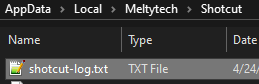
This file might shed some light on what happened.
Hi.
Iam using Win11-Standart
when I take a few steps in the program, it closes komplete.
The Blue Circle ( loading or Save Circle ), and then it closed
I did not change something.
I’ve got 16Gb RAM.
I think i’ve got the newest Version.
If the main menu Settings > Processing Mode is set to 10-bit Linear GPU/CPU (Experimental) choose something else. If not, then Shotcut is probably not stable on your computer for some unknown reason. Or maybe the problem always occurs with a certain file you keep using. After a crash, you can:
Maybe it will reveal something.
Also try turn off Settings > Preview Scaling > Use Hardware Decoder
On thank you.
I will try it, and try if it works.
For now thank you!