This sub-menu chooses how Shotcut does its image processing after reading a video or image and before displaying or exporting it. It shows these options:
- Native 8-bit CPU (fast, flexible)
- Native 10-bit CPU (slower, better)
- Linear 10-bit CPU (slowest, best)
- Linear 10-bit GPU/CPU (Experimental)
This was added in version 25.12 and replaces the old menu item Settings > GPU Effects. Previous versions of GPU Effects did not process the image in linear color when using CPU filters; since version 25.12 it does.
10-bit Video
Bit depth is the number of colors or video brightness levels. 8-bit has only 256 values per color component, for example, red/green/blue. 10 bits has 1024 levels. Previously, 10-bit video sources were only partially supported using GPU Effects and only GPU filters. Without GPU Effects (CPU), in order to stay in the 10 bit space, you could only use filters with the #10bit tag but no transitions or track blending/compositing. Now, we have ported many CPU video effects to support 10- and 12-bit video sources including transitions and track blending. Also, the #10bit CPU video filters also work properly with the experimental GPU processing. Not all of the video CPU filters have been converted; many of them come through another software project that does not support it. However, we were able to convert many for this release or at least mark them as safe for a 10-bit project.
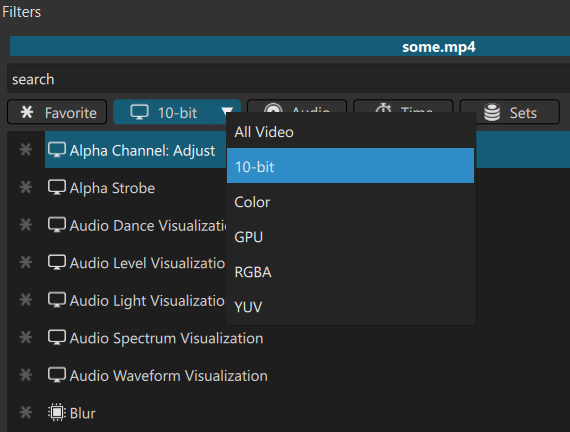
The filters menu Video button shows a drop-down to choose a suitable filter for either 10-bit and/or GPU processing pipelines:
Linear Color Processing
Any mixing of pixels with a color space’s gamma is not ideal, can cause color distortions, and is technically incorrect. This pixel mixing occurs whenever images interpolated, for example scaling, blurring, and sub-pixel positioning, as well as with track blending/composition. Previously, only GPU Effects and video filters in the GPU category operated in linear color. Now, there is an option to use it outside of the GPU processing.
There is no linear option for 8-bit because that naturally causes quantization artifacts. There are not enough bits available to show enough levels for the portions that the human eye is most sensitive.
Non-linear “native” options are still included because there is a signficant performance decrease when using linear (more conversions). We have a plan to improve performance for the next release. 8-bit is still included because it is more “flexible” by including more video filters. Of course, you can use an 8-bit video filter in a 10-bit, but the quality of the video clip or track will suffer a reduction in bit depth.