The Sepia Tone filter applies a two-axis color tint inspired by traditional sepia processing.
Historically, sepia refers to a brownish tone produced by chemical treatment of black-and-white photographs and film, originally used to improve image longevity and later adopted for its distinctive aesthetic.
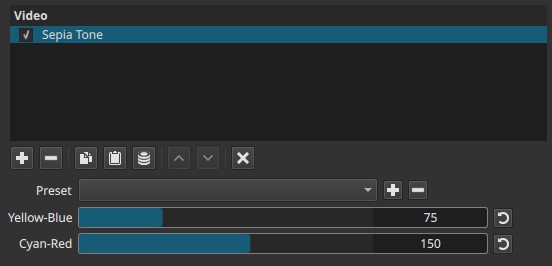
In Shotcut, this filter generalizes that concept: it can produce classic sepia looks as well as other monochrome color tints, depending on parameter settings.
Parameters
Yellow-Blue (0–255)
Controls the color balance along the yellow–blue axis.
-
Lower values
Shift the image toward blue -
Higher values
Shift the image toward yellow
Cyan-Red (0–255)
Controls the color balance along the cyan–red axis.
-
Lower values
Shift the image toward cyan -
Higher values
Shift the image toward red
Neutral point and monochrome behavior
When both sliders are set near 127-128, the filter applies no color bias, resulting in a neutral black-and-white image.
Values above or below this midpoint introduce color tinting by biasing the grayscale image along the two color axes.
Color behavior and flexibility
Although named Sepia Tone, the filter is not limited to sepia coloration:
-
The default values (Yellow-Blue ≈ 75, Cyan-Red ≈ 150) produce a classic sepia-like brown tone
-
Other combinations can produce:
- Cool cyan or blue monochrome looks
- Warm reddish or golden tones
- Stylized monochrome color effects
The filter always starts from a monochrome base and then applies color bias.
Visual characteristics
Typical effects include:
- Conversion to black and white at neutral settings
- Warm or cool monochrome tinting
- Uniform color application across the frame
- No change to image geometry or motion
Recommended use cases
- Vintage or historical looks
- Period reenactments
- Stylized monochrome grading
- Creating tinted black-and-white video
Historical tone references (approximate)
The following historical photographic toning processes can be visually approximated using this filter.
-
Sepia (Sulfur toning)
Produces warm brown tones from silver-based black-and-white images.
Closely matches the filter’s default behavior and naming. -
Gold Chloride Toning (Daguerreotype gilding)
Used on daguerreotypes to improve contrast and permanence.
Results in cool-to-neutral grayscale with slight warm highlights. -
Selenium Toning
Deepens blacks and shifts tones toward cool purples or reddish-browns.
Can be approximated with reduced Yellow-Blue and increased Cyan-Red bias. -
Platinum / Palladium Printing
Known for neutral to slightly warm gray tones with smooth tonal transitions.
Approximated by keeping both sliders near midpoint with subtle warm bias. -
Cyanotype
Produces distinctive blue monochrome images.
Approximated by lowering Yellow-Blue and Cyan-Red toward blue/cyan values.
Limitations
- Parameters cannot be keyframed
- Uniform effect across the frame
- Not intended for precise color grading
- No control over contrast or luminance