When doing Ripple delete on a clip while Ripple Markers button active, the subsequent markers are moved by the length of the clip minus 1 frame. So after 30 deletions (on a 30fps project) the markers are left behind by 1 second and it keeps increasing.
Simple reproduction with 3x 1 second color clips, then X the first clip:
Maybe this is related.
Sometimes I use a range marker when I need to cut multiple clips of the same length. But if I set the length of the range marker to 00:00:04:00 for example, after the splits the resulting clip will be one frame shorter than expected.
Yes, I experience this same bug in Shotcut 25.11.2 running on Linux. Exactly as daniel47 described. After each ripple delete (with all 3 ripple toggles ON, including markers), markers after the delete get shifted one frame to the right to where they should be after each ripple delete, so I have to manually move them back left one frame into place. It’s obviously a very painful problem since, if you have hundreds of markers in a project, shifting them all left by dragging them each is extremely laborious, and doing these hundreds of marker drags every time you ripple delete before them quickly makes it exponentially time consuming.
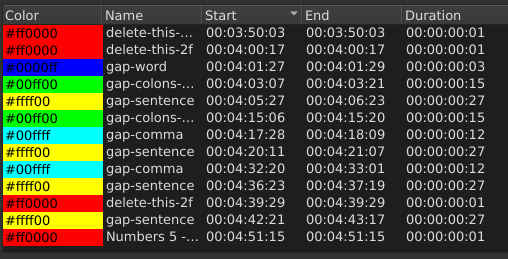
I also noticed the duration of all markers is always miscalculated in the markers panel. They are all shown as 1 frame longer than they actually are. My guess is that this math is all related and what causes the problem in shifting.
If you look at the numbers in the screenshot, it’s pretty obvious that there is +1 frame more than there should be in duration for all markers. Most can be spotted by doing the math in your head, but a calculator will confirm it of course.
I did some testing, and the bug of shifting markers occurs primarily with ripple cut. If I make 2 splits, and delete the segment instead of the problematic split cut, and then move the clip on the right toward the one on the left with the magnet on so it snaps, all of the following markers don’t shift one frame to the right. Only with ripple cut do they shift. A bit more work (more clicks per split cut), but at least it avoids the marker shift bug until it’s fixed. I will attempt to remember to mentally do the “minus one frame” math on the incorrect calculations on all marker durations until that bug is fixed. My markers must be frame accurate for scripting purposes, so I have to make sure to drag them to their proper durations, and the duration bug throws me off. I’m like “wait, do I add a frame or minus a frame.” Would be cool if the duration was correct so I don’t have to try to remember to do the math to fix it each time.
Also related: when exporting a range marker that fully surrounds a clip, the final video contains 1 extra frame from the next clip following the marker.
Oh wow, that’s a subtle catch. I don’t have an easy way to test that one since my videos are outdoor hiking type videos, and detecting a single frame like that isn’t hugely noticeable. If it repeats an existing frame twice, I think I would notice the stutter… but if it just pulls one too many frames from the rightmost clip, that would be hard to detect at a glance. It would be interesting to make 2 test source videos with red background on one and the other with blue (to be sure to see when the transition from left clip to right occurs) both videos with numbered frames in a giant font like “frame 1”, “frame 2”, “frame 3”… “frame 30” on a 1 second sample (for 30fps, or however many frames on another framerate), do the cut at a specified frame within Shotcut, with markers and so on, and then analyze the frames one-by-one within the exported mp4 to see which frames are present, repeated, unexpected, extra, etc. That would give a very definitive answer which frames are cut, repeated, and so on. It wouldn’t surprise me that since the math is off to count all marker frame durations, that the “bad math” might shift everything that relies on the duration variable in the code.
If someone wants to play around with this stuff, I made some simple files for testing purposes. The MLT is the source, video was exported using the full timeline. Can split the video on a timeline, ripple cut a chunk out of the middle, add markers, and see how the frames align.