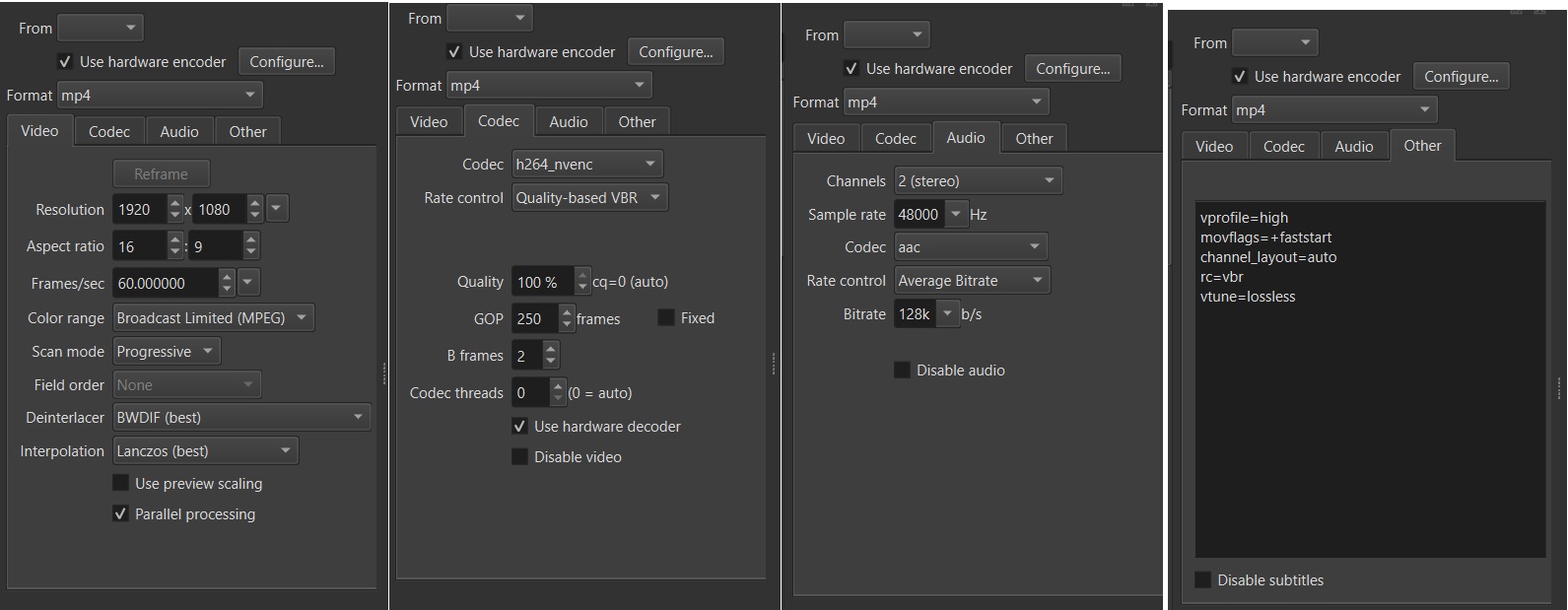
Do you actually get a successful export? I tried this and the export fails with libx264. Are you using hardware encoder?
Right clicking the export job and View log for me says some stuff like:
[error]: high profile doesn't support lossless
[libx264 @ 000001f2848f8400] Error setting profile high.
[libx264 @ 000001f2848f8400] Possible profiles: baseline main high high10 high422 high444
There’s a lossless category in the export presets, click on the H.264 there and try again.
Btw, it’s not really recommended to export at 100% as there’s a point where you just get diminishing returns so large file size but no extra details. But this is a different discussion.
agreed. I personally used this preset because i clip my stuff in obs with a set CQP, and set my CQP in shotcut to be 0 so that i dont lose quality on top (just how ive always done it) setting a decent GOP helped to bring down file size since its not coming in at lossless quality.
im using h264_nvenc. the resulting video has audio but no video
note ive used the same preset for like the last 2 years and only within the last 6 months did it stop working.
i couldnt find the preset file so here is everything that i have
Repeating the steps in the first post works for me on a RTX 4070. Even when I use your screenshots to configure other things away from the defaults it works for me. I guess it depends on your hardware.
Changing things in Advanced mode requires your own trouble-shooting and not accepted as a bug. Advanced mode is designed to let you break things. There are too many variables to codify the rules to prevent that. And even if someone uses AI to generate a million new lines of code to add those rules, I do not want to try to understand it all to debug something. You troubleshoot it by reading the log.
I think there was a change in the past year to allow B frames with hardware encoding since a lot of hardware in the past several years supports that now. Combined with this