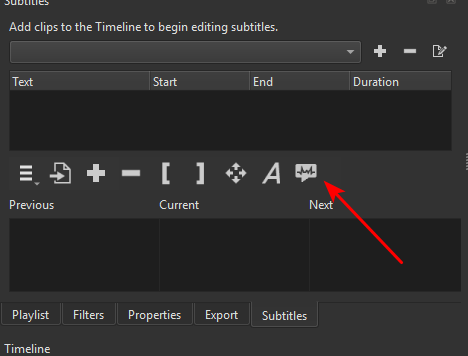
Urgent, please, how do I remove the speech-to-text from my video?
Every time I save a video, the text appears on it. I would like to stop or remove this, please.
Urgent, please, how do I remove the speech-to-text from my video?
Every time I save a video, the text appears on it. I would like to stop or remove this, please.
It is not clear if you are talking about text that you added to overlay the video (A) or subtitles to be embedded as timed text data inside the exported file (B).
For (A), you need to look for the filter. It could be on Timeline > Output or as a dedicated video track depending upon how you did it.
For (B) that causes some media players to render the subtitles, you can either turn them off in the media player. Or, in Shotcut there is a checkbox Disable Subtitles in Export > Advanced > Metadata (or the Other tab in previous versions).
Thank you, even though my question took a long time to be approved.
Thanks anyway.
But I want to clarify, I’m referring to what’s done using the speech-to-text button, not what’s added manually at specific points in the video.
Another very important question: Can I add animation effects to the subtitles?
We are not in the same time zone, and this is not a company with a full time customer service.
And I know what you said. The same answers apply. See that A button next to your arrow head? If you used that it puts a filter on the project to overlay the subtitles as text items that get drawn into the video. The only animation that supports is typewriter letter-by-letter or word-by-word. Also, in the menu button there is a way to convert subtitles to text clips on a track. Those you can animate in a number of ways such as size, position, opacity, color, etc. but not typewriter style.
If you did not use either of those see answer B.
Thank you for sure.
The only animation that supports is typewriter letter-by-letter or word-by-word
that’s great, how I can add this to my subtitles please?
Update: Thanks, it’s in the new version.
It’s OK, thanks again.