The Smart Blur filter reduces noise by applying a selective blur that attempts to smooth small variations while preserving edges. Unlike simple blur filters, it limits smoothing based on pixel differences to avoid blurring across strong edges.
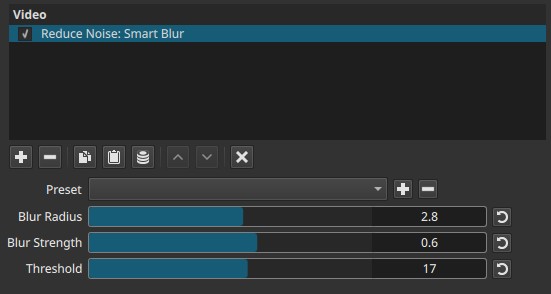
This filter operates spatially within a single frame and does not use temporal information.
Parameters
Blur radius (0.1–5.0)
Controls the size of the neighborhood used for blurring.
-
Lower values
Affect only immediate neighboring pixels
Preserve fine detail -
Higher values
Use a wider area for averaging
Increase smoothing and risk of detail loss
This parameter defines how far the blur can spread.
Blur strength (0.0–1.0)
Controls the intensity of the blur applied within the selected radius.
-
0.0
No visible effect -
Higher values
Stronger smoothing within the blur radius
This parameter determines how strongly pixels are blended once they are considered eligible for blurring.
Threshold (0–30)
Controls the edge-preservation threshold.
-
Lower values
Blur is applied only to very similar pixels
Strong edge preservation -
Higher values
Blur is allowed across larger differences
Increased smoothing with reduced edge protection
This parameter defines what is considered noise versus detail.
Parameter interaction
The three controls work together:
- Blur radius defines the spatial extent
- Blur strength defines the blur intensity
- Threshold defines which differences are preserved as edges
Effective noise reduction typically requires balancing all three rather than increasing one parameter alone.
Visual characteristics
Typical effects include:
- Reduction of fine grain and small artifacts
- Preservation of strong edges at moderate thresholds
- Gradual loss of texture and edge definition at high settings
Recommended use cases
- Light spatial noise or grain
- Footage where temporal denoising is undesirable
- Static or lightly textured scenes
- Situations requiring edge-aware smoothing
Limitations
- Operates only within individual frames
- Cannot reduce temporal noise or flicker
- Parameters cannot be keyframed
- High values may blur fine detail and edges