Opens a video capture device using the Video4Linux (V4L2) subsystem.
This allows Shotcut to capture live video (and optionally audio) from supported devices instead of importing a media file.
This feature is Linux-specific.
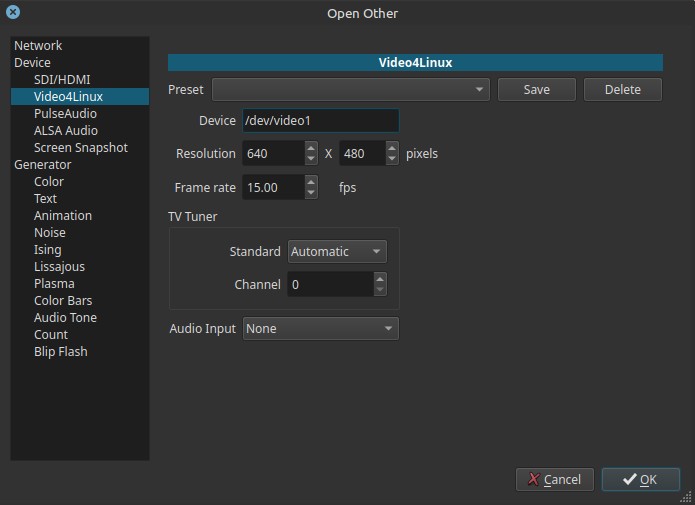
What Video4Linux is
Video4Linux (V4L2) is the standard Linux framework for video capture devices.
It is used by webcams, USB capture cards, TV tuners, and other video input hardware.
Shotcut uses V4L2 to access these devices directly and treat them as live video sources.
Scope and behavior
-
Available only on Linux
-
Captures live video from supported devices
-
Appears as a source clip that can be:
- Previewed
- Recorded to a file in Export
-
Device behavior depends heavily on kernel support
Controls
Device (device selector)
Selects the video capture device exposed by Video4Linux.
When compatible hardware is connected, this field lists available devices such as webcams, USB capture cards, or TV tuners. If no supported device is detected, the list may be empty.
Typical examples (when devices are present):
- Built-in webcam
- USB webcam
- HDMI / composite capture card
- TV tuner device
If no compatible device is connected, this list may be empty.
How devices usually appear
On Linux, Video4Linux devices are exposed as character devices under /dev/.
Common examples:
/dev/video0
/dev/video1
/dev/video2
In some cases, Shotcut may display both the path and a short description, depending on the driver and desktop environment, for example:
/dev/video0 (Integrated Webcam)
/dev/video1 (USB Video Capture)
But the path is always the authoritative identifier.
Resolution (input, pixels)
Specifies the capture resolution.
-
Must be supported by the selected device
-
Unsupported resolutions may:
- Be ignored
- Fall back to a default
- Fail to start capture
Example values:
640x4801280x7201920x1080
Frame rate (0.00 - 1000.00)
Sets the capture frame rate in frames per second (fps).
- Lower values reduce CPU usage
- Higher values require device and driver support
Note:
The actual frame rate may be limited by the hardware.
TV Tuner section
Only relevant if the selected device includes TV tuner functionality.
Standard
Selects the analog television standard:
- Automatic
- NTSC
- PAL
- SECAM
These standards correspond to historical analog broadcast systems and are relevant only for legacy TV tuner hardware.
Channel (0 - 99)
Selects the analog TV channel number.
- Channel numbering depends on regional broadcast standards
- Only meaningful for analog TV capture devices
Audio Input
Selects the audio capture backend.
Common options include:
-
None: no audio capture
-
PulseAudio: default audio system on most Linux desktops, also works with PipeWire
-
ALSA: low-level Linux audio interface
The available audio input options depend on the Shotcut build and the system’s audio configuration.
Important note:
Audio capture is handled separately from video and depends on system audio routing.
Typical use cases
- Capturing webcam footage directly into Shotcut
- Recording from USB or HDMI capture cards
- Digitizing analog video sources (VHS, camcorders)
- Capturing legacy TV tuner signals
- Live preview of external video sources
Usage notes and tips
- Always test capture settings before long recordings.
- Use supported resolutions and frame rates to avoid failures.
- Audio sync depends on system audio configuration.
- Some devices expose limited or non-standard controls.
Limitations
- Linux-only feature
- Device support depends on drivers
- Analog TV features are legacy and hardware-dependent
- No built-in channel scanning for tuners
- Audio and video may require manual sync adjustment