Rearranges the image by splitting it into regions and swapping their positions, producing a deliberate misalignment effect reminiscent of analog signal loss or desynchronization.
The filter does not distort geometry or color; it repositions rectangular regions of the frame.
No Sync is a spatial effect. It operates per frame and does not analyze motion or time.
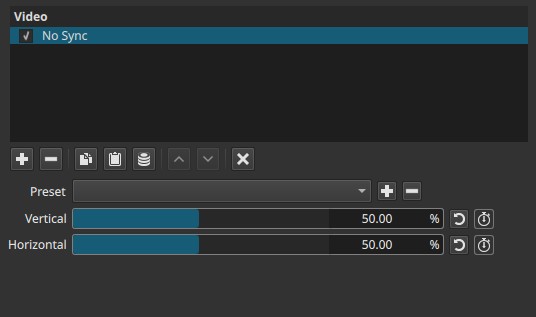
With both parameters at 50.00%, the image is divided into four equal quadrants and swapped diagonally.
Parameters
Vertical (0.00 - 100.00%)
Controls the vertical split position of the image.
-
50.00%
The frame is split evenly horizontally.
The bottom quadrant swaps with the top. -
Below 50.00%
The lower portion of the image becomes smaller.
The split line moves downward, giving more vertical space to the top region. -
Above 50.00%
The upper portion becomes smaller.
The split line moves upward. -
0.00% or 100.00%
The image is not split.
Horizontal (0.00 - 100.00%)
Controls the horizontal split position of the image.
-
50.00%
The frame is split evenly vertically, contributing to the four-quadrant swap. -
Below 50.00%
The right portion of the image becomes larger.
The split line moves left, giving more horizontal space to the right region. -
Above 50.00%
The left portion becomes larger.
The split line moves right. -
0.00% or 100.00%
The image is not split.
Keyframes
Both Vertical and Horizontal parameters can be keyframed.
This allows:
- Animated region swapping
- Progressive desynchronization effects
- Glitch-like transitions between layouts
Parameter interaction
- Vertical and Horizontal define the split positions along their respective axes.
- At 50.00% / 50.00%, the image is divided into four equal regions that swap diagonally.
- Moving either parameter away from 50.00% changes the relative size of the regions before they are swapped.
- Extreme values collapse the effect into a simple two-part swap along one axis.
Visual characteristics
- Hard rectangular splits
- Abrupt spatial jumps
- No blending or feathering between regions
- Clear, mechanical rearrangement of image areas
- Strongly reminiscent of video sync or signal errors
Recommended use cases
- Glitch and analog-error effects
- Stylized transitions
- Visual emphasis or disruption
- Abstract or experimental video design
- Simulating desynchronization without distortion or blur
Limitations
- No control over edge softness
- No rotation or scaling of regions
- Effect is purely positional
- Can be visually jarring on detailed footage