I am definitely seeing major differences between Native 8-bit processing vs Linear 10-bit CPU processing. I may need to change the way I color grade since they look totally different. The size difference is also dramatic. It took me more than an hour to export an 8-minute video and it ended up being 24 gigs. I can’t wait for improvements that may potentially cut export times.
I took the exact same video and exported twice, the only difference being the processing. I played them side by side on my screen and the difference is dramatic.
You should be aware that filters are going to be interpreted differently in linear vs. with gamma. You cannot simply switch modes and expect the same results but with better blending in linear 10-bit. The parameters will be interpreted differently and not automatically converted. You need to grade color in the mode. The performance improvement is in GPU mode.
I usually set it pretty high for YouTube. Do you have more efficient suggestions for the same high results? I’m not an expert in encoding and have been using these settings for 5 years.
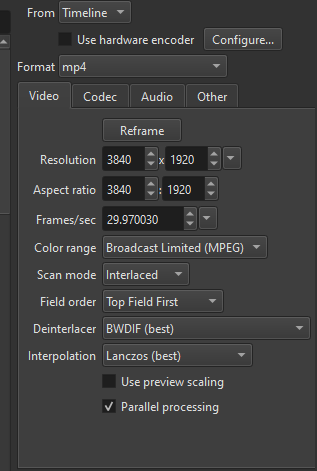
Is your source interlaced? It seems weird to intentionally export interlaced for digital media. I can’t think of any reason to choose interlaced these days and youtube will have to undo your interlaced video anyway so you should just go with progressive.
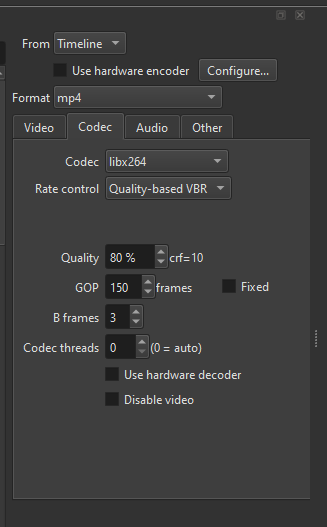
Probably not a visible difference but a smaller GOP (usually recommended to be equal to your fps, so 30 here) would theoretically result in better quality as a high GOP number is used to reduce file size, which you clearly don’t care about by using crf 10.
I actually am not too versed with optimal export settings. I’ve just been using the same presets for 5 years. I would love to know the optimal settings for below and favoring highest viewable quality:
I am complete noob on 10 bit, so can’t help at all there, but the tweaks I mentioned should be valid for any bit depth.
In the end don’t stress too much over it, if the result look good then you’re fine, youtube will bring down the quality a lot anyway so as long as the final clip is 4K and at least 80mbps you’re fine.
What’s the point of doing 10-bit color correction and exporting with 10-bit color if this video is uploaded to YouTube, which does not support 10-bit videos and converts them to 8-bit?
Since I don’t know much, here’s the ChatGPT answer:
Uploading 10-bit video to YouTube can provide measurable benefits, but only under specific conditions.
1. Reduced banding after YouTube compression
YouTube recompresses every uploaded video. When the source file is 10-bit, the encoder has more color precision (1024 levels per channel vs. 256 in 8-bit).
Result:
I can confirm YouTube delivers 10-bit for HDR, but their HDR processing is so slow and intermittent (still waiting on some for weeks) that it almost not worthwhile unless you are like doing indie film or pro film trailers. My most recent HDR video took a week for a 4 minute video. I will be a little surprised if they deliver 10-bit for anything else, but yeah, it can improve it slightly by giving it the best possible. This was uploaded as 10-bit ProRes HDR
I actually saw this video and wondered why it was so smooth.
The key is future-proofing your content. You know eventually 10-bit output will be more widespread on YouTube. According to them, as technology improves they will also upscale to match. It’s better to provide them with the optimal quality, and when YouTube catches up hopefully all your files match the quality as well.
If I were going to stay in 8-bit color, does anyone know the optimal export settings for YouTube? I know there is a preset, but is that the best quality?
To make things more interesting, Dan just added 10-bit VP9 encoding to the next version of Shotcut for all platforms.
To help determine what optimal means for you, we need to understand your use case and hardware.
AV1 is great, but requires hardware decoding or beefy CPU to avoid stuttering on 4K playback. It’s royalty-free to use anywhere, including commercially.
VP9 is not as small as AV1 but it plays back smoothly pretty much everywhere, including smartphones. Also royalty-free.
HEVC might provide hardware encoding in Shotcut to reduce export time, but requires royalty payments for any commercial video over 12 minutes that isn’t released for free on the Internet. (Free Internet viewing is a royalty exemption.) The faster hardware encoding (if available) may be very appealing to you.
ProRes is fantastic quality, but takes up enormous space. It would probably cause high storage costs at your level of output.
I assume you want to archive and view your videos locally with no stutter? The answer to that, along with sending your CPU and GPU specs, and how much you value a royalty-free codec, will narrow down the answer quickly.
EDIT: The ChatGPT answer to 10-bit video on 8-bit YouTube is actually quite coherent and valid. Also, your local 10-bit copy for viewing will look better. And as archive footage, it will edit and grade better if you pull it into a future project and want to make tweaks.
@Austin as always, thanks for the comprehensive answer.
First, my gear:
Model: Lenovo Legion 5 16IAX10 (Gen 10)
Processor: Intel Core Ultra 9 275HX (2.70 GHz)
GPU: NVIDIA GeForce RTX 5060 Laptop GPU
Memory: 32 GB RAM (31.4 GB usable)
System Type: 64-bit operating system, x64-based processor
OS: Windows 11 Home
Use-Case
I film with 2 main cameras
Insta360 X4 - 8 bit
DJI Action 3 - 10 bit log (both at 4k 60)
My auxiliary camera is my phone Pixel 9A (8 bit)
I figure, since my lowest common denominator is 8 bit, my timeline should be set to 8 bit in 4K for now until I upgrade all 8 bit cameras. I’m not liking how 8 bit files from the Insta360 is being upsampled to 10 bit.
My primary end use is to upload the highest quality I can on YouTube, especially to force them to assign the highest quality codec to my post. I of course, would love to save the videos for myself in ProRes, but I think it’s overkill.
I would love to be educated on your export recommendations.
Yeah, I want to try it out after the next nightly build. I’ll have some results to you in a few days.
Although, given your hardware, AV1 should be fine. There is a “10-bit AV1 in WebM” preset already in Shotcut (near the bottom of the presets list) that you could try with a higher quality percent if you want to experiment. Somewhere around 74% would probably be plenty. Maybe experiment on a one-minute clip to avoid waiting forever on an export.
Playback without stutter is the big question. If your media player of choice consumes a lot of CPU on playback, try playing the exported video in a web browser instead. Most web browsers are good at using hardware decoding for AV1 if it is available, which it should be on your 5060.
If the file size is too large, there is a preset=5 setting on the Export > Advanced > Other tab. Change it to 2 instead of 5. The export will take longer, but that means more effort at making the file smaller.
A
10 Bit
Color Range: Broadcast Limited
Scan Mode: Interlaced
Field Order: Top Field First
Deinterlacer BWIDF (best)
Interpolation: Lanczos (best)
Codec: libx264
Rate control: Quality-based VBR
Quality: 80%
Export time: 1:28
B
10-bit AV1 WebM preset
Export time: 1:31
C 8 Bit
Color Range: Broadcast Limited
Scan Mode: Interlaced
Field Order: Top Field First
Deinterlacer BWIDF (best)
Interpolation: Lanczos (best)
Codec: libx264
Rate control: Quality-based VBR
Quality: 80%
Export time: 34 secs
Don’t use interlaced; your source is not interlaced, and neither is your target. That applies both to the video mode and export options.
It concerns me that an experienced video person like yourself (relative to many others) can get this wrong. Perhaps, Shotcut has a bad mix of user experience. It does not strive to be a very advanced tool, but some things like this that are somewhat low level are exposed. Maybe more things need to be hidden and require a text-based override ala code or an incantation.