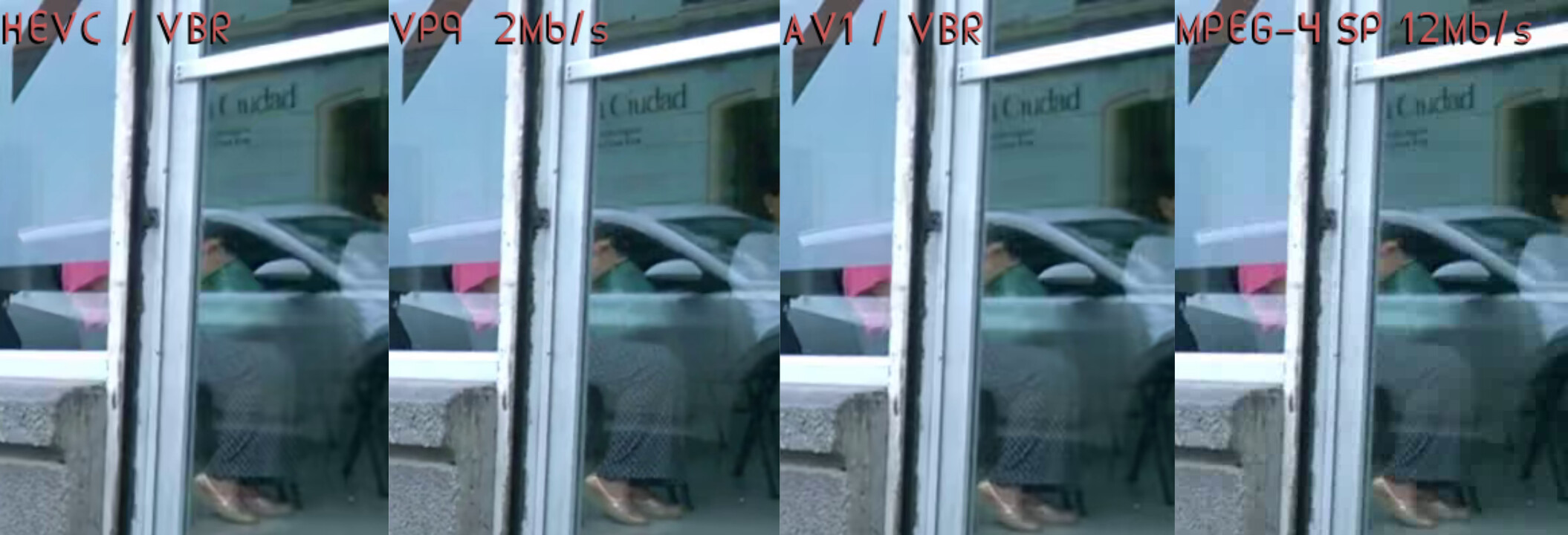
After many tests with averages between 9-12 Mb/s, I decided on HEVC. However, with the default values in Shotcut and VBR, WebM seems to be slightly better, with more noise but more detail.
Despite everything, with a higher bitrate and with a pixelated image, MPEG-4 SP showed better contrast.
In the silhouette behind the window, the woman in the white blouse, the earring is better captured.
Generally speaking, with a bitrate of 12 Mb/s, I also noticed better contrast with AVI-MJPEG, “my favorite.”
//The purpose of this article
is to present options when exporting a video on an older computer or one with very limited resources (processor and memory - 4 GB).
The final file size, if it’s up to three times that, shouldn’t matter if you upload it to YouTube or elsewhere.
Likewise, if you share it with other people on their phones, it will look good on those small screens. Lower the bitrate to 6 Mb/s.
I’m not sure if WhatsApp supports this when attaching as media,
but you can send it as any other file
and it will play fine on the other receiving device
It does make sense to me that any 2 codecs you choose you will get excellent image quality if you allow the file size to be big enough.
So if you don’t care about file size then you can use a less complex/older codec to both finish exporting faster and have the playback as smooth as possible due to not needing a good CPU to decode it.
AVI-MJPEG is generally a decent codec with wide support so you can use it with no worries.
That being said, I still want to mention that your test is unfair to the other codecs, you should have chosen 12Mb/s for all of them otherwise the VP9 considering it is producing 6 times smaller file size (2 vs 12 mbps) than the MPEG4 file and the quality is also better (significantly less pixelation) is craazy good. Yes, the contrast will look better if you have pixelated areas (this is a direct result of smoothing vs non smoothing pixel edges) but overall I think it is more visually pleasing to not have pixelation.
@daniel47yeah… seeing how far we had to push it to match the quality.
Even with a low bitrate, they display the word “Ciudad” better.
In extreme cases, with Avidemux, we copy the video and audio, save it exactly the same, just cutting it. Technically, we don’t edit the video.
That wouldn’t even take a minute for everyday purposes.