Processes a left/right (L/R) stereo signal internally using a mid/side (M/S) model to control perceived stereo width. This filter redistributes energy between the center (mid) and the sides without changing overall timing or pitch.
This filter is typically used along with a special, dual microphone recording technique.
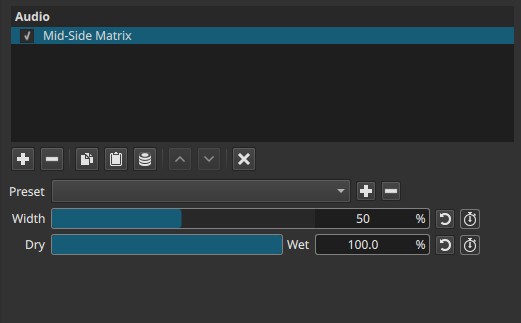
Mid-Side Matrix is a stereo spatial processing filter. It operates only on stereo material.
Parameters
Width (0 - 100%)
Controls the balance between the mid (center) and side (stereo difference) components.
-
0%
Side information is removed.
The result is effectively mono (center only). -
50% (default)
Neutral setting.
Stereo width is preserved as in the original signal. -
>50%
Side information is amplified.
Stereo image becomes wider. -
100%
Maximum widening.
Can sound exaggerated or unstable on some material.
Note:
Width changes how wide the sound feels, not how loud it is.
Dry → Wet (0.0 - 100.0%)
Controls the mix between the original stereo signal and the mid-side processed signal.
-
0.0%
Original audio only. -
50.0%
Blend of original and processed audio. -
100.0%
Fully Mid-Side processed audio.
This allows subtle widening or narrowing without fully replacing the original stereo image.
Auditory characteristics
- Changes perceived stereo width
- Center content (vocals, dialogue) remains stable
- Side content (ambience, reverb, stereo effects) is emphasized or reduced
- Excessive widening may cause phase issues or poor mono compatibility
Recommended use cases
- Widening music or ambient tracks
- Narrowing overly wide stereo recordings
- Improving focus of dialogue by reducing side content
- Creative stereo effects
- Matching stereo width between clips
Example settings
-
Subtle widening (music)
- Width: 60 - 70%
- Dry → Wet: 100%
-
Strong widening (ambient effects)
- Width: 80 - 90%
- Dry → Wet: 100%
-
Dialogue focus / near-mono
- Width: 0 - 20%
- Dry → Wet: 100%
-
Gentle adjustment
- Width: 70%
- Dry → Wet: 40 - 60%
Usage notes and tips
- Always check mono compatibility after widening.
- Small changes in Width are often sufficient.
- Use Dry → Wet for fine control rather than extreme Width values.
- Best suited for stereo music and ambience, not centered narration.
Limitations
- Operates only on stereo audio
- Does not create true spatial depth
- Extreme values can introduce phase cancellation
- Not a replacement for surround mixing