Applies a radial geometric distortion to the image, allowing manual compensation for lens-like warping or deliberate spatial deformation.
Despite its name, this filter does not model real lens optics and does not use camera metadata. All adjustments are visual and manual.
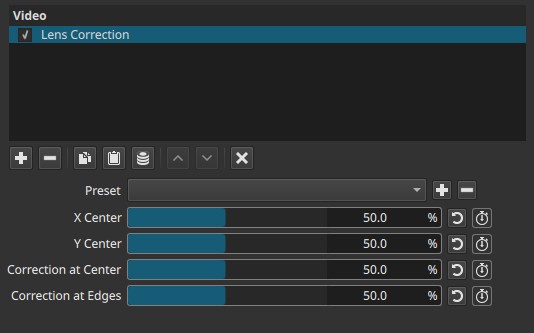
With all parameters set to 50.0%, the filter is neutral and produces no visible change.
Parameters
X Center (0.0 - 100.0%)
Sets the horizontal pivot around which the distortion is applied.
-
50.0%
Distortion is centered horizontally. -
Lower values
The pivot shifts left, making distortion stronger on the right side. -
Higher values
The pivot shifts right, making distortion stronger on the left side.
Note:
This parameter does not move the image. It defines the origin of the distortion.
Y Center (0.0 - 100.0%)
Sets the vertical pivot around which the distortion is applied.
-
50.0%
Distortion is centered vertically. -
Lower values
The pivot shifts upward. -
Higher values
The pivot shifts downward.
Correction at Center (0.0 - 100.0%)
Controls how early distortion begins as you move away from the center, not the center itself.
-
50.0%
Neutral reference point. -
Below 50.0%
Distortion ramps up closer to the center, causing the region just outside the center to stretch outward. -
Above 50.0%
Distortion is delayed toward the edges, compressing the region just outside the center.
Important clarification:
The exact geometric center does not move.
This parameter affects the surrounding region, not the center point.
Correction at Edges (0.0 - 100.0%)
Controls how strongly distortion increases toward the frame edges, with inverted behavior relative to its name.
-
50.0%
Neutral reference point. -
Below 50.0%
Edge distortion is reduced; edges appear more stretched or pulled. -
Above 50.0%
Edge distortion is amplified; compression becomes more pronounced near the borders.
Important clarification:
Despite the name, higher values increase distortion at the edges rather than “correcting” it.
Note on parameter naming
Some parameter names in this filter do not reflect their observable behavior. Adjustments should be made visually rather than by relying on the parameter names alone.
Keyframes
All parameters can be keyframed.
This allows:
- Progressive distortion or correction over time
- Animated warping effects
- Shifting distortion pivots during a shot
Parameter interaction
- X Center and Y Center define where the radial distortion originates.
- Correction at Center determines where distortion begins along the radius.
- Correction at Edges determines how strong distortion becomes near the frame borders.
- Both correction parameters shape a single continuous distortion curve and do not operate on isolated regions.
Note:
Adjustments should be evaluated visually using straight lines near the edges as reference.
Visual characteristics
- Radial stretching or compression
- Straight lines may bend, especially near borders
- Edge regions may lose apparent sharpness due to resampling
- Extreme values can expose empty areas at the frame edges
Recommended use cases
- Manual compensation for lens-like distortion
- Aligning architectural or horizon lines by eye
- Creative warping or stylized spatial effects
- Animated distortion using keyframes
Limitations
- There is no interpolation a.k.a. sub-pixel rendering. That means it can cause jagged or block image artifacts.
- No automatic lens profiles or metadata support
- Parameter names are misleading relative to observed behavior
- Not a physical lens simulation
- May require cropping or scaling after correction
See also: Fisheye Video Filter which does support interpolation.