SC 26.02.22, Win10: I set a filter (audio gain) in the track head of a long clip (> 1hr). I want to set keyframes now and then, looking at the waveform in the timeline, then switch to keyframes view and adjust my gain points. But when my cursor is somehwere on the timeline and I switch to keyframe view, I always end up at 0:00. When I jump to the “next” keyframe, I end up at the desired position (where my cursor is), even if there are several keyframes set befor the cursor - so it is definitely not the “next” one after 0:00. Not sure if if do something wrong, but I would expect, that when I switch from timeline to keyframe view, I see the keyframes around the cursor position and not at 0:00.
I also find it annoying that the zoom factor of the keyframe window is independent of the zoom in the timeline. Is there a way to sync the zoom factors of those two views?
If there is a good reason why these zoom factors are not synced, I’d like to understand why.
The developers are not always here to do your bidding and provide justifications.
Hello @Samse26 , i also find myself scrolling when editing a keyframe in a clip longer than a few seconds. In this example i’am in the credits and want to “roll” in the muscians, while their music already plays. I share your thoughts, but on the other hand i’am not annoyed, instead i find myself thankful about Shotcut in general, because i enjoy working with it.
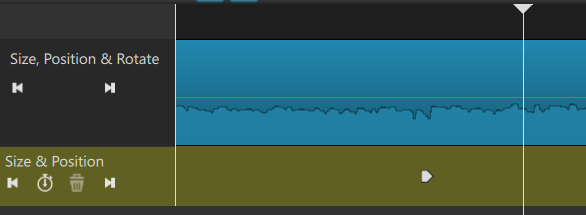
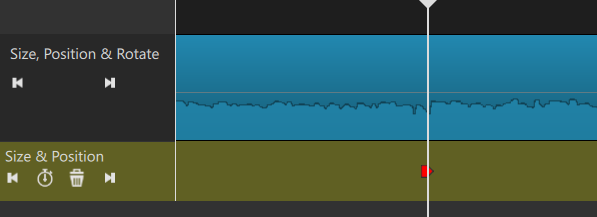
I have however another “problem” with keyframes and playheads. On the timeline i set the playhead to a very specific frame where i want a existing keyframe to be. In keyframe-view i see the playhead, still being where i left it, and next to it the to-be-moved-keyframe (image 1). In the very moment where i drag that keyframe, the playhead jumps to cursor position, rendering my frame-specific playhead-position useless (image 2). Because of that i tip with a finger on the sreen to maybe find the previous playhead position. I haven’t found anything about this in the search-function. Is there a keyboard-shortcut or any other trick which lets me set an existing keyframe to the playhead-position?
Thank you all in advance,
best
Florian
Image 1: Playhead where i need the keyframe to be
Image 2: Playhead immediatly jumping to cursor-position when dragging keyframe - “target lost”
I certainly didn’t mean to step on anyone’s toes and if my wording was inappropriate, I apologize. I was just curious to learn if there is a use case where it makes sense to have the zoom factors of timeline and keyframe window not in sync. For me, I found a way to ge the keyframe window jump to the cursor position by pressing arrow-left then arrow-right - but it seems kinda clumsy…
Regarding your “target-lost” problem, I can’t reproduce this. I can drag the keyframe position to he cursor just fine (Win10 v26.2.26 with SPR filter)
That happens to me from time to time too. If the cursor is just slightly outside the keyframe icon, the playhead jumps to that position. Then you have to find again that specific position where you want to move the keyframe.
The only trick I have is to place a marker at the playhead position before trying to move the keyframe. Doesn’t solve the accidental jumping problem, but it makes it easier and faster to move the playhead back exactly where it needs to be.
Was there a change in version 26.04? I just noticed in 26.4.30 that I can drag keyframes while the cursor stays in place. Previously, the cursor moved along with the keyframe, which meant losing the cursor position as a target time point. Anyway, it’s great now – thank you so much!!