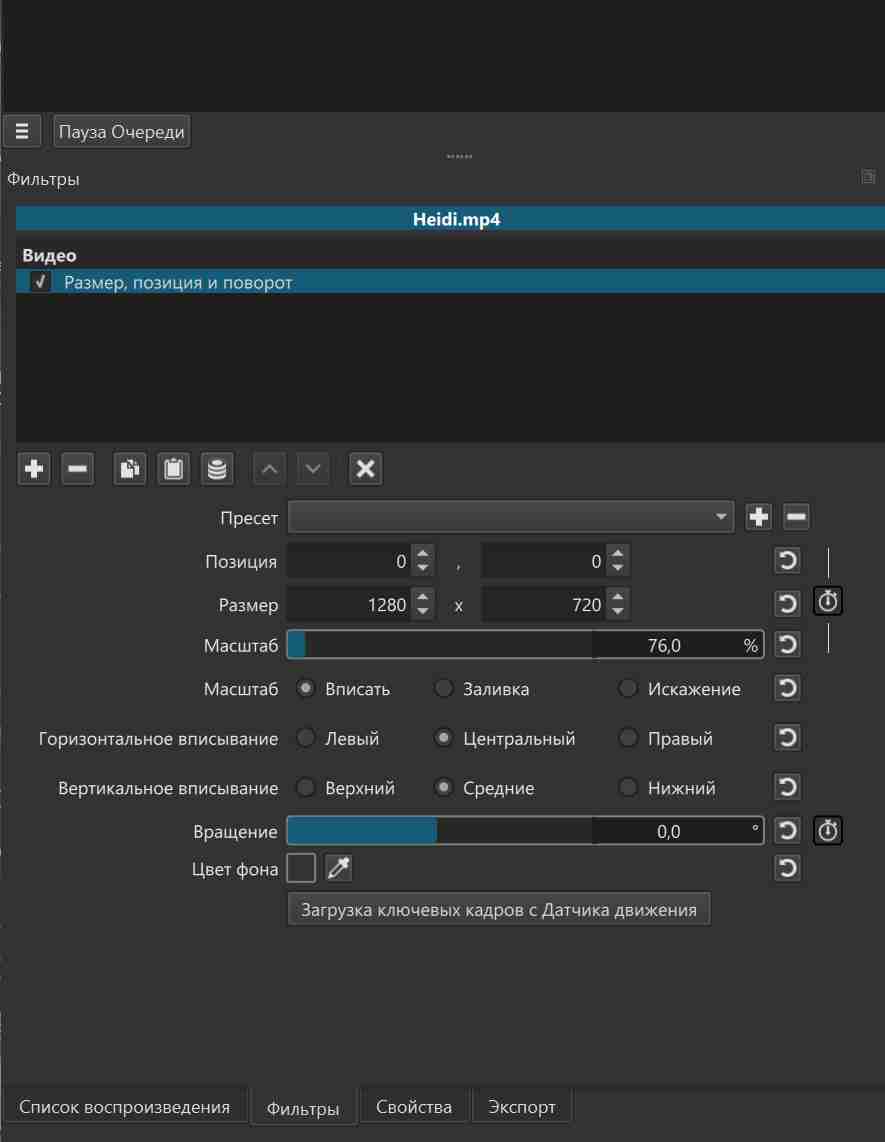
I’m trying to place two videos side by side in Shotcut so that they play simultaneously. The videos have different widths but the same height, so I increased the project width to match the combined width of both clips.
However, I ran into a problem:
as soon as I change the project width, the video with the larger resolution automatically scales itself to fill the entire project preview. Because of this auto‑scaling, I can’t position the two videos next to each other the way I need.
I want both videos to appear side by side and play at the same time, but the larger one keeps snapping to full project width, even when I try adjusting Size & Position or Rotate & Scale filters.
Could someone explain how to stop Shotcut from auto‑scaling the clip so I can manually place both videos next to each other?
You should not be placing them on the same track if you are.
There are some skills you can pick up from this technique: https://youtu.be/r4vaYfatuRw
All the skills you need should be there. It’s not exactly the same the knowledge is there.
1 Like
thanks for the video but I don’t need to crop my videos. I just want to place two videos of different widths next to each other in my project
If the heights are the same there shouldn’t really be an auto scale happening, did you increase project width in Settings → Video mode → Custom? (or in timeline properties?). A screenshot with the clips and project would probably help us spot the issue.
But basically if you are sure the project mode is the correct height and width1+width2, then add a Size, Position&Rotate filter to each of your clips and manually type the resolution there (like 1080x1920 i assume).
can you do this such me at your screens your settings for each videos?
increase project width in Settings → Video mode → Custom? -yes i set manually for both videos if my frist video has 1280/720 and other is 404/720 = 1684 pixels but first videos
is always setiing at fulll my project = 1684/720!
Weird, it should work that way. Can you share a screenshot with the entire shotcut window with the videos side by side?