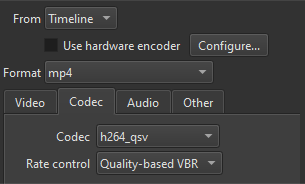
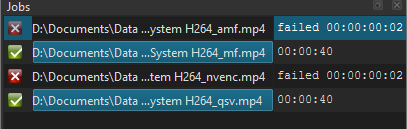
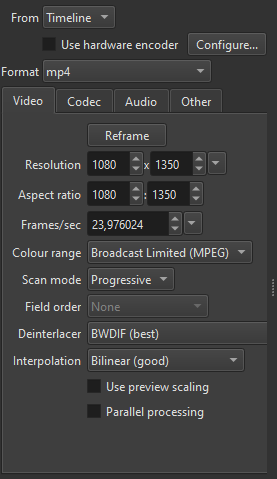
Thanks for the info! No, I don’t have an Nvidia gpu and, anyway, I don’t use hardware encoding. But, in the interest of scientific progress (!), I decided to export the same video using exactly the same settings throughout, changing only the video encoder:
LIBX_264, for some reason didn’t give a fail this time and exported well. Quality was fine and file size was 26.4 mb. Go figure!
H264_QSV exported as expected. Quality was fine and file size was 22.2 mb. Unexpectedly smaller than LIBX_264.
H264_AMF failed as expected. The log says the following:
h264_amf @ 00000213d1479cc0] [Eval @ 000000280edfec40] Undefined constant or missing ‘(’ in ‘fast’
[h264_amf @ 00000213d1479cc0] Unable to parse option value “fast”
[h264_amf @ 00000213d1961240] [Eval @ 000000280edff130] Undefined constant or missing ‘(’ in ‘fast’
[h264_amf @ 00000213d1961240] Unable to parse option value “fast”
[h264_amf @ 00000213d1961240] DLL amfrt64.dll failed to open
[h264 @ 00000213d1453700] Reinit context to 1920x1088, pix_fmt: yuv420p
[h264 @ 00000213d1c756c0] Reinit context to 1920x1088, pix_fmt: yuv420p
[h264 @ 00000213d1f3d800] Reinit context to 1920x1088, pix_fmt: yuv420p
[producer avformat] audio: total_streams 1 max_stream 1 total_channels 1 max_channels 1
[mlt_buffer @ 00000213dd9c9300] w:1920 h:1080 pixfmt:yuv420p tb:1/600 fr:30000/1001 sar:1/1 csp:unknown range:unknown
[AVIOContext @ 00000213d1455340] Statistics: 2326554 bytes read, 2 seeks
[chain avformat-novalidate] D:/Documents/Data/sample.MOV
checking VFR: pkt.duration 20
[link swresample] 1(mono) f32le 44100Hz → 2(stereo) f32le 48000Hz
[h264 @ 00000213d1b39480] Reinit context to 1920x1088, pix_fmt: yuv420p
[mlt_buffer @ 00000213dd9c9800] w:1920 h:1080 pixfmt:yuv420p tb:1/600 fr:30000/1001 sar:1/1 csp:unknown range:unknown
[mlt_buffer @ 00000213dd9c9800] Changing video frame properties on the fly is not supported by all filters.
[mlt_buffer @ 00000213dd9c9800] filter context - w: 1920 h: 1080 fmt: 0 csp: unknown range: unknown, incoming frame - w: 1920 h: 1080 fmt: 0 csp: bt709 range: tv pts_time: 43.971667
Failed with exit code -1073741819
Failed with exit code -1073741819
The average cobbler like myself doesn’t know what most of that means and have neither the time nor the inclination to find out when other, successful, options exist. I’m surprised that the H264_QSV exported to a smaller final size than the LIBX_264, but there you go.
I didn’t time the exports because I expected the first one to fail and when it didn’t it was too late to switch the stop watch on. It was a 3-minute video so I may not have noticed a difference. On a 1-hour video that I export frequently, things might be different I didn’t notice any difference in quality between the two successful exports.
A fun exercise and one that has done nothing to dampen my enthusiasm for the recently-discovered benefits of exporting to QSV.
I was going to post the results of a search using AI on the question “what are the benefits of exporting to H264_QSV codec over LIBX_264?”. There was a VERY LONG reply with tables of data. I will therefore just post this:
Bottom Line
-
QSV = speed & low CPU – perfect for live, real‑time, or power‑constrained workloads.
-
libx264 = quality & control – the go‑to choice when you can spend the extra CPU cycles and need the absolute best visual fidelity.
Pick the encoder that matches the primary constraint of your workflow (latency/power vs. visual quality), and tune the relevant parameters accordingly. If you ever need a hybrid approach (e.g., fast encode for a preview, then a libx264 pass for the final master), you can pipe the QSV‑encoded stream into libx264 as a source, but in most cases one encoder will cover the job perfectly.
Many thanks for joining me on this very interesting and ultimately (for me) successful journey!
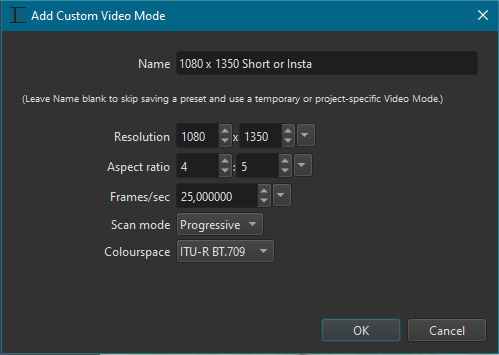
 1080 x 1350 (4:5) is a standard and recommended Instagram video mode.