Attenuates low frequencies below a selected cutoff, allowing higher frequencies to pass through.
This filter is commonly used to remove rumble, handling noise, or unwanted low-frequency energy while preserving clarity.
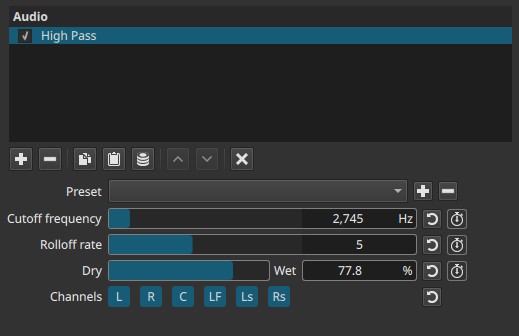
High Pass is a frequency-domain filter evaluated continuously over time.
Parameters
Cutoff frequency (5 - 21 600 Hz)
Defines the frequency below which audio is progressively attenuated.
-
Very low values (≈5 - 40 Hz)
Remove subsonic rumble without affecting audible content. -
Low values (≈60 - 120 Hz)
Clean up low-end noise while preserving most voice and music. -
Mid values (≈150 - 300 Hz)
Thin out sound deliberately; remove bass content. -
High values (>500 Hz)
Strong filtering effect; useful for special effects.
Note:
Raising the cutoff removes more bass.
Rolloff rate (1 - 10)
Controls how steeply frequencies below the cutoff are reduced.
-
Low values (1 - 3)
Gentle slope. Bass fades out smoothly. -
Mid values (4 - 7)
Clear cutoff with controlled transition. -
High values (8 - 10)
Aggressive filtering. Low frequencies are strongly suppressed.
Behavior note:
- Higher rolloff values can sound unnatural if set too high.
Dry → Wet (0.0 - 100.0%)
Controls the mix between the original signal and the filtered signal.
-
0.0%
Original audio only. -
50.0%
Balanced mix of filtered and unfiltered audio. -
100.0%
Fully filtered audio.
This allows subtle filtering without fully removing low frequencies.
Channel selection (toggle buttons)
Determines which audio channels the filter is applied to.
Buttons are toggle switches.

Available buttons depend on the project’s audio channel configuration: Settings > Audio Channels
- L — Front Left
- R — Front Right
- C — Center
- LF — Low-Frequency Effects (LFE)
- Ls — Surround Left
- Rs — Surround Right
Note:
Independent filtering per channel requires adding separate instances of the filter.
Auditory characteristics
- Reduced bass and low-frequency energy
- Improved clarity for dialogue
- Cleaner mixes with less rumble
- Excessive settings can make audio sound thin
Recommended use cases
- Dialogue cleanup
- Removing wind or handling noise
- Reducing low-frequency hum
- Preventing bass buildup in mixes
- Preparing audio before compression
Example settings
-
Dialogue cleanup
- Cutoff: 80 - 120 Hz
- Rolloff: 3 - 5
- Dry → Wet: 100%
-
Subtle rumble reduction
- Cutoff: 40 - 60 Hz
- Rolloff: 2 - 3
- Dry → Wet: 50 - 100%
-
Special effect (thin / radio-like sound)
- Cutoff: 300 - 600 Hz
- Rolloff: 6 - 8
- Dry → Wet: 100%
Usage notes and tips
- Start with the lowest effective cutoff.
- Increase rolloff only if low frequencies remain audible.
- For natural results, avoid extreme cutoff values.
- Always evaluate changes during playback.
Limitations
- Not a substitute for detailed equalization
- Cannot selectively remove specific bass notes
- Extreme settings can reduce audio naturalness