Controls whether Shotcut uses hardware-accelerated video encoding instead of software (CPU-based) encoding during export.
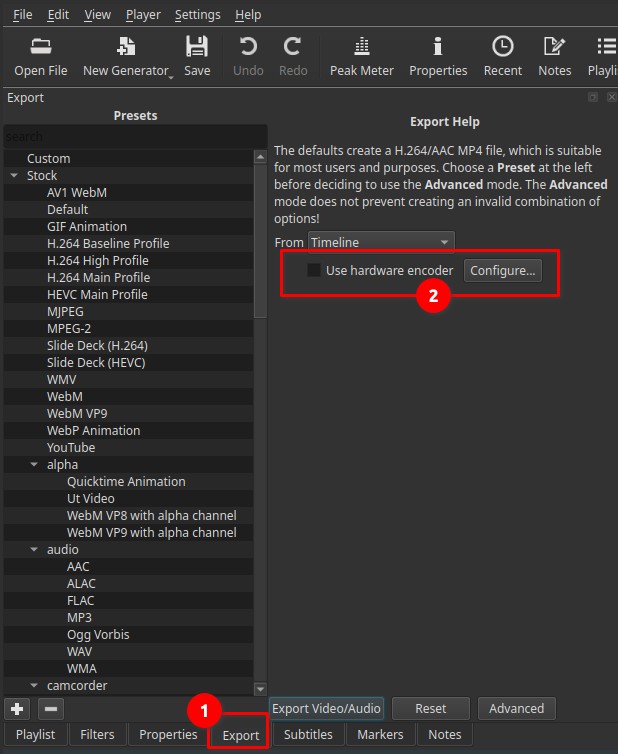
Hardware encoding can significantly reduce export time and CPU usage, at the cost of some flexibility and, in certain cases, slightly reduced compression efficiency.
What hardware encoding is
Hardware encoding uses dedicated circuitry inside the GPU (Graphics Processing Unit) or integrated graphics processor to compress video.
This is different from software encoding, which uses the CPU only.
Key characteristics:
- Faster exports
- Lower CPU load
- Fixed-function encoders optimized for speed
- Limited to codecs and formats supported by the hardware
What a GPU is (in this context)
A GPU is a processor specialized for graphics and parallel workloads.
Modern GPUs often include dedicated video encoding blocks, separate from 3D rendering units.
These blocks are designed to encode formats such as H.264 or HEVC efficiently and with low power consumption.
How Shotcut detects hardware encoders
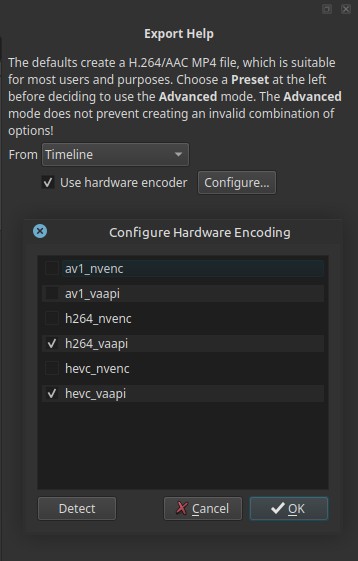
Shotcut automatically scans the system and lists all hardware encoders it can access on the current operating system.
What appears depends on:
- Your GPU vendor (Intel, AMD, NVIDIA)
- Installed drivers
- Operating system support
- Enabled APIs (VAAPI, NVENC, etc.)
Unchecked options mean:
- The encoder exists in Shotcut
- But is not available on your system
Common hardware encoder types explained
VAAPI (Linux)
VAAPI (Video Acceleration API) is commonly used on Linux systems.
Examples:
- h264_vaapi — H.264 encoding using VAAPI
- hevc_vaapi — HEVC (H.265) encoding using VAAPI
- av1_vaapi — AV1 encoding using VAAPI (if supported)
Typically available on:
- Intel GPUs
- AMD GPUs
- Some newer integrated graphics
NVENC (NVIDIA)
NVENC is NVIDIA’s proprietary hardware encoder.
Examples:
- h264_nvenc
- hevc_nvenc
- av1_nvenc (newer GPUs only)
These appear only if:
- An NVIDIA GPU is present
- Proper NVIDIA drivers are installed
If unchecked, it usually means no NVIDIA GPU is detected.
Codec prefixes explained
- h264 — Widely compatible video codec
- hevc (H.265) — More efficient compression, slower to decode
- av1 — Very efficient, newest standard, limited hardware support
Suffixes:
- _vaapi — Linux VAAPI backend
- _nvenc — NVIDIA hardware encoder
What Shotcut uses hardware encoding for
When enabled:
- Video compression is offloaded to the GPU
- Audio encoding remains CPU-based
- Filters and effects may still be processed on the CPU or GPU depending on settings
Export speed and performance gains
Typical improvements:
-
2× to 10× faster exports, depending on:
- Resolution
- Codec
- GPU capabilities
-
Dramatically reduced CPU usage
-
Lower system power consumption
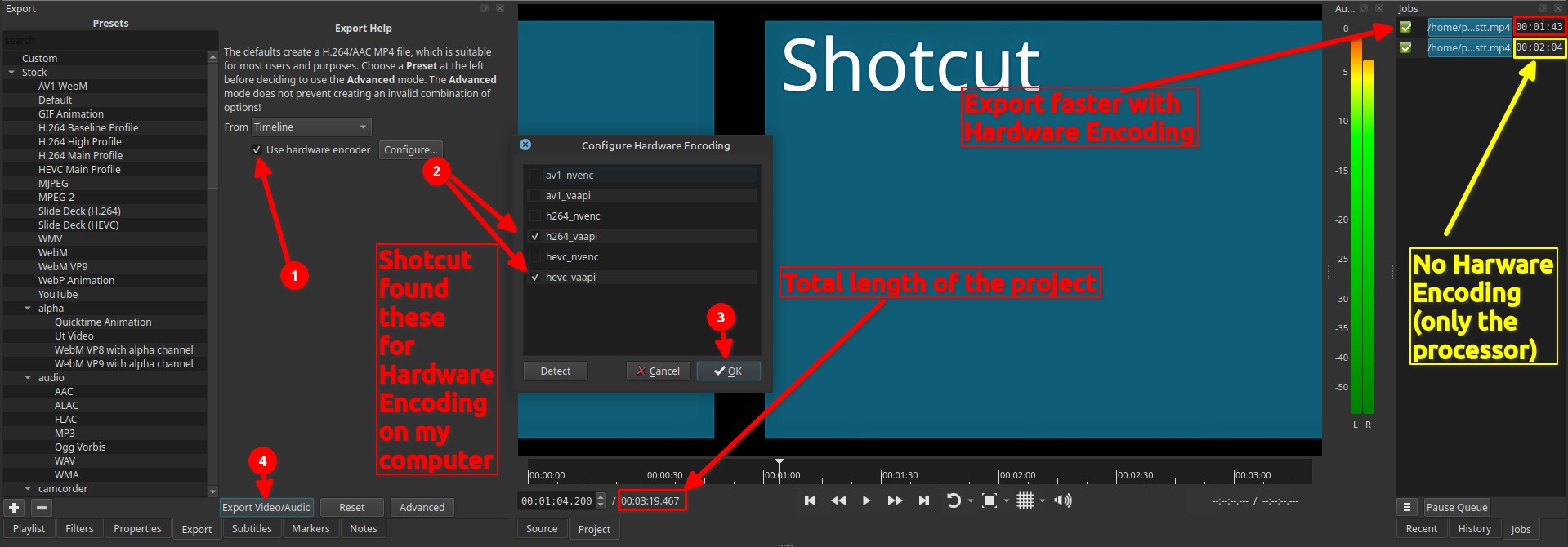
Actual gains vary by hardware and project complexity.
Quality considerations
Hardware encoders prioritize speed and consistency.
Compared to software encoders:
- Compression efficiency may be slightly lower
- File sizes may be larger at the same quality target
- Advanced tuning options are limited
For most practical use cases, quality remains very good.
Important nuance:
Hardware encoding is usually less compression-efficient, not lower quality.
The visual quality difference is often small or invisible; the difference is usually in bitrate efficiency, not obvious artifacts.
Recommended usage
-
Enable hardware encoding for:
- Long exports
- High-resolution video
- Preview or draft renders
- Laptop or low-power systems
-
Prefer software encoding for:
- Maximum compression efficiency
- Archival-quality exports
- Advanced codec tuning
Limitations
- Available encoders depend on hardware and drivers
- Fewer fine-grained quality controls
- Some export presets may not support hardware encoders
- Not all codecs are available on all GPUs