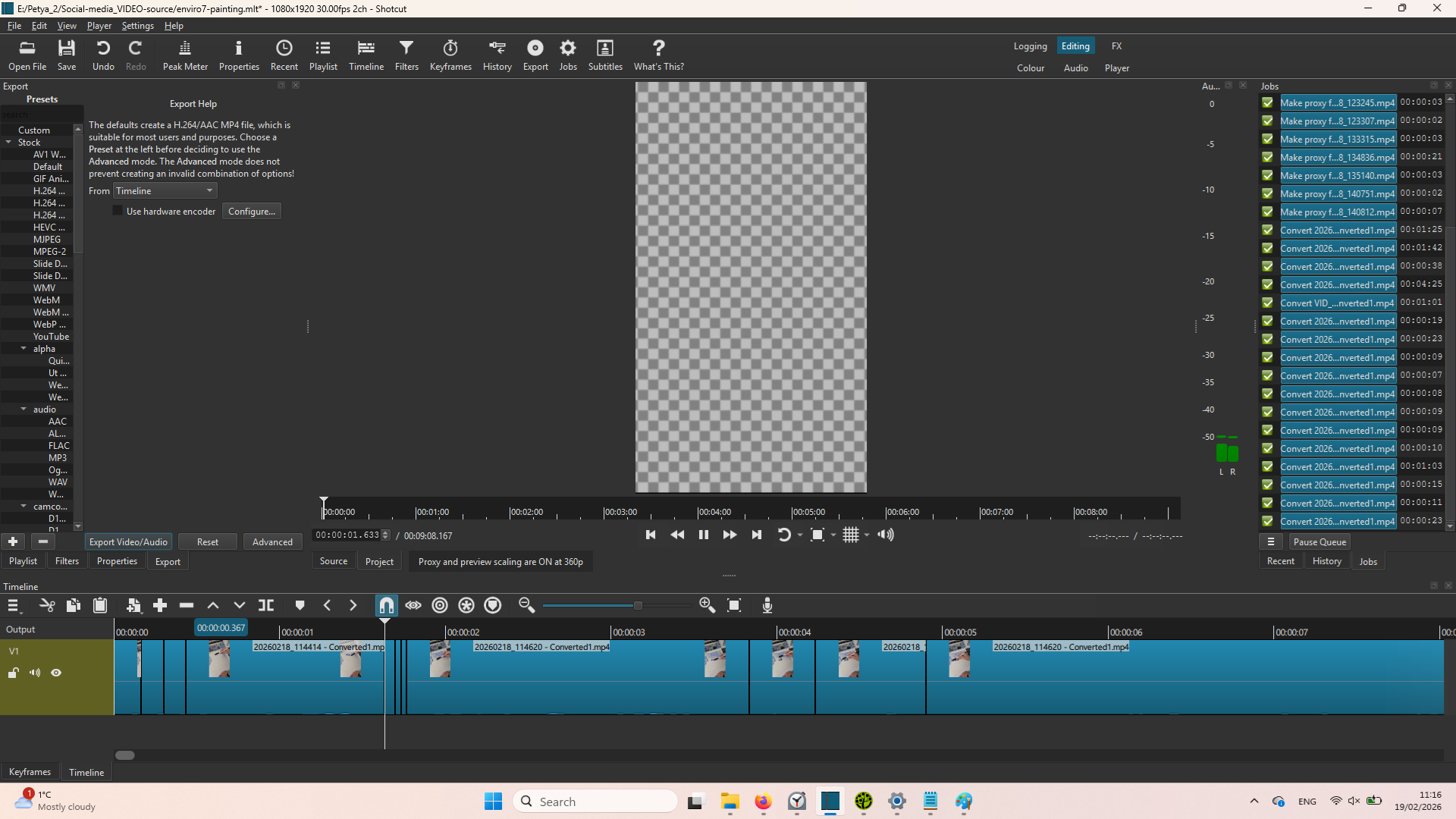
I recently upgraded to a new laptop and installed ShotCut (version 26.1.30).
On my old laptop, with same OS (Windows 11) and same version of ShotCut I haven’t encountered this bug: when I play my cut video, the viewport shows grey and white squares instead of the video snippet, it takes a second or two at the beginning of every shippet and I cut my snippets quite short, so I can’t preview in editing and see what I’ve done anymore unless I export them. When I export the videos, they run smoothy, no glitches, no squares, but this impedes my editing process a lot!
Laptop specifications:
Graphics card: Intel UHD Graphics
16GB RAM
Processor: Intel Core i5-1035G1 CPU @ 1.00GHz
This started happening after I enabled the Use proxy, because my viewport preview was too laggy (it was also enabled on my old laptop and didn’t cause any problems). It happens with every project now. Restarting the program doesn’t change it.
Same OS, same version of ShotCut, same preferences set, but something is not working right on the new laptop.
I am attaching the log of this project, as well as linking a short video showing what’s happening:
I opened my projects again, the grid was showing up like usual and unchecked the Use Hardware Decoder, the grid didn’t appear anymore.
Checked it again to see whether this was causing it, but I am not getting the grid overlay appearing anymore (checked or unchecked), so not sure whether that is the exact solution or not.
Your video is not seeking properly. Do not change the frame rate in export. If you are using variable frame rate source video, you should convert it using Properties > Convert.
It worked perfectly on all version before the February one. And I am creating videos many times a week, so this problem is very annoying… I tried with the libx265 it’s the same… and it’s appear only on the cuts ! on previous version I did never have that, doing exactly the same… Very strange problem
Hardware decoder was added in version 26.1. It does not default to on in export, but if you turn it on then it stays until you turn it off. Check that yours is not on: Export > Advanced > Codec > Use hardware decoder.
Still have the same problem with the latest verstion of Shotcut 26.4.30 wether I use the hardware decoder… or not… on the begining of each cut, there is that annoying frame added!
I will roll back again to 25.12.31 which is not making that…
Could I send you a exported video so you could see ?
And to be more precise, it’s not when I am cutting something, it’s each time I use the Split at Playhead (S), even if I do not cut anything… Hope you will find a solution
The problem is probably due to the FFmpeg upgrade that occurred. I will not roll it back for this issue that is particular to the format of videos that you are using. Transport stream is generally unreliable for editing. There is a possibility that a future FFmpeg update will fix it if you want to keep testing, even on the current version FFmpeg 8.1, which is a branch specification that continues to receive bug fixes ala 8.1.x, not fixed at 8.1.0.