At lest in Linux (KDE), the titles of the settings for filters such as Zoom, Position and Rotate are invisible (black text on dark grey background)
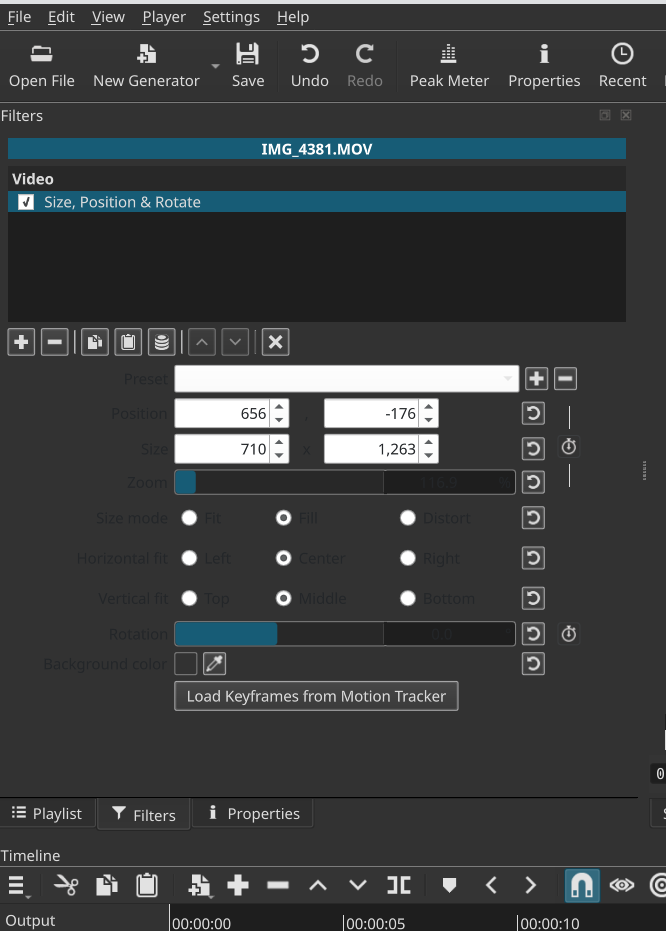
I do not experience on KDE Neon. See this; you need to change something:
I made a change for the next version to not respect a system- or user-supplied QT_QUICK_CONTROLS_CONF environment variable in case that is the issue.
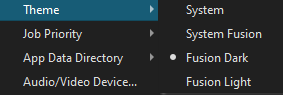
Here is our heuristic for determining light vs. dark in the System or System Fusion themes:
(palette().color(QPalette::Text).lightnessF() > 0.5f)
It is possible you are using a system palette that confuses that. That reads simply: if the text is more than half-gray (i.e. white, near white, or light) then use the dark theme palette. The problem you see is that the light theme’s palette is being used for the Qt Quick QML parts of the UI.
It is also possible the package you are using (not our build) did something weird to patch or break what we have done.
Hi there,
using Shotcut 25.10.31 on Windows 10 with Theme “Fusion Dark”.
It’s kinda hard to read “previous” and “next” subtitles. Am i doing anything wrong?
Thank’s in advance,
Florian
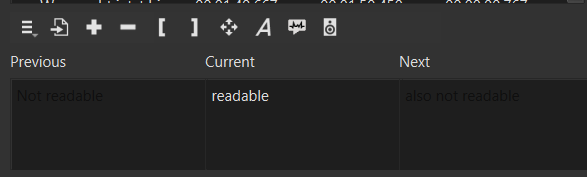
No, but it does not look like that for me on Windows 11. However, in some scenarios (Shotcut theme, OS, desktop environment, and its theme), I have seen this in the search fields such as at the top of Recent & Playlist. These use what are called “placeholder” strings for an editable field. They appear as a prompt (“search”) until you enter something.
@brian I see that you had set these fields to read-only and are using setPlaceholderText(). I know you are doing that to dim the text for the Previous and Next. Another way to handle this is to make them disabled and use setText(). I made that change for the next version. I am not going to bother with figuring out why placeholder text is sometimes dark on dark (non-obvious, low priority, & too many factors).
2 Likes
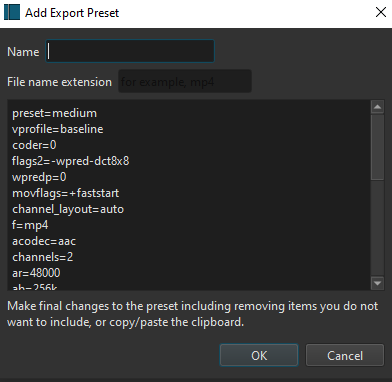
Hi @shotcut , maybe there is the same issue with "Add Custom Export Preset Dialoge - Field File Format”.
As you see in the picture the field for the file format is hardly readable. I use Theme “Fusion Dark”. Shotcut Version 26.04 and Win 10.
Don’t call out my handle for something so minor. Geez
1 Like