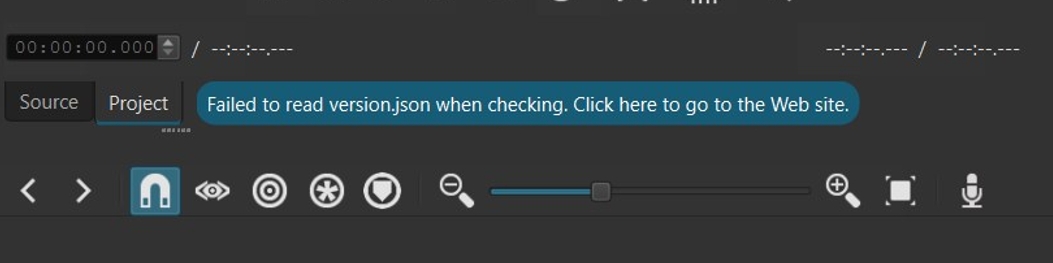
Hello, I just updated to the latest (26.9.27) version via Windows full installer, even run as admin from the start to see if it would change anything, but once installed I get this error both on app load and when trying to look for updates manually. Latest Win10 x64.
(sidenote but, if this gets seen by staff, may as well also report that I’m running it in Italian and the fourth tab in the top right menu is misspelled as Riporduttore instead of Riproduttore)
Not going to fix. It cannot establish a secure HTTP connection on Windows 10 for whatever reason, and I had to remove the fallback to allow an unsecure connection. Read the security notice on the release notes . Also, the developers do not make translations, and the Italian translators are unlikely read your post. See Shotcut - How to Contribute
Shotcut relies upon Windows Certificate Store to handle TLS (SSL) handshakes.
Why It Works for Some Users but Fails for Others
1. OS-Level Cipher Suite & TLS Protocol Discrepancies
Schannel uses the cipher suites enabled in the Windows Registry.
If a Windows 10/11 system has restricted cipher suites, disabled TLS 1.2 / TLS 1.3, or strict Group Policy settings enforced (common on managed PCs or systems modified by privacy/hardening tools), Schannel will fail to negotiate a handshake with the remote web server.
Qt fails immediately with TLS initialization failed if Schannel cannot find a mutually agreeable cipher suite or protocol version.
2. Root Certificate Store Updates
The server hosting check.shotcut.org uses modern SSL certificates (e.g., Let’s Encrypt or similar automated CAS).
Windows updates root CA certificates dynamically in the background via Windows Update (crypt32.dll).
If a user’s machine has disabled automatic root certificate updates, or is behind a strict network policy, Schannel may not recognize the root CA certificate used by the server, causing initialization to abort before completing the connection.
3. Third-Party Security Software Interception
Antivirus programs (like Norton, Kaspersky, or Bitdefender) or local proxy/VPN tools often use HTTPS/SSL Inspection (TLS interception).
They insert a custom, locally-generated root certificate into the system or intercept Schannel API hooks directly.
While web browsers frequently handle these intercepted certificates fine (or maintain their own certificate stores), Qt’s Schannel plugin will throw a TLS initialization failed warning if it detects an unexpected certificate chain structure or an untrusted local proxy certificate.
Summary
The certificate for [https://check.shotcut.org/version.json](https://check.shotcut.org/version.json) itself is valid, but using Schannel shifts all cryptographic responsibility onto the local Windows installation. Systems fail if they are missing required TLS 1.2/1.3 ciphers, have outdated root certificates, run SSL-inspecting security software, or fail to load Qt’s native qschannelbackend plugin.
Windows Schannel is fine: Invoke-WebRequest https://check.shotcut.org/version.json in Windows PowerShell returns 200 OK.
Renaming lib\qt6\tls\qopensslbackend.dll to .bak makes the error go away, so Qt seems to prefer the OpenSSL backend over Schannel and then fail to initialize it.
No OpenSSL DLLs on PATH (where libssl-3-x64.dll libcrypto-3-x64.dll finds nothing), so it’s not a conflicting OpenSSL from another app.
In the install folder, libcrypto-3-x64.dll is present but libssl-3-x64.dll is missing, so the OpenSSL backend can’t initialize.
This happens when you upgrade over an existing install. Those DLLs you mentioned are no longer included in new installs. To fix it, uninstall and reinstall.