It seems to me that with version 26.2.16, exporting an MLT video to MP4 takes much longer than with previous versions. For example, exporting a 13 minutes video from Shotcut takes 15 minutes.
Do you think this is a reasonable time?
My hardware:
Windows 11 – Asus ROG Strix – G733 QS – 16GB graphics card – 32GB RAM
AMD Ryzen 9 processor – Radeon 5900HX graphics.
Just a thought - in December, Shotcut gained partial support for 10-bit processing on the CPU (including implicitly if you have GPU effects enabled), which comes at a performance cost:
There is a new sub-menu in Settings > Processing Mode with options:
Native 8-bit CPU (fast, flexible)
Native 10-bit CPU (slower, better)
Linear 10-bit CPU (slowest, best)
Linear 10-bit GPU/CPU (Experimental)
Non-linear “native” options are still included because there is a signficant performance decrease when using linear (more conversions). We have a plan to improve performance for the next release. 8-bit is still included because it is more “flexible” by including more video filters. Of course, you can use an 8-bit video filter in a 10-bit, but the quality of the video clip or track will suffer a reduction in bit depth.
I just made a test with a non-trivial project (multiple tracks, filters, videos, images, and audio). In version 25.08 an export took 2:00 and in version 26.2.16 beta 1:49 (faster). Using Settings > Processing Mode > 8-bit with hardware encoder on Windows.
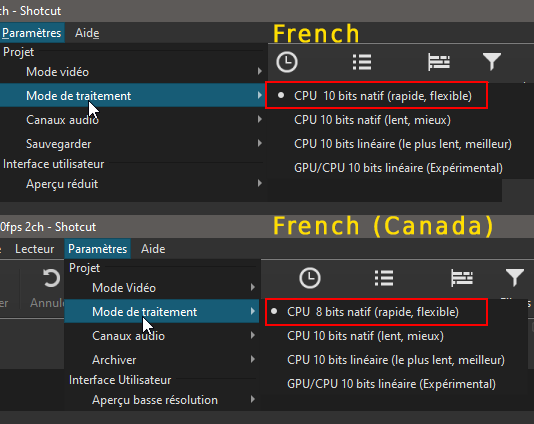
On my computer, I use French, and Shotcut only offers 10-bit modes, not 8-bit.
However, if I use English, it offers both 8-bit and 10-bit modes. There seems to be a translation issue.
I have an MLT project to which I want to add simple text, but Shotcut tells me that “I cannot add non-sweepable text.” What does this mean, and what should I do?
I haven’t used Shotcut since February 2024. I’ve been quickly reading through the documentation and updating Shotcut.
POUR la version Française j’ai coché 10 bit natif et enregistré le même projet en 5 minutes au lieu de 15 et Shotcut la enregistre comme un 8 bit natif.
For the French version I checked 10 native bit and recorded the same project in 5 minutes instead of 15 and Shotcut records it as a native 8 bit.
Processing mode is not equal to export. There are separate 10-bit export presets. It can make sense to process in 10-bits but export to 8. For example, the audio is generally 32-bit float in processing but usually not exported as such.
tells me that “I cannot add non-sweepable text.”
If it literally says that it is another translation bug because that is not the English version of that string. You should post in French, and I will use my web browser to translate or lookup the French word in the translation file. There is an English string “You cannot add a non-seekable source.” I do not know why you would get that. It does not make sense for the vague steps that you provided. There are a lot of easy ways to add text in numerous places.