UPDATE - seems to be only happening with AAC codec export
Hi there y’all
Just a note on something to look out for if you are working with 5.1.
When a file with 5.1 is exported the labeling is changed to C-L-R-Ls-Rs-LFE during the export, even though the actual mapping isn’t altered during the edit or the export from the default L-C-R-LFE-Ls-Rs.
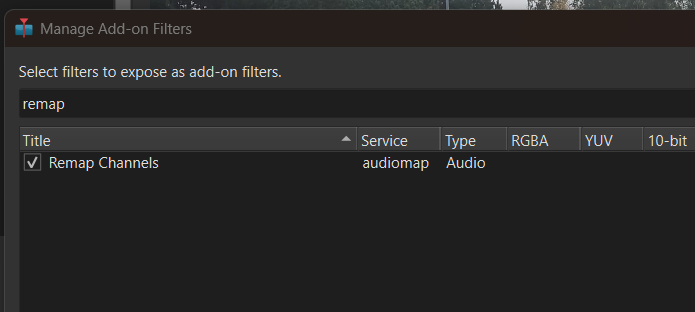
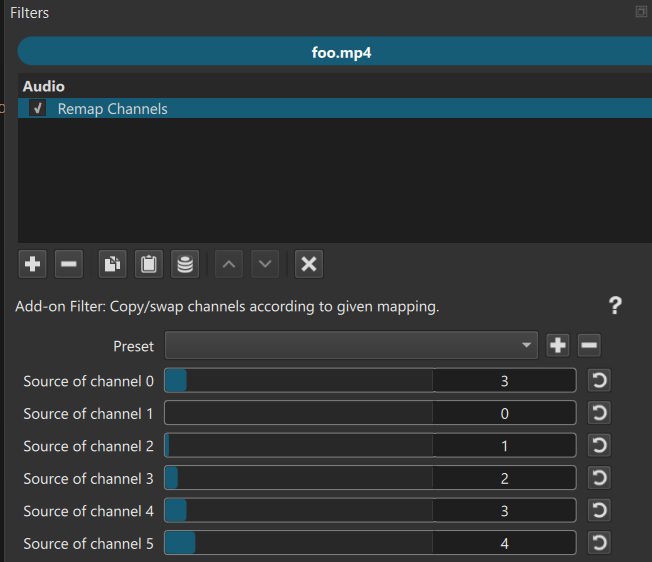
Shotcut only supports L, R, C, LFE, Ls, Rs channel order and hopes that the export format+codec supports that. Apparently AAC does not. Shotcut does not yet expose an channel remap filter or function, but it is there. You would need to run shotcut with --experimental to access the UI generator for add-on filters.
Here is just one web page of many about this topic:
You would add this filter to the Timeline > Output when using the timeline.
However, I discourage this because the AAC encoder in this FFmpeg version is not very good. It is getting a major improvement in the next version (FFmpeg 9.1). eac3 (Dolby Digital Plus) with a high bitrate (>=384) is good and no need to bother with remap.
Audio
ID                                       : 2
Format                                   : E-AC-3
Format/Info                              : Enhanced AC-3
Commercial name                          : Dolby Digital Plus
Codec ID                                 : ec-3
Duration                                 : 2 s 715 ms
Source duration                          : 2 s 720 ms
Bit rate mode                            : Constant
Bit rate                                 : 384 kb/s
Channel(s)                               : 6 channels
Channel layout                           : L R C LFE Ls Rs
Sampling rate                            : 48.0 kHz
I just thought I would give it a mention, it’s good to see you are aware. I am very glad that Shotcut does properly support multichannel audio files at import and export, not many ‘free’ video-editors do that, and avoid mentioning the actual details.