Reduces the level of audio signals that fall below a defined threshold, increasing the difference between quiet and loud parts.
Unlike a compressor, which reduces dynamic range, an expander increases dynamic range by attenuating low-level material.
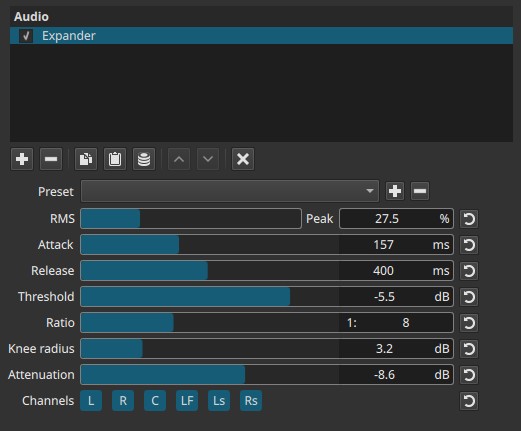
This filter operates in the amplitude domain and is evaluated continuously over time.
None of its parameters are keyframeable.
What this filter does
- Low-level signals are reduced further
- Loud signals remain largely unchanged
- Background noise, room tone, or bleed can be suppressed
- Transients and intentional sounds are preserved
The Expander is often used as a gentle noise-reduction or cleanup tool, not as a hard gate.
Parameters
RMS → Peak (0.0 - 100.0%)
Controls how the expander detects signal level.
-
0.0% (RMS)
Detection is based on average signal energy.
Smoother, more natural behavior. -
100.0% (Peak)
Detection reacts to instantaneous peaks.
Faster, more aggressive response. -
Intermediate values
Blend between RMS and Peak detection.
Practical note:
RMS detection is usually preferred for dialogue and music.
Attack (2 - 400 ms)
Controls how quickly attenuation begins after the signal drops below the threshold.
-
Short attack
Rapid suppression of low-level sounds. -
Long attack
More gradual reduction, preserving natural decay.
Release (2 - 800 ms)
Controls how quickly attenuation stops after the signal rises above the threshold.
-
Short release
Fast recovery; can sound abrupt. -
Long release
Smoother transitions; more natural sound.
Threshold (-30 to 0 dB)
Defines the level below which expansion occurs.
-
Lower values
Only very quiet sounds are affected. -
Higher values
More of the signal is treated as “low level”.
Ratio (1:1 to 1:20)
Controls how strongly low-level signals are attenuated once they fall below the threshold.
-
1:1
No expansion. -
1:2 to 1:4
Gentle expansion; subtle noise reduction. -
1:8 to 1:20
Strong expansion; approaches gate-like behavior.
Higher ratios result in more aggressive suppression.
Knee radius (1 - 10 dB)
Controls how smoothly the Expander transitions around the threshold.
-
Low values
Hard knee: abrupt onset of attenuation. -
High values
Soft knee: gradual, less noticeable transition.
Soft knees generally sound more natural.
Attenuation (0.0 - 24.0 dB)
Defines the maximum amount of gain reduction applied to signals below the threshold.
-
Low values
Subtle reduction of quiet material. -
High values
Strong suppression of background noise or bleed.
This sets a ceiling on how quiet low-level signals can become.
Channel selection (toggle buttons)
Determines which audio channels the Expander is applied to.
Buttons are toggle switches.

Available buttons depend on the project’s audio channel configuration: Settings > Audio Channels
- L — Front Left
- R — Front Right
- C — Center
- LF — Low-Frequency Effects (LFE)
- Ls — Surround Left
- Rs — Surround Right
Note:
Independent processing per channel requires adding separate instances of the filter.
Auditory characteristics
- Reduced background noise between sounds
- Clearer separation between silence and signal
- Can sound cleaner and more focused
- Overuse can make audio feel unnatural or “choppy”
Recommended use cases
- Reducing room noise in dialogue
- Cleaning up microphone bleed
- Suppressing low-level background sounds
- Improving clarity without fully muting silence
- Pre-processing before compression
Usage notes and tips
- Start with low ratios and moderate attenuation.
- Use soft knees and longer release times for natural results.
- Avoid extreme settings unless a gate-like effect is desired.
- Monitor quiet passages carefully to avoid unnatural dropouts.
Relation to the Compressor
The Expander is conceptually the inverse of the Compressor:
-
Compressor
Reduces levels above a threshold. -
Expander
Reduces levels below a threshold.
They are often used together:
- Expander to reduce background noise
- Compressor to control loudness and dynamics
This combination improves clarity while maintaining consistent output levels.
Limitations
- Not a true noise remover
- No lookahead or sidechain
- No keyframe support
- Extreme settings can sound unnatural