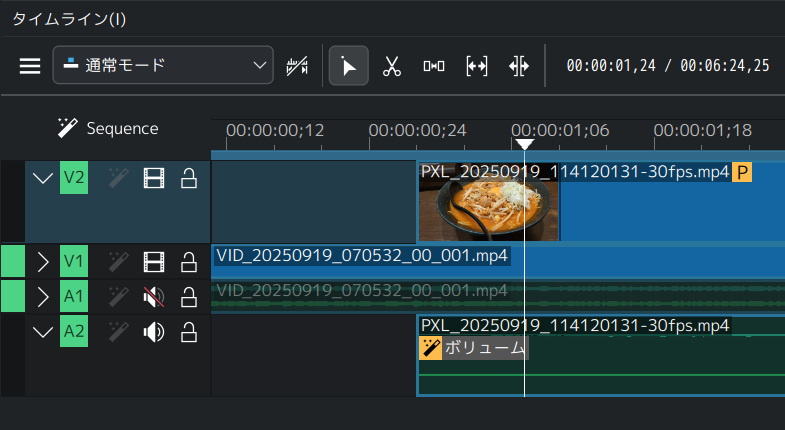
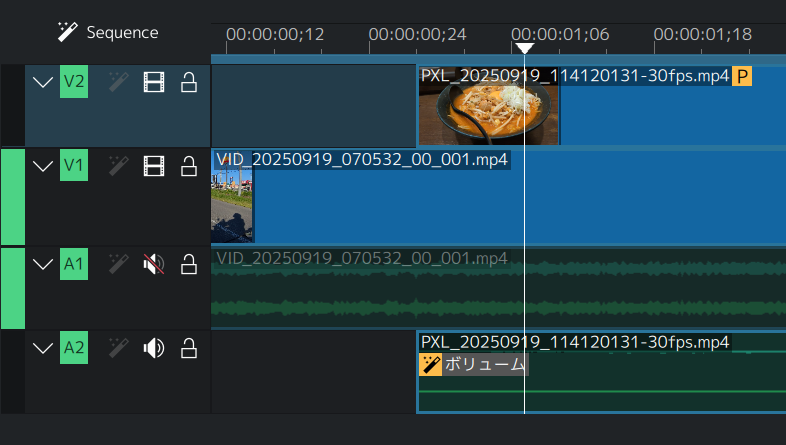
Being able to expand and fold each track just by clicking buttons on them.
Makes the display estate effective and allows us to focus on specific track while being able to check the time relation between other tracks as well.
It would be even better if we can,
Toggle Expand All / Fold All
Expand one and Fold all others (Clicking a button with CTRL or ALT etc…)
Right now the tracks that are not in interest are also taking the same height than the one that’s I’m working on and they waste so much vertical space.
So I’m pushing my timeline window up and squeezing the size of the playback screen instead.
Below is the screenshot from Kdenlive as example.
Pretty sure many video editors implement these kind of features.
I think this is a good suggestion. It would also be nice to have more flexibility with the track height instead of the current preset options for “Make Tracks Shorter” & “Make Tracks Taller”. I like the presets but maybe smaller increments? I personally don’t need my video track to be twice the height of my audio track in order to work efficiently. I’d rather have my playback video be as large as possible.
+1 from me.
My template has two tracks for title and a black background so the title fades away and reveals the video (on tracks 3 and on). Since tracks 1 and 2 need to supersede the video, they need to stay on to and always take away vertical display estate although they are only relevant for the first few seconds. I would love to collapse them and focus on the video track(s).