Applies a fully parametric equalizer with five adjustable sections, allowing precise control over specific frequency ranges.
Unlike graphic equalizers, this filter lets you choose which frequencies are affected, how much they are boosted or cut, and how wide each adjustment is.
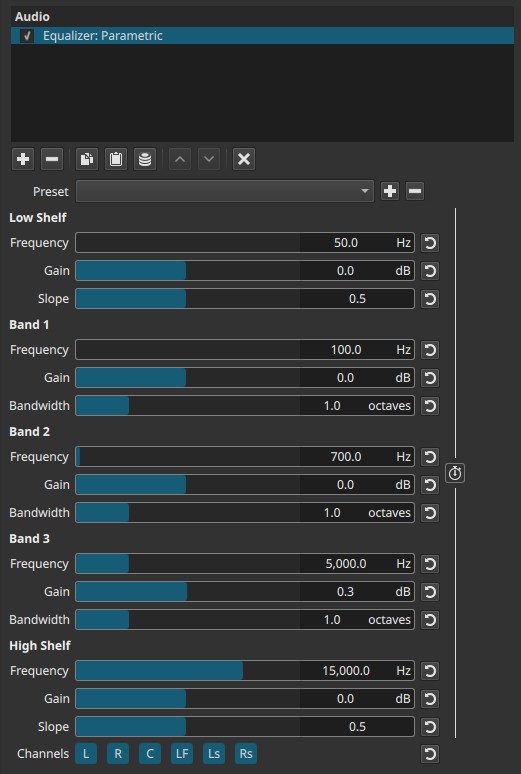
This filter operates in the frequency domain.
Structure overview
The filter is divided into five EQ sections:
- Low Shelf – broad control of low frequencies
- Band 1 – fully parametric mid band
- Band 2 – fully parametric mid band
- Band 3 – fully parametric mid band
- High Shelf – broad control of high frequencies
Each section affects a different part of the spectrum and serves a distinct purpose.
Parameters
Low Shelf
Affects all frequencies below the selected cutoff frequency.
Frequency (20.0 - 20 000.0 Hz)
Sets the point below which frequencies are boosted or attenuated.
- Lower values affect deep bass
- Higher values affect upper bass and low mids
Examples: rumble, bass weight, low-end warmth
Gain (-30.0 to +30.0 dB)
Controls how much the low frequencies are boosted or cut.
- Positive values add bass
- Negative values reduce bass
Slope (0.0 - 1.0)
Controls how gradually the shelf transitions.
- Low values – gentle, smooth transition
- High values – steeper, more pronounced shelf
Band 1 / Band 2 / Band 3 (Parametric bands)
Band 1, Band 2, and Band 3 are three independent parametric mid-frequency filters.
Having multiple mid bands allows you to:
- Remove several problematic frequencies at once
- Boost one frequency area while cutting another
- Shape voice or music using multiple focused adjustments
- Avoid overusing shelves for mid-range corrections
- Target different frequency areas, or
- Overlap intentionally to shape complex tonal curves
For example:
- Band 1: reduce low-mid muddiness
- Band 2: enhance speech intelligibility
- Band 3: tame harshness or resonance
Each band contributes one “piece” to the final EQ curve.
These are fully adjustable midrange bands, typically used for detailed tone shaping.
Each band has the same controls.
Frequency (20.0 - 20 000.0 Hz)
Selects the center frequency affected by the band.
- Low values: warmth and body
- Mid values: clarity and presence
- High values: sharpness and detail
Gain (-30.0 to +30.0 dB)
Controls how much the selected frequency range is boosted or attenuated.
- Boosting emphasizes that frequency
- Cutting reduces it
Bandwidth (0.0 - 4.0 octaves)
Controls how wide the affected frequency range is.
- Low values – narrow band (precise, surgical adjustment)
- High values – wide band (broad tonal shaping)
Audible note:
Narrow bandwidth with high gain can introduce audible resonance or ringing.
High Shelf
Affects all frequencies above the selected cutoff frequency.
Frequency (20.0 - 20 000.0 Hz)
Sets the point above which frequencies are boosted or attenuated.
- Lower values affect upper mids
- Higher values affect treble and air
Gain (-30.0 to +30.0 dB)
Controls brightness and high-frequency energy.
- Positive values add clarity and air
- Negative values soften harsh or hissy sounds
Slope (0.0 - 1.0)
Controls how sharply the shelf transitions.
- Low values sound smoother
- High values sound brighter but more aggressive
Keyframes (grouped)
All parameters are keyframed together.
- Individual bands cannot be animated independently
- Each keyframe stores the entire EQ curve
This allows:
- Gradual tonal changes
- Scene-dependent EQ
- Smooth transitions between different EQ settings
Channel selection (toggle buttons)
Determines which audio channels the equalizer is applied to.
Buttons are toggle switches.

Available buttons depend on the project’s audio channel configuration: Settings > Audio Channels.
- L — Front Left
- R — Front Right
- C — Center
- LF — Low-Frequency Effects (LFE)
- Ls — Surround Left
- Rs — Surround Right
Important note:
Independent equalization per channel requires adding separate instances of the filter.
Auditory characteristics
- Precise tonal shaping
- Can subtly correct issues or drastically reshape sound
- Narrow boosts may introduce resonance
- Large boosts can cause harshness or listener fatigue
- Broad cuts often sound more natural than boosts
Recommended use cases
- Cleaning up dialogue (removing muddiness or harshness)
- Removing resonant frequencies
- Enhancing speech intelligibility
- Detailed music tone shaping
- Channel-specific EQ in surround mixes
- Corrective audio work where precision matters
Usage notes and tips
- Start with cuts before boosts.
- Use narrow bandwidth to remove problematic frequencies.
- Use wide bandwidth for natural tonal shaping.
- For dialogue:
- Cut low frequencies with the Low Shelf to remove rumble
- Use mid bands around 1–3 kHz to improve intelligibility
- For brightness, prefer the High Shelf over narrow high boosts.
Limitations
- Grouped keyframes only
- Extreme settings can cause distortion
- Requires careful listening and iteration