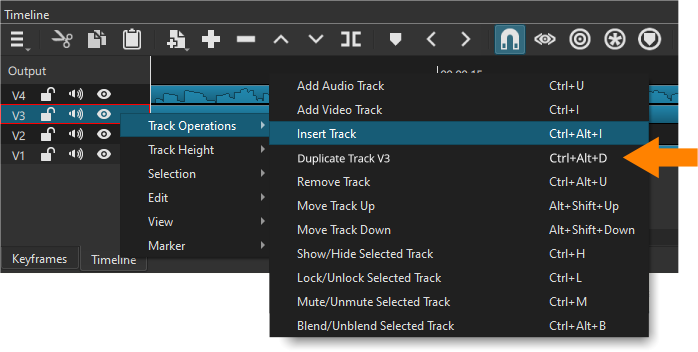
This topic has been posted, to my knowledge, twice before, but it has never generated a discussion and no response as if it was /dev/null.
Can anybody let me know if they would (or would not) like this feature (maybe not given it hasn’t generated any interest in, like, ever). But why? Does nobody ever require to easily duplicate a track?
For the record, and I don’t know why I never asked before, but I would love this feature addition.
Not saying I’m opposed to the suggestion, but right now I can’t think of when I’d need this feature. I don’t remember a time when I said to myself: “I wish I could duplicate this track”
@BeretGascon maybe you could give us a couple of examples of when you need a track duplicated?
Eg 1. Yesterday I created a video which included a slideshow. I loved it, transitions were perfect everything was great. EXCEPT, the slideshow I made was too short for the space it was to fill, meaning I’d have to add a second or two to each frame in the slideshow dialog. Say this was on track V6. With this feature I’d duplicate the track, so I’d have a V7, I’d delete the slideshow from V6 and then recreate the slideshow with the additional frame durations and watch the new V6, but now I can easily compare it to V6 to see whether what I did made it better or worse.
Eg 2. I have to change the speed of a video clip so, before doing so, I duplicate the track retaining the speed at 1.0 so that I can now change the speed and pitch of V6 and have V7 which remains at 1.0 to compare it to. Does she sound OK, or does she now sound like a smurf? I can compare the two tracks to verify that what I have done is an improvement or not.
These are two examples from just yesterday and earlier today.
Go to the track you want to duplicate and select all the clips on that track. The best way to do this is to hold down the Ctrl key and drag your mouse over the clips you want to select.
Press Ctrl+G to group the selected clips.
Press Ctrl+C to copy the grouped clips.
Create a new video track by right-clicking in the track area and selecting “Add Video Track” (or use a shortcut Ctrl+I).
P.S. it is not necessary to use groups, but thanks for the general answer @TLR_Pictures . The only thing this does not do is copy the track filters, but that is simply another couple of steps to copy and paste them.
Thanks for the effort, but I’ve been using ShotCut for years. I know how to duplicate a track. That’s precisely why I would appreciate an easy 1-click “duplicate track”.
Every time you change something in the slideshow, it retains that setting. So when you go back to create another slideshow, you have to remember what the settings were of the last slideshow you made. An easy 1-click “duplicate track” means you always have a copy of the original slideshow.
You cannot compare the two if you’re using “undo/redo”. You have to remember what the first one was, then change the setting, then play it, then hope your memory of what it is compared to what it was is accurate. An easy 1-click “duplicate track” means you always have a copy of the original.
I’m not sure why, but there seems to be a lot of resistance to this request so I would be grateful if the admin could close this topic. I didn’t want to create a storm in a teacup. Many thanks anyway for giving it some of your time.
I don’t see any resistance - just curious questions. Maybe you are reading the comments with the wrong “tone”? It’s an interesting suggestion - I’m trying to figure out if/how it could help my workflow.
Then you can make changes in SS2.mlt than you compare with the mlt video (SS1.mlt)
I really don’t know but I think this @BeretGascon can work because seems as your major aim is to compare what you doing to the previous edit version. I think this might work @brian@shotcut@BeretGascon
I really appreciate your efforts which are ingenious in their Heath Robinsonness, but I wasn’t asking or looking for ways to achieve this through workarounds - I’ve already been down that road myself. All I was wondering was the feasibility of one menu item: “Duplicate track”.
Please include the funktion: Copy/Paste Track
This track should be pasted in the same or a different projekt.
Verry often i need a funktion, to copy/paste one track (with its trackfilters) from one mlt to an other one or inside the actuell one (duplicade).
I only find the funktion to copy/paste the clips inside a track -or- the trackfilters, but not the whole track.
I always do it this way:
Copy all the clips of a track.
Make a new track.
Put the copied clips inside the new track.
Copy all the trackfilters.
Put the copied trackfilters inside the new track.
To do this with only to use copy/paste would be much easier and less prone to errors!
To paste copied clips inside a new track, i always need to adjust the time to the right positition.
I can’t see how this could work to copying between MLT’s, unless you have two MLT’s open at the time of course, CTRL-C on one track in the first MLT and then CTRL-V into the second MLT. Yes, I agree that this would be a very useful feature.