Applies a time-varying geometric distortion to the image, warping the frame along a moving wave pattern.
The filter displaces pixels spatially over time, creating wobble, ripple, or oscillation effects rather than changing color or tone.
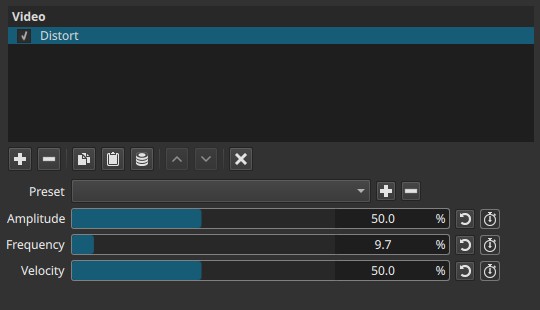
This filter is intended for stylization and motion distortion, not for lens correction or stabilization.
Parameters
Amount (0.0 - 100.0%)
Controls the strength of the distortion.
-
0.0%
No distortion. The image is unchanged. -
Low values (5% - 20%)
Subtle wobble or gentle image drift. -
Medium values (20% - 60%)
Clearly visible distortion. The image bends and shifts over time. -
High values (60% - 100%)
Strong warping. The image becomes unstable and heavily deformed.
Important behavior
- Amount is a master control.
- If Amount is set to 0%, Frequency and Velocity have no effect, regardless of their values.
Note:
Amount defines whether distortion exists at all.
Frequency (0.0 - 100.0%)
Controls the spatial repetition of the distortion pattern.
-
Low values (0% - 5%)
Large, smooth bends affecting broad areas of the frame. -
Medium values (5% - 30%)
Multiple waves appear across the image. -
High values (30% - 100%)
Dense, zig-zag or ripple-like patterns.
Important behavior
- Frequency affects how many waves exist, not how fast they move.
Note:
Frequency controls how often the image bends across space, not time.
Velocity (0.0 - 100.0%)
Controls the speed and direction of the distortion’s motion over time.
-
0.0%
Static distortion pattern. -
Low values (5% - 30%)
Slow drifting motion. -
Medium values (30% - 70%)
Continuous wobbling. -
High values (70% - 100%)
Rapid oscillation and strong temporal instability.
Important behavior
- The default diagonal motion (top-left to bottom-right) is intrinsic to the effect.
- Velocity does not change distortion strength, only its movement.
Note:
Velocity controls how fast the distortion travels, not how strong it is.
Keyframes
All parameters can be keyframed.
This enables:
- Gradual buildup or release of distortion
- Pulsing or rhythmic warping
- Synchronization with music or motion
Parameter interaction
- Amount enables and scales the effect.
- Frequency defines the number of spatial waves.
- Velocity animates those waves over time.
If Amount is zero, the filter is effectively disabled, regardless of the other parameters.
Visual characteristics
- Time-based geometric warping
- Diagonal wave motion by default
- Zig-zag or ripple patterns at higher Frequency
- No color, brightness, or alpha changes
This is a spatial + temporal effect and must be evaluated during playback.
Recommended use cases
- Stylized distortion or glitch-like effects
- Simulating heat, water, or instability
- Transitional effects between scenes
- Music videos or experimental visuals
Limitations
- Not suitable for corrective distortion
- Direction of motion is fixed
- Can cause motion sickness at medium-high values
- Compression may exaggerate artifacts