Applies a softening that spreads light within textures rather than simply blurring edges. The effect reduces micro-contrast and detail while largely preserving overall shapes, producing a softer, more organic image. Diffusion is a spatial effect and operates per frame. It does not analyze motion or time.
NOTE:
This filter is only available when GPU processing is enabled. It does not appear in CPU-only processing modes.
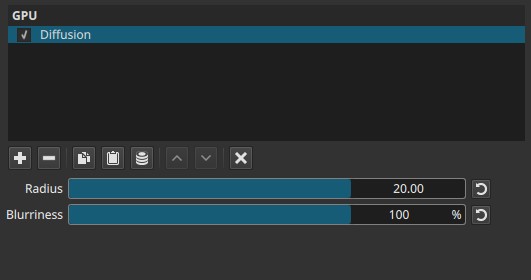
Parameters
Radius (0.00 - 20.00)
Controls the spatial extent over which diffusion spreads.
-
Low values (≈0.00 - 3.00)
Very subtle diffusion. Fine texture is slightly softened with minimal spread. -
Mid values (≈3.00 - 10.00)
Noticeable diffusion. Light and detail begin to bleed into neighboring pixels. -
High values (≈10.00 - 20.00)
Strong diffusion. Texture and fine detail are heavily softened.
Behavior note:
- Radius defines how far the diffusion reaches, not how strong it appears.
- Increasing Radius increases the area of influence, not blur intensity.
Blurriness (0 - 100%)
Controls how strongly the diffused result blends with the original image.
-
Low values
Diffusion is faint; original texture remains mostly intact. -
Higher values
Diffusion becomes more pronounced, reducing fine detail and local contrast.
Important distinction:
Blurriness does not increase the diffusion radius. It controls the visibility and strength of the diffusion effect.
Parameter interaction
- Radius determines the scale of diffusion.
- Blurriness determines how dominant the diffused image becomes.
- Small Radius with higher Blurriness softens texture without obvious blur.
- Large Radius with high Blurriness produces a pronounced soft-focus look.
Visual characteristics
- Reduced micro-contrast
- Softer internal texture rather than sharp edge blur
- Slight “glow-through” within detailed areas
- Overall shapes remain readable longer than with standard blur filters
Recommended use cases
- Softening harsh digital texture
- Subtle beauty or diffusion pass
- Reducing noise-like detail without heavy blur
- Creating a mild optical softness reminiscent of diffusion filters used in photography
- Stylized or atmospheric visuals
Limitations
- GPU processing required
- Not keyframeable
- Can reduce perceived sharpness if overused
- Not a physical simulation of optical diffusion filters