I record audio in audacity and import it into shotcut.
Then I use the normalization two pass filter. Target loudness is -23dB by default.
If I add some music, it is always much louder then the voice track.
And if I watch music videos in youtube and compare it with my audio tracks, they are also much louder.
So what should be the default normalized volume in shotcut?
Why is the default -23dB so low?
Which volume or filters do you use for voice tracks to get a normal volume?
For video, it is very easy. Brightness directly works fine. But the audio is always a big problem. I also see that the volume is so different on my videos in youtube. I wonder why there is no default normal volume for all videos. And even in TV - some channels are louder than others.
-23 LUFS is the standard volume level for broadcast television. -14 LUFS is the standard for YouTube. Uploading a -23 LUFS file to YouTube will sound 9 LUFS quieter than everyone else’s videos.
Music is a mixed bag. During the Loudness Wars, everyone tried to mix as close to -0dB true peak as they could. Because of this, music will sound louder than speech, and will need to be turned way down to be mixed with speech. Today, music is usually mixed at more sane levels, usually around -16 LUFS.
The standard Volume/Gain filter or the Normalize filters are good tools to get audio where you need it. Use analysis or watch the LUFS scope in Shotcut to see how much adjustment is needed.
Great, thank your for your help and explaination !
Too bad that I already uploaded 8 videos. For the next ones, I will use -15 Lufs for voice. And for background music - I will check. Or is there also a level which is usual for background music?
I just wonder how a professionel video editor does this job. At the moment I add the two pass normalization filter for every single audio clip in the time line. That takes lot of time. And in the end I need to double check that I really added it too all clips. And check if the level -15 is correct. (I will save -15 as my own set)
Edit: -14 was too loud. Voice sounds not good. In my feeling, -15 is great.
Is there any other easy way to normalize all clips ? I don’t believe that professionells will do it for every single clip.
Going in process order… speech can sound fine even at -6 LUFS if the dynamic range is compressed hard enough. Conversely, if the dynamic range of the speech is 20 dB but the volume is raised to -14 LUFS, then that’s 6 dB of possible clipping (distortion). The trick is to get a compressor or limiter in the chain before normalizing to -14 LUFS.
Which brings us to the next point… compressors and the Normalize: One Pass filter can be added to a track head, which applies to all clips on the track, as opposed to adding a normalizer to every individual clip.
As for background music level, that’s always going to depend on the dialog track above it. Some people have voices that can punch through concrete, while other people have muddled voices even in a quiet room, and EQ can only shape them so much. So unfortunately, there isn’t a general recommendation there, it’s kinda “whatever sounds good”. But something you can do to help speech intelligibility is to add an EQ filter to the music which notches (reduces) the music frequencies that collide with the speech. If speech is hovering around 500 Hz, then putting a 500 Hz hole in the music will let the speech cut through easier.
One thing I learned earlier this year after putting some background music in a video is that the level of music that sounds right to the video creator may be too loud for others. The way someone explained it to me is that you know what you said in the video so you can understand the speech even if the music is perhaps obscuring a bit of it - but your audience doesn’t know what you said so they’ll have trouble understanding you. So if you’re going to put in some background music, make it a few dB quieter than what you think is right. Austin’s suggestion of EQ is also a worthwhile idea.
I also recently started using the compressor (with fairly gentle compression to maintain a natural sound) instead of two-pass normalizer for portions of my videos where I’m narrating on camera. The compressor has a makeup gain setting, which you can use to adjust the final volume (which is what normalization does). As Austin mentioned, just normalizing to a specific level doesn’t guarantee you won’t clip - and I used to find that most of the time I need to be between -16 to -18 to avoid clipping - so I’d have to normalize, play it back while watching the audio meter, and adjust the normalize filter’s level according to what the meter shows. Now I compress, play it back while watching the audio meter, and adjust the makeup gain according to what the meter shows, so it’s pretty much the same amount of work but more intelligible.
That’s what I, a very non-professional video editor, do; hopefully something in there will be useful to you.
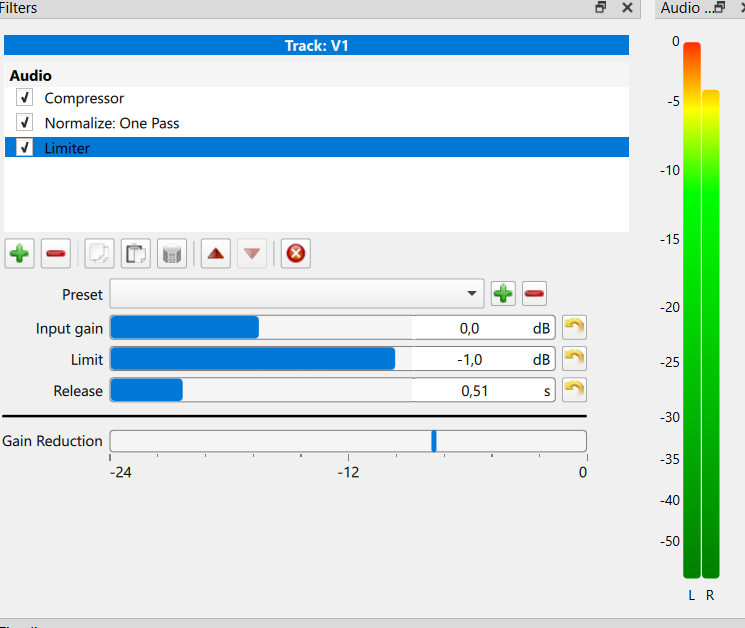
All great points. There is also value in putting a limiter on the output track at -1 dB. It is a safety net for clipping, and also provides headroom for lossy codecs to work during export. A lossy codec by nature is going to deviate above or below the level of the source depending on the alterations it is making to achieve better compression. In the event the lossy encoding is louder than the original, the limiter provides some headroom which avoids clipping when playing back the louder lossy signal.
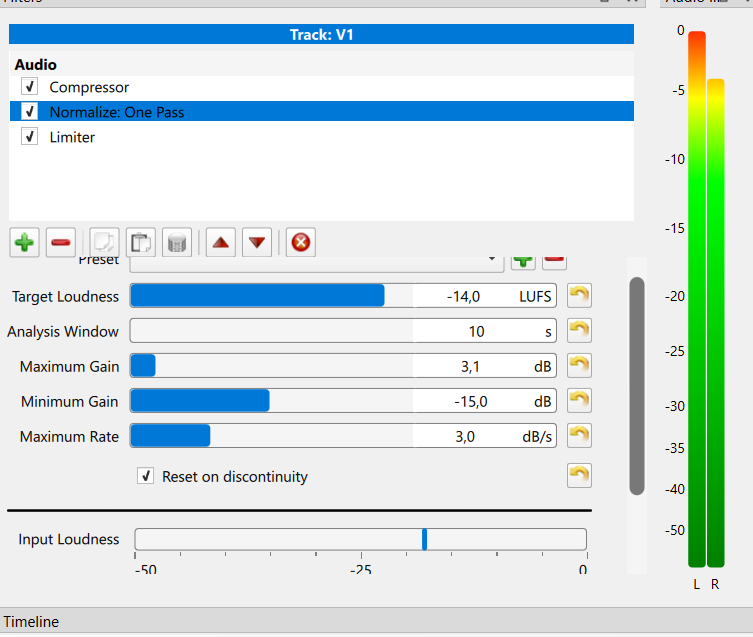
Pretty close. The compressor and Normalize filters are in the right place. The settings for the compressor will depend on how loud the source clip is and how much dynamic range it has. The Normalize settings as posted look like a good start.
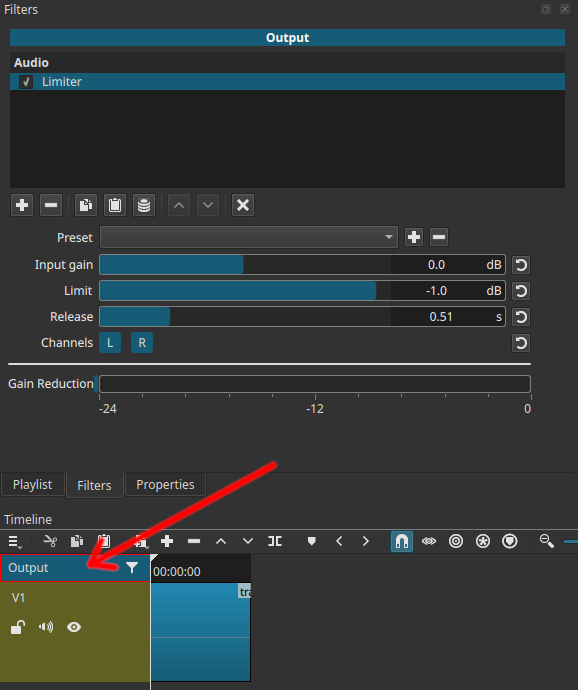
There is another track head called Output (see arrow in screenshot). After all the individual tracks are mixed together, the Output filters are applied to that mixdown. This is where we want the limiter, so that it is applied at the very last stage. A limiter on an individual track cannot protect the entire mix from clipping because the music on another track could push the combined level over 0 dB. That’s why the limiter is on the Output… it sees the final mixed audio and can clamp any problems before the encoder receives it.
But now, whatever I do with those filters, the volume between some clips has a bigger difference than before. I think i need to play with filter settings.
In video of brian, the normalize one pass is on the top of filters and compressor below.
in my setting, the order is changed. First compresor, than normalize one pass.
I tried both variants, but it seems to be the same. Does it make a difference?
I tried 2 hours now this evening to get it working. No chance!
The one pass filter in the video head is too slow. Even if I try to speak always with same power and have same distance on microphone, the volume is different. And the one pass filter is not fast enough to push volume up or down at the beginning of next clip.
I set analysis window to 2s and maximum rate to 9 dB/s. It is still too load if a new, louder clips starts.
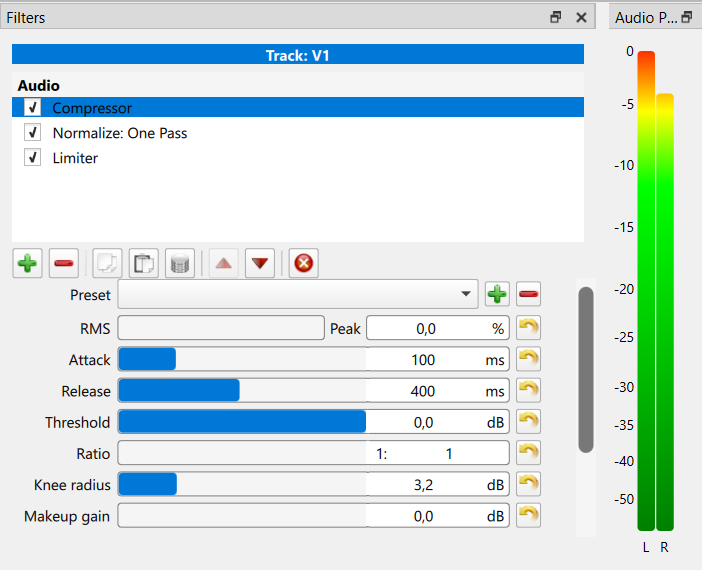
And the compressor doesn’t do anything. I tried all settings. Even in a very loud clip, it does not reduce the volume. I tried it on video head and on a clip itself. The gain reduction always shows same - it does not move.
What is wrong here?
It sounds like you are trying to match the volume at the end of one clip with the volume of the beginning of the next clip. That isn’t what the filter is for, and Shotcut doesn’t have a feature for that. The filter is intended to make the average volume match over time. And it takes some time to do that at the start of the video.
For my own workflow, if I have a large audio volume change between clips, and I want to match them, I slap a gain filter on the following clip and “roughly” match it - then, I let the normalize filter worry about averaging it over time.
Yes exactly! And it is the problem you described in your video above and I did it same way. But for me, it does not work.
As long as there is no other easy solution for the track head, I will continue to add the two pass filter to every single clip. That works great - it only takes some time.
Perhaps there is something better in future available
Hmmm. i don’t know if that will work either. The two pass filter sets a fixed gain for the whole clip. So they might still mismatch between clips. But if that works for you, that is good!
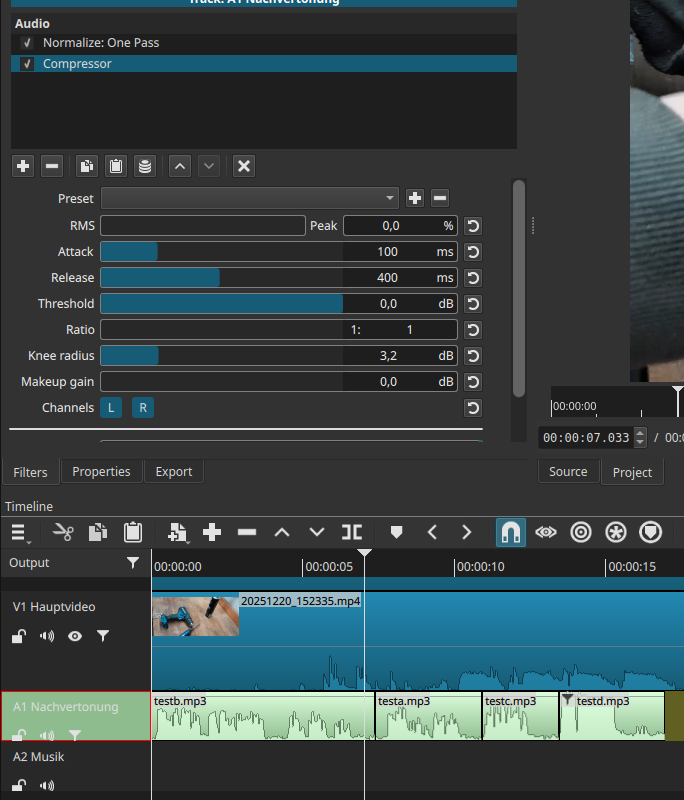
In the attached image, you’ve set the ratio to 1:1 (which means no compression) and the threshold to 0 (which means that, other than the knee radius, only compress things that are louder than full range). There are plenty of tutorials online about using compressors for audio, and with all those settings it’s a complex effect, but as a starting point to see how the effect works, set the threshold to -20 and the ratio to 2:1, leaving the rest as is; I think you’ll find that’s subtle enough to not be “in your face” but you’ll see the gain reduction doing its thing.
I already played with those settings and also set threshold very low (I remember it was -18 in the video of Brian) and I tried different ratios up to 5:1. But I can’t hear or see any difference. Perhaps I have another problem. I will try again in next days.
Given how quiet the input audio was in previous posts, it wouldn’t surprise me if the threshold needed to be closer to -30.
One way to get a ballpark number is to deactivate all audio filters and play only the raw dialog track. Watch the audio level meter to find the average volume level. Let’s say it is -25. Set the compressor threshold around 5 to 10 dB lower, meaning -30 to -35 in this case. That means the audio is on average 5-10 dB louder than the threshold, which will get compressed at 2:1 ratio down to 2.5-5 dB louder than threshold. With dynamic range reduced (not as loud above threshold), we have opened up some headroom the signal will never reach, which means the whole volume level can be raised 5 dB with less potential of clipping. Clipping is still possible on a very dynamic clip, but the transients may be reduced enough that the Output limiter can handle them gracefully.