Several years ago I had a YouTube channel. Used Shotcut. Mac. All good.
This year decided to upgrade (cough) to DVR free. New channel, travel. 4K HLG video on my DJI OSMO Pocket 3. Video looks fantastic on my PC monitor or phone.
Today was the final straw. Try and try and try there is no way I can import these assets into DVR and then render the colours accurately to 4K HLG. I can get close buts it’s dressed up SDR really. Maybe it’s a free Davinci limit, dunno. Today was my last attempt. I’m done.
Can somebody please say. Can I do 4K HLG in Shotcut? The editing monitor is not important. The output file is the key. PC has 64GB. Graphics card is Radeon 9070. Forget the CPU.
I looked at the Shotcut blurb on the website. It says it can but is that for real or just dressed up SDR, I mean “fancy colour graded”. I’m looking at automatic. No need to do tricky grading magic. Thank you.
Short answer from Shotcut’s own release notes: yes, since version 26.6 (June 2026) HLG HDR is a real output path, not dressed-up SDR. What the 26.6 release notes say:
- Custom Video Mode and Timeline Properties gained a Dynamic range setting with SDR, HLG HDR and PQ HDR.
- HDR export was added, driven by the video mode plus a 10-bit processing mode.
- One codec caveat: HDR10 metadata is embedded only with the libx265 and libsvtav1 encoders, not with the hardware encoders.
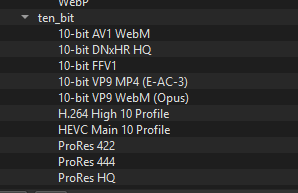
So for Pocket 3 HLG clips: set the project video mode’s dynamic range to HLG HDR, switch processing to a 10-bit mode, and export. The editing monitor really doesn’t matter for the output file - the HDR preview window they added needs an HDR-capable display anyway, and per the same notes it doesn’t appear to work on Linux yet. Two more documented limits worth knowing before you commit: Shotcut currently can’t convert between HDR formats or combine multiple HDR formats in one project, and converting log-profile footage to HDR currently requires the GPU processing mode plus the HLG HDR video mode. The feature list on the site explicitly names HDR10 (PQ) and HLG HDR, so the blurb is real - just make sure you’re on 26.6 or newer.
One more thing. Google AI warned me to expect a Shotcut hard crash if I try to render, say, a 30 minute video. Is that for real? I already get DVR hard crashes or just the app quiting so I don’t mind the App giving up every so often but how often?
On that one I can only tell you what Shotcut’s own documentation says - I haven’t found any official crash-rate number, and the FAQ does not tie export failures to project length. Its entry for failing or stuck exports gives a concrete procedure instead: give the percentage time to move (long exports can look hung when they aren’t), then stop the job and retry with Parallel processing disabled under Export > Video. If it still fails, note the percentage it reaches, map that onto your project duration to find the rough spot, and look at what’s complicated or different there - temporarily removing things around that position to see whether the export gets further is the documented approach. So a blanket “30 minutes will hard crash” isn’t something the official docs support. If it does fail on your machine, that procedure is the official way to narrow down why.
That’s a weird one by google, I haven’t had a crash during export in.. years? I mean worst case it fails at start of export if you try to use a bad combination of codecs (in advanced mode), but otherwise that would be a very rare thing and it’s definitely not a “anything above 30 mins crashes”. My longest export is 7h I think and I just left it overnight to run with no issues.
For 4K HLG I can’t speak in detail, I know HDR support was added this year and I did preview and export a short test video from my phone with HDR10 just to see how it is and it works properly as long as you only use 10 bit capable filters (there’s a filter for them) AND use the 10 bit export preset.
One thing you need to mind is that HDR preview is only supported in the preview window (CTRL+` shortcut, or Player → External monitor → Preview window), the “main” Shotcut window is only written in/for SDR. But the export file will absolutely be HDR as long as you do the right settings.
Oh and the main thing to make sure is to have the correct video mode (4k + one of the hdr options). You can use the Automatic video mode to just copy the original video type (make sure the first clip you drag in the program is a 4k hlg one).
Since the output file is the priority, I’d run a short end-to-end test before moving the whole project. Put one 20–30 second Pocket 3 HLG clip on an HLG HDR timeline, enable 10-bit processing, and export it as HEVC Main10 with libx265. Then inspect the file in MediaInfo. The colour primaries should be BT.2020, and the transfer characteristic should be HLG/ARIB STD-B67. This confirms that the export is tagged as HDR instead of relying on how it looks in the editor preview.
Once the test passes, save the project and export settings as your baseline for the travel channel. A fixed colour pipeline keeps the rest of the workflow simple: edit first, then add narration, captions, and titles without changing the HDR settings midway. Wordfully can help turn rough trip notes into a narration outline or first script draft, while Shotcut handles the colour and export checks.