Applies a circular crop mask to the clip, keeping a circular region visible while replacing everything outside the circle with either a solid color or transparency.
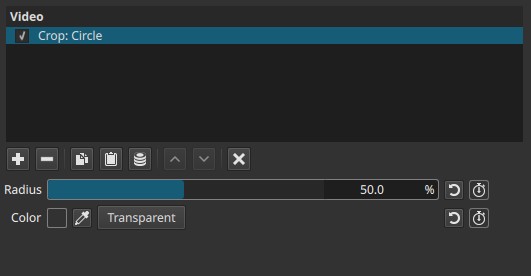
This filter is a masking tool, not a geometric crop in the traditional rectangular sense.
General behavior (important)
-
The filter defines a circle centered on the frame.
-
The inside of the circle shows the original clip.
-
The outside of the circle is either:
- Filled with a solid color, or
- Made transparent (if enabled)
The circle expands or contracts based on the Radius setting.
Parameters
Radius (0.0 - 100.0%)
Controls the size of the circular visible area, expressed as a percentage of the frame.
-
0.0%
The circle has zero radius.- With Transparent disabled: the entire frame is filled with the selected color.
- With Transparent enabled: the clip is fully transparent.
-
Low values (10% - 40%)
A small visible circular window appears at the center of the frame. -
Medium values (40% - 80%)
The visible area expands, cropping less of the image. -
100.0%
The circle fully covers the frame.- The original clip is fully visible.
- Color and transparency settings have no effect.
Note:
Radius controls how much of the clip remains visible, not how much is removed.
Color
Defines the fill color used outside the circle.
-
Can be selected from:
- The color palette
- The color picker in the preview
When the circle does not cover the full frame, this color replaces the cropped area.
Transparent (button)
When enabled:
- The area outside the circle becomes transparent
- Underlying video tracks show through
When disabled:
- The outside area is filled with the selected Color
Important behavior
- Transparency affects timeline compositing, not the clip itself.
- Export transparency is preserved only if the chosen export format supports an alpha channel.
Keyframes
All controls are keyframeable.
This enables:
- Animated circular reveals or hide effects
- Spotlight or iris-style transitions
- Dynamic masking over time
Visual characteristics
- Hard-edged circular boundary
- No feathering or soft edge
- Centered circle only (no position control)
- Clean, predictable masking behavior
Recommended use cases
- Circular reveals or transitions
- Picture-in-picture with circular framing
- Spotlight or focus effects
- Masking content for overlays or UI elements
Limitations
- Circle is always centered; cannot be repositioned
- No edge softness or feather control
- No aspect-ratio control (always circular)
- Transparency on export depends on format support