Hi Dan,
with the current version 26.2.26 I faced a crash that I experienced with earlier versions but not with the last but one and not with that before:
It is repeatable when SC is encoding in the background in the moment when I click on the Windows 10 taskbar button to bring SC to the foreground (to check the progress). During the crash, the mouse arrow turns to the hour glass (Win 10 circle design) for a few seconds and then SC window disappears without a message. Encoding is in CPU mode, nVidia GPU was active for windows presentation but not for encoding.
Please find the upload of the Windows application event log and a MTA file that was created. I missed to save the SC internal application log but I remember from earlier events that it indicates no cause. For other reasons I permanently monitor the memory status with HwInfo and I upload a screenshot which rules out a memory problem, and I have no crash issues with other applications.
Qt6Widgets.dll application error.zip (20.0 KB)
Perhaps the circumstance that the crashes did not happen with the previous version 26.1.30 helps you to narrow down the problem quickly.
It just crashed again just one minute before an encoding was going to finishedand right after the crash I saved the application log:
application log.zip (4.2 KB)
Although the error seams to be repeatiable, it cannot be provoked at the beginning of an encoding pass, but only after some progress, which would indicate a memory issue, but I can’t pinpoint it. Free target drive capacity is 8 TB.
I have not reproduced it on Windows 11, and the logs are not useful but will keep an eye out for it by minimizing more often when exporting.
After I reboot it did’t happen until know, but I know it will start after a while. Could be a memory page conflict with another software. I don’t know how to monitor this, but I will report any observations.
Today, I tested this numerous times on Windows 10 and did not reproduce it. If you are still affected, then consider using a virtual desktop instead of minimizing and restoring. For the next version, I will try to bring back the progress indication on the task icon.
Thank you for following up this topic, and thank you for the hint to use virtual desktop, which sounds inspiring to clean up my desktop anyway.
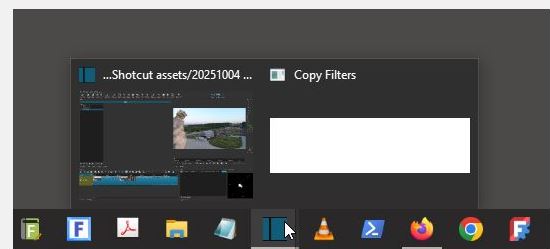
In the meanwhile the Shotcut task bar icon showed another behavior: When I clicked the button “save filter set”, the dialog box “save as” didn’t appear, and Shotcut, waiting for the dialog to finish did not respond. In this situation the task bar icon had a second instance named “copy filters”, which I was not able to bring to the foreground and so I had to kill SC with the task manager.
Earlier I experienced the same thing occasionally with the print to pdf dialog of another application. Today, for this and other reasons, I decided to set back my Windows partition to an earlier state, and I’m already curious to see if the taskbar button will start acting strangely again.
After recovery of the Windows partition from an image backup, the issues with the Qt6Widget did’t show up again for 2 weeks, so it must have been due to my Windows 10 installation. The problem seems to be solved.
By the way, I made a new observation. Sometimes, when scrubbing on the timeline or moving the playhead frame by frame with the arrow keys, the last frame of the track appears in the middle of the timeline. This looks like a cache issue. Occasionally, this last frame is the square pattern instead of the actual last frame. This happens rarely, so I haven’t started a new thread yet.