What is your Shotcut version (see Help > About Shotcut)?
I just updated to 25.08, I believe
Can you repeat the problem? If so, what are the steps?
Step 1: Add at least 2 video sources, one of them in need of Chroma Key
Step 2: Apply Chroma Key
Step 3: Profit(?)
Workaround
I applied a Size, Position & Rotate filter to the source with Chroma Key and it’s working properly again. I fell like reporting this bug is still a good idea, though. Please let me know if there’s any kind of log file I can share for this!
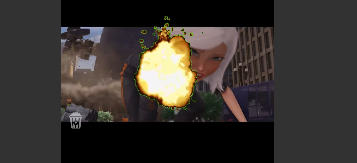
Unable to reproduce and unclear. Your screenshot does not clarify the problem as the background below the explosion is not black and “anything not behind it” would be what? The explosion? That is not black either.
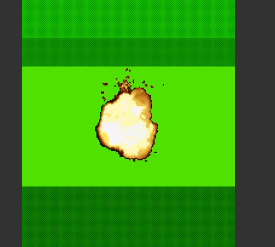
I think the problem here is the green clip not being the same ratio as the project.
When the Chroma Key filter is applied, we can see black bars on the top and the bottom.
Adding a SP&R filter removes the black bars.
I see. I think most of the time you want to use a Size, Position & Rotate with this anyways. Chroma Key: Advanced with Operation = Minimum is another workaround if you really don’t want SPR. Or add a Crop: Rectangle with Padding color = Transparent to crop out the black bars.