Applies a band-pass filter that allows only a selected range of frequencies to pass while attenuating frequencies below and above that range.
This filter is used to isolate specific frequency content, shape tone, or create stylized audio effects.
Band Pass is a frequency-domain audio filter. Its effect is evaluated continuously over time and can be animated using keyframes.
Parameters
Center frequency (5 - 21600 Hz)
Defines the center point of the frequency range that will pass through the filter.
-
Low values (≈5 - 300 Hz)
Emphasize bass and low-frequency content. -
Mid values (≈300 - 3000 Hz)
Emphasize midrange frequencies, including most speech intelligibility. -
High values (≈3 000 - 21600 Hz)
Emphasize high-frequency detail such as sibilance or hiss.
Behavior note:
- This does not define a single frequency, but the midpoint of the allowed band.
Bandwidth (5 - 21600 Hz)
Defines the width of the frequency band centered around the Center frequency.
-
Low values
Narrow band. Only a small frequency range is audible. -
High values
Wide band. More of the surrounding frequencies are included.
Important clarification:
Bandwidth controls how wide the pass region is, not how strong the filter sounds.
Rolloff (1 - 10)
Controls how sharply frequencies outside the band are attenuated.
-
Low values (≈1 - 3)
Gentle slope. Frequencies outside the band fade gradually. -
High values (≈7 - 10)
Steep slope. Frequencies outside the band are cut more aggressively.
Rolloff affects the transition sharpness, not the band width itself.
Dry - Wet (0.0 - 100.0%)
Controls the mix between the original signal and the filtered signal.
-
0.0%
Original (unfiltered) audio only. -
50.0%
Equal mix of original and filtered audio. -
100.0%
Filtered audio only.
Channel selection (buttons)
Determines which audio channels the filter is applied to.
These buttons are not keyframeable.
Mono / Stereo projects
Settings → Audio Channels → 1 (Mono) or 2 (Stereo)
Channels
- L — Enables or disables the filter on the left channel
- R — Enables or disables the filter on the right channel
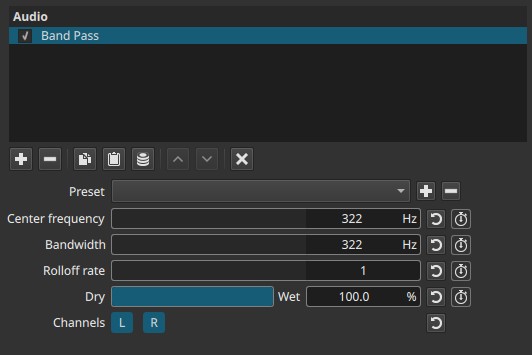
In mono projects, enabling either channel affects how the mono signal is routed into stereo output.
Quad / Ambisonics projects
Settings → Audio Channels → 4 (Quad / Ambisonics)
Channels
- L — Front Left
- R — Front Right
- Ls — Surround Left
- Rs — Surround Right
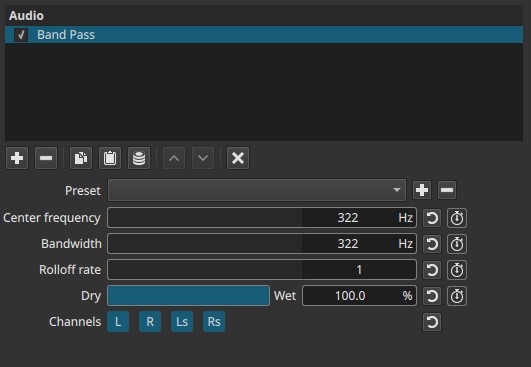
Each channel can be filtered independently.
5.1 Surround projects
Settings → Audio Channels → 6 (5.1 Surround)
Channels
- L — Front Left
- R — Front Right
- C — Center
- LF — Low-Frequency Effects (LFE)
- Ls — Surround Left
- Rs — Surround Right
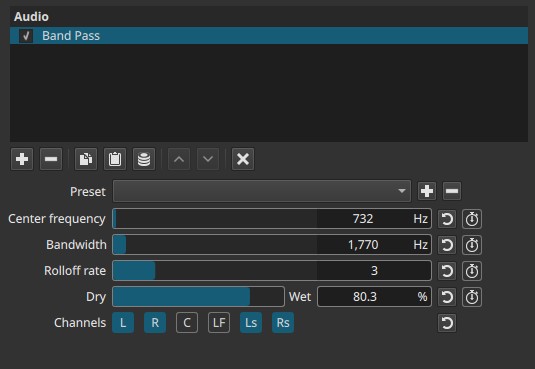
This allows precise frequency control per speaker channel.
Keyframes
All four sliders (Center frequency, Bandwidth, Rolloff, Dry - Wet) are keyframeable.
This enables:
- Frequency sweeps
- Moving “radio” or “telephone” effects
- Time-based tonal changes
- Dynamic emphasis of different frequency ranges
Channel selection buttons are static.
Auditory characteristics
- Audible isolation of a specific frequency range
- Removal of bass and treble outside the selected band
- Narrow bandwidth produces a thin, focused sound
- Wide bandwidth sounds more natural but still filtered
Recommended use cases
- Telephone or radio voice effects
- Isolating dialogue frequencies
- Sound design and special effects
- Removing unwanted low or high frequencies
- Frequency sweeps and transitions
- Channel-specific filtering in surround mixes
Usage notes and tips
- Start with a midrange center frequency (≈1 - 2 kHz) for speech effects.
- Narrow bandwidth + high rolloff produces classic “band-limited” sounds.
- Use Dry - Wet to soften the effect instead of widening the band.
- In surround projects, filtering only the center channel is useful for dialogue shaping.
Limitations
- Not a full equalizer
- No visual frequency display
- Extreme settings can sound artificial
- LFE channel filtering may have limited audible effect on some systems