Hello, I’d like some advice on how to adjust the height of the audio track. I find it confusing when the video and audio tracks are the same height. It also takes up more space on the screen. Thank you. Otherwise, the new graphics are brilliant.
Change the code or make your own video editor.
1 Like
You cannot adjust the height of tracks independently.
Because audio and video track heights are tied together in the interface, it isn’t currently possible to shrink the audio tracks independently.
While this global system may help to keep the code “easier” to maintain (if I can say that, nothing is easy, though), changing it would likely mean a massive overhaul or rewrite of the timeline → which isn’t a priority for the project right now.
In the meantime, an excellent workaround is: Shift + Mouse Wheel 
It is not that difficult. It was an easy change in response to an obvious user experience issue. With the valuable addition of the volume meters and sliders on the track to make it like a mixing console, it was strange for them appear inconsistently at typical heights. When the track height is short, it only displays a dot meter and you click the mute/speaker icon to get the volume slider:
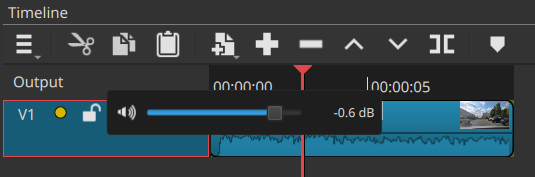
Before the change to make them the same height, more often than not, the video tracks showed full meter/slider but not the audio tracks! That was really weird because most people expect more direct audio controls on audio tracks. Prior to this change, you had to increase the track height absurdly high to expose them for audio tracks.
1 Like
Just a side note…
Maybe the VU meter height could be reduced in half?
Still plenty visible, but it would take less vertical space on the track head.
Sometimes when there is little space below the volume slider, the meter provides a non-interactive area to click to select the track. Not going to tweak this.
1 Like
Dan and I tested a lot of variations of track sizes before we settled on the current behavior. I tried to preserve the ability for audio tracks to be different size than the video tracks. But that was really unworkable because of the meter disappearing on the audio tracks before the video tracks. As Dan said, it isn’t so much about the technical limitation as it is about trading this small feature for a UI consistency.
I struggled myself with the change until I realized how easy it is to change the track heights while I edit with the shortcut keys (CTRL-++/-). I adapted my own workflow to just resize the height as I work and now it is natural to me. Give it some time and see if you can make the keyboard shortcuts work for you.
3 Likes
Thank you for the explanation – I’m just a user and I’m grateful that you’re developing such an editor for us free of charge. After all these years of using it almost every day, I’ve got used to the original interface and thought I simply didn’t know how to adjust the heights; that’s what my question was meant to convey. Dan’s reply – ‘make your own editor’ – was really unnecessary; I suppose he was just having a bad day. Thank you once again – I really appreciate your work. Here’s a link to my latest reel: https://www.youtube.com/shorts/2rS55bEbjxI?feature=share
Translated with DeepL.com (free version)
1 Like