Applies a selective wrap-and-blur treatment to a rectangular region of a 360° equirectangular image.
The filter preserves a central angular window while wrapping and blurring the areas outside it, allowing discontinuities at the image edges to be softened or hidden.
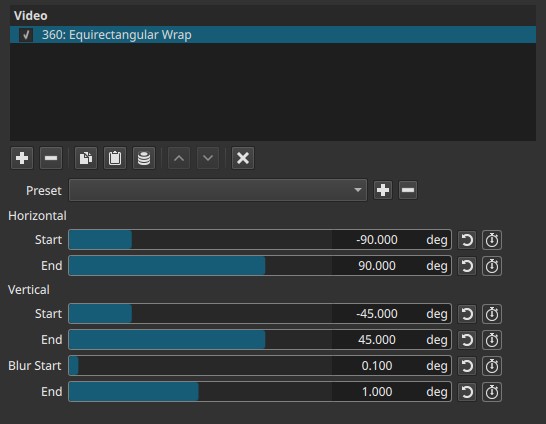
This is a 360°-specific utility filter. All parameters operate in angular coordinates (degrees), not pixels.
360° context
In equirectangular 360° video, the left and right edges of the image meet, representing a full 360° horizontal wrap.
Hard cuts, reframing, or projection changes can make these edges visually discontinuous.
360: Equirectangular Wrap is designed to manage these transitions by wrapping and blurring areas outside a defined angular window.
General behavior (important)
- The filter defines a central rectangular angular region that remains readable.
- Everything outside this region is progressively blurred and wrapped.
- The effect is spatial, but perception improves during playback.
- It does not change the projection or viewpoint.
Note:
This filter defines what stays clear; everything else is treated as peripheral context.
Parameters
Horizontal
Defines the horizontal angular window to preserve.
Start (−180.000 to 180.000°)
Sets the left boundary of the preserved region.
End (−180.000 to 180.000°)
Sets the right boundary of the preserved region.
- The region between Start and End is treated as the main visible window.
- Areas outside this range are wrapped and blurred.
Vertical
Defines the vertical angular window to preserve.
Start (−90.000 to 90.000°)
Sets the lower boundary of the preserved region.
End (−90.000 to 90.000°)
Sets the upper boundary of the preserved region.
Together, the Horizontal and Vertical ranges define the central rectangular area you observed.
Blur
Controls how strongly the outside regions are softened.
Blur Start (0.000–2.000°)
Defines the blur amount at the inner edge of the preserved region.
End (0.000–2.000°)
Defines the blur amount at the outer edge.
Important behavior
- Blur is applied only outside the defined rectangle.
- Even small values have a strong perceptual effect due to angular compression.
- Blur is progressive between Start and End.
Note:
Blur values are angular, not pixel-based; small numbers go a long way.
Keyframes
All parameters can be keyframed.
This allows:
- Animated reframing of the preserved region
- Smooth transitions between focus areas
- Motion-guided emphasis inside 360° scenes
Parameter interaction
- Horizontal + Vertical define what stays readable.
- Blur defines how softly the rest of the sphere is integrated.
- Narrow windows increase perceived blur dominance.
If the preserved region is very small, the effect may appear as a blurred surround with a clear “window” in the center.
Visual characteristics
- Clear rectangular region in angular space
- Wrapped and blurred surroundings
- No hard seams at 360° boundaries when tuned correctly
- Best understood during playback
Does this filter need another filter?
No; it can operate on its own, but it is most useful in a 360° filter chain.
Typical combinations
-
Equirectangular Wrap → 360° Reframe / Viewpoint change
Softens edge discontinuities after reframing. -
Equirectangular Wrap → Equirectangular to Stereographic
Helps integrate wrapped edges after projection changes. -
Raw 360° footage → Equirectangular Wrap
Reduces visual harshness near boundaries without altering projection.
This filter is supportive, not transformative.
Recommended use cases
- Softening 360° edge seams
- Limiting viewer attention to a central region
- Creating guided-focus 360° visuals
- Reducing discomfort caused by hard angular transitions
Limitations
- Not intended for non-360° footage
- Does not change projection or camera orientation
- Blur control range is intentionally narrow
- Effect can look confusing on still frames