Projects a 360° equirectangular image into a stereographic projection, producing a non-linear, globe-like or “tiny planet” style view.
The filter remaps spherical coordinates to a plane, transforming the full 360° environment into a visually compressed and highly distorted perspective.
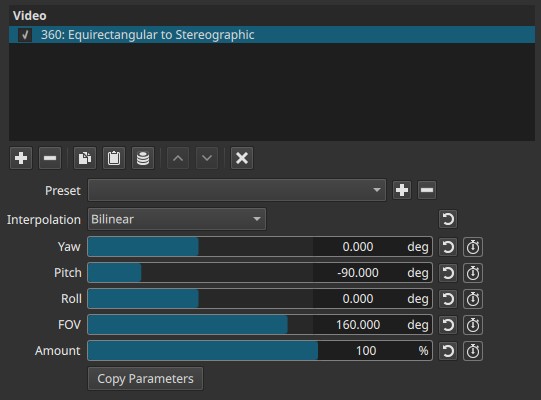
This is a projection filter, not a blur or distortion effect. It changes how the spherical image is mapped to the frame.
360° context
In 360° video, the image represents a full sphere mapped onto a rectangle (equirectangular projection).
This filter converts that spherical representation into a stereographic projection, where angles are preserved but distances and areas are increasingly distorted away from the center.
Parameters
Interpolation
Controls how pixels are resampled during projection.
-
Bilinear
Smooth interpolation using neighboring pixels.
Produces softer edges and is recommended for natural footage. -
Nearest-neighbor
Uses the closest pixel without smoothing.
Produces hard edges and visible stepping; mainly useful for stylized or technical results.
Yaw (−360.000 to 360.000°)
Rotates the view horizontally around the vertical axis.
- Changes the viewing direction left or right
- Equivalent to turning your head horizontally inside the 360° sphere
Pitch (−180.000 to 180.000°)
Rotates the view vertically.
- Positive and negative values tilt the view up or down
- Useful for centering the projection on the ground, horizon, or sky
Roll (−180.000 to 180.000°)
Rotates the view around the viewing axis.
- Spins the projected image clockwise or counter-clockwise
- Does not change what is being looked at, only its orientation
FOV (0.000 to 180.000°)
Controls the field of view of the stereographic projection.
-
Low values
Narrow view, strong magnification, extreme distortion near edges -
Medium values
Balanced globe-like appearance -
High values
Wider view with less aggressive distortion
Important behavior
- Values near 180° approach the limits of stereographic projection and can produce extreme stretching.
Amount (0 - 100%)
Controls how strongly the stereographic projection is applied.
-
0%
With valid 360° equirectangular input, the image remains in its original projection.- This filter has no true neutral state for non-360 footage; distortion occurs even at 0% Amount due to incompatible image geometry.
-
Low values
Partial projection mixed with the original mapping. -
100%
Full stereographic projection.
Note
Amount blends between the original projection and the stereographic one.
Copy Parameters
Copies the current parameter values to the clipboard so they can be pasted into another instance of the same filter.
This is useful for:
- Applying identical projections to multiple clips
- Maintaining consistency across edits
- Reusing complex setups without manual re-entry
Keyframes
All parameters can be keyframed.
This enables:
- Animated camera moves inside a 360° scene
- Smooth transitions between viewpoints
- Dynamic projection effects over time
Visual characteristics
- Strong non-linear distortion
- Globe, “tiny planet,” or inverted sphere appearances
- Increasing distortion away from the center
- Motion-dependent perception; best evaluated during playback
Recommended use cases
- Creating “tiny planet” or spherical panorama visuals
- Stylized transitions from 360° footage to flat video
- Exploratory or artistic 360° presentations
- Animated reframing of 360° environments
Limitations
- Not intended for conventional (non-360°) footage
- Projection distortion is intentional and non-corrective
- Extreme FOV values can produce unreadable imagery
- Requires equirectangular 360° input for meaningful results