

The video filters beginning with “Mask:” let you select a portion of the image or video in which to apply other video filters. There are a few different ones, and this one lets you choose the portion of the image by a color and a distance from the chosen color.

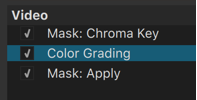
See the “Tip” above. To really make this work you add additional video filters that affect the selected color range followed by the Mask: Apply video filter, which combines every thing in between. So, the order of the filters is very important. For example, for secondary color correction, you might put a Color Grading, Levels, or Hue/Lightness/Saturation video filter in between them:
- Key color lets you choose the color to be affected. Click the dropper icon next to the color box to pick a color from the video. The dropper also lets you drag select a small rectangle of the image as well to get an average color for the rectangle to avoid picking a single stray pixel.
- Distance helps you choose the range near Key color like a threshold.
See also Mask: Apply