

Attenuates high frequencies above a selected cutoff, allowing lower frequencies to pass through.
This filter is commonly used to soften harsh sounds, remove high-frequency noise, or deliberately reduce clarity for stylistic effects.
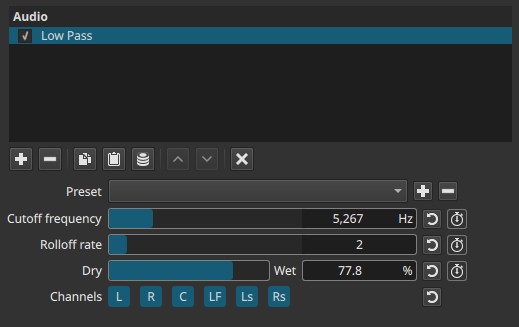
Low Pass is a frequency-domain filter evaluated continuously over time.
Parameters
Cutoff frequency (5 - 21 600 Hz)
Defines the frequency above which audio is progressively attenuated.
-
High values (≈8 000 - 20 000 Hz)
Very subtle effect; only extreme highs are reduced. -
Mid values (≈3 000 - 8 000 Hz)
Noticeable softening of clarity and brightness. -
Low values (≈500 - 3 000 Hz)
Strong filtering; audio becomes muffled or “covered”. -
Very low values (<500 Hz)
Extreme effect; only bass and low mids remain.
Note:
Lowering the cutoff removes more treble.
Rolloff rate (1 - 10)
Controls how steeply frequencies above the cutoff are reduced.
-
Low values (1 - 3)
Gentle slope; natural-sounding attenuation. -
Mid values (4 - 7)
Clear cutoff with controlled transition. -
High values (8 - 10)
Aggressive filtering; high frequencies are sharply suppressed.
Behavior note:
- High rolloff combined with low cutoff can sound unnatural or “boxed”.
Dry → Wet (0.0 - 100.0%)
Controls the mix between the original signal and the filtered signal.
-
0.0%
Original audio only. -
50.0%
Partial filtering with retained clarity. -
100.0%
Fully filtered audio.
This allows subtle softening without fully removing high frequencies.
Channel selection (toggle buttons)
Determines which audio channels the filter is applied to.
Buttons are toggle switches.

Available buttons depend on the project’s audio channel configuration: Settings > Audio Channels
- L — Front Left
- R — Front Right
- C — Center
- LF — Low-Frequency Effects (LFE)
- Ls — Surround Left
- Rs — Surround Right
Note:
Independent filtering per channel requires adding separate instances of the filter.
Relation to the Low & High Pass filters
Low Pass and High Pass are complementary filters:
- High Pass removes low frequencies and preserves highs.
- Low Pass removes high frequencies and preserves lows.
Used together, they can:
- Isolate a specific frequency band
- Create band-limited or “telephone” effects
- Clean both rumble and hiss from dialogue
Auditory characteristics
- Reduced brightness and detail
- Softer, darker sound
- Suppressed hiss or sharp transients
- Extreme settings can remove intelligibility
Recommended use cases
- Removing hiss or high-frequency noise
- Softening harsh dialogue or effects
- Creating distance or obstruction effects
- Stylized audio (radio, underwater, behind walls)
- Preparing audio before further processing
Example settings
-
Subtle softening
- Cutoff: 10 - 14 kHz
- Rolloff: 2 - 4
- Dry → Wet: 100%
-
Dialogue muffling / obstruction effect
- Cutoff: 2 - 4 kHz
- Rolloff: 4 - 6
- Dry → Wet: 100%
-
Band-limited effect (with High Pass)
- Low Pass cutoff: 3 - 4 kHz
- High Pass cutoff: 300 - 500 Hz
Usage notes and tips
- Start with high cutoff values and lower gradually.
- Avoid extreme rolloff unless a strong effect is desired.
- Combine with Dry → Wet for subtle results.
- Always evaluate during playback.
Limitations
- Cannot target specific high frequencies selectively
- No resonance or Q control
- Extreme settings reduce clarity significantly