

When an audio/video clip is selected, the Properties panel shows the audio and video properties.

- The heading shows the title of the clip. The default is the file name, but you can click into it or press
F2to rename the clip. Renaming here only affects how it appears in the current project. It does not change the file name or its name in other or future projects. - Comments: is where you can add your own description, keywords, or tags. These are searchable in the Playlist panel for playlist clips only. Remember, in Shotcut, Playlist and Timeline are separate containers for clips. So, you need to open (double-click) a playlist item to see that clip objects’ comments that are searchable.
- The Speed setting allows the playback speed of the clip to be increased or decreased. There is a down arrow button that has some commonly used speed presets such as 0.5 (slower) and 2.0 (faster).
- Pitch Compensation affects how the audio sounds for speed-changed clips. When it is off, the frequency or pitch changes according to the speed. When it is on, Shotcut tries to maintain the correct pitch, but it can only do so much. It works ok for small speed changes but for large speed changes you probably need to mute the audio.
- Duration only overrides the source duration, not the duration of the playlist item or timeline clip. If you are using Time Remap or Speed filters to slow down the video you might need to increase this duration because these filters do not have access to the source clip to make the changes. Speed here within Properties can and does automatically adjust Duration.
- Timeline duration is always disabled because you cannot adjust the duration of a clip numerically at this time. You need to use the actions available in the Timeline and playback controls.
Video Tab
- Track lets you change which of multiple embedded streams or tracks within a multi-track file. Or you can use it to disable the video on this selected clip.
- Aspect ratio lets you override the wideness or tallness of the video in case it was mis-detected or for an effect. For example, you can force a 4:3 video to be stretched to 16:9 to make it fill the screen.
- Scan mode lets you override whether the clip is progressive or interlace in case it was mis-detected.
- Color range lets you override whether the clip uses the full numeric range of values or the more common (since MPEG-1) limited range. Normally, you should not need to change this and only change it if you know for sure. If this shows Broadcast Limited but the Video Waveform scope shows values below 0 or above 100, then your video is most likely actually full range, and you will experience clipping if not corrected.
- Rotation is another override. Sometimes a video is shot upside-down or with the camera turned, but the camera did not specify the correct orientation in the video file.
Audio Tab
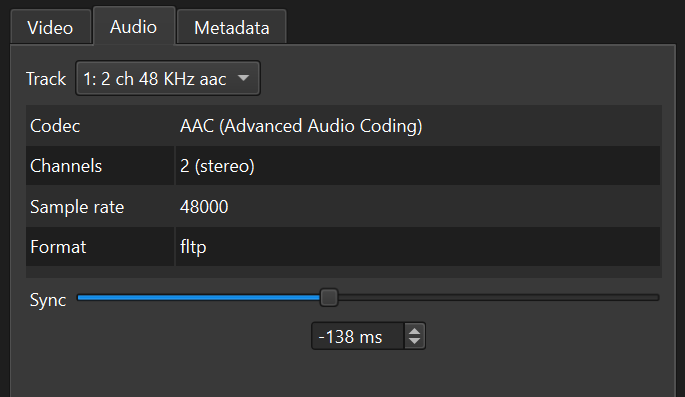
- Track lets you change which of multiple embedded streams or tracks within a multi-track file. Or you can use it to disable (mute) audio on this selected clip.
- The Sync slider appears if the clip also has video. Use this to fix the audio/video synchronization for the clip. However, before doing so, you should also verify your Shotcut’s system level playback audio/video synchronization in Settings > Player > Synchronization
Metadata Tab
This shows non-editable metadata that is embedded in the file. You can enter your own metadata in Comments, but that only saves with the Shotcut project. Shotcut does not modify source media assets.
Button Bar

Menu
The first button in the Properties button bar is a menu button:
- Reset
- Show In Files
- Show In Folder
- Copy Full File Path
- More Information
- Start Integrity Check Job
- Convert to Edit-friendly
- Extract Sub-clip
- Extract Subtitles
- Set Creation Time
- Set Equirectangular
- Measure Video Quality
- Export GPX
- View Bitrate
Convert
This is the same as the Convert to Edit-friendly menu item above.
Reverse
Proxy
Open With and Reload
- Open With shows a menu of other tools with which you can open this video or audio-only file.
- Choose System Default to let the operating system decide which tool to use–the same as if you double-clicked the file in its file manager.
- Choose Other to add an application that is on your computer.
- Choose Remove to remove something you added with Other.
- You can think of this as “Edit With” especially useful for images and audio files.
- There is a file watcher upon opening with another tool as long as selection (Properties) does not change. If it does, you can use Reload. This does not yet reload–whether manual or automatic–every clip object based on this file.
- This is not available in the Linux Flatpak.
- This was added in Shotcut version 25.10