This generates an animated procedural plasma pattern based on mathematical interference functions.
The animation is continuous and non-repeating, and all controls interact with each other.
This type of imagery originates from early computer graphics and demoscene visuals, where smooth color gradients and flowing motion were generated mathematically rather than from filmed footage.
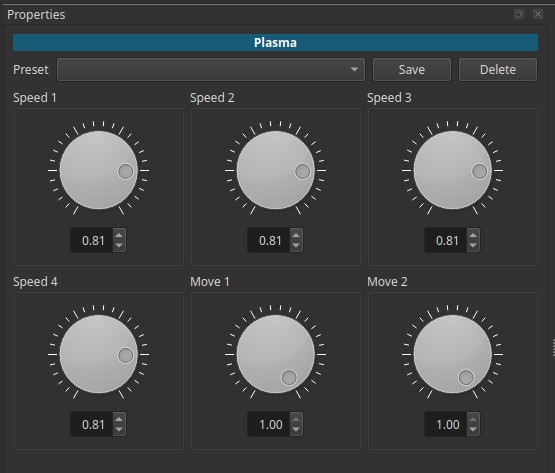
In Shotcut, Plasma is a generator, not a filter.
All parameters are adjusted in the Properties tab of the generated clip.
Behavior Note:
Plasma must be evaluated during playback.
A single frame is misleading and does not represent the effect.
Small numeric changes can result in qualitatively different motion and structure.
How the Plasma generator actually behaves
The Plasma generator combines several evolving wave fields.
The controls do not correspond to simple axes or isolated properties.
Instead, they influence:
- Pattern topology (rounded vs stretched)
- Temporal evolution (static vs pulsing)
- Directional drift
- Rate of internal phase change
Parameters
All parameters range from 0.00 to 1.00 and are evaluated continuously over time.
Speed 1
Controls the overall temporal evolution of the plasma field.
-
Lower values
Slower internal evolution; patterns feel more stable. -
Higher values
Faster internal changes; increased pulsing and morphing.
Important:
Speed 1 strongly affects whether the plasma appears static, slowly drifting, or actively pulsing.
Speed 2
Influences the spatial structure bias of the plasma.
-
Values below 1.00
Tend to produce elongated or stretched structures. -
Values at or near 1.00
Tend to produce rounder, more isotropic patterns.
This parameter affects shape character, not direction alone.
Speed 3
Works in conjunction with Speed 2 to define pattern geometry.
-
When Speed 2 ≠ Speed 3
The plasma exhibits directional stretching. -
When Speed 2 ≈ Speed 3
The plasma becomes more symmetrical and rounded.
Key point:
Speed 2 and Speed 3 form a pair. Their relative values matter more than their absolute values.
Speed 4
Controls the rate of internal phase cycling.
-
Lower values
Colors and structures change slowly. -
Higher values
Faster internal cycling; more visible pulsing.
This parameter contributes to the “alive” feeling of the plasma.
Move 1
Controls global drift with deformation along one axis.
-
Lower values
Minimal drift. -
Higher values
Slow directional movement combined with compression/expansion.
This is not a pure translation.
Move 2
Controls global drift with deformation along the second axis.
As with Move 1:
- Movement includes squishing and stretching
- Direction and speed depend on interaction with Speed parameters
Behavior note:
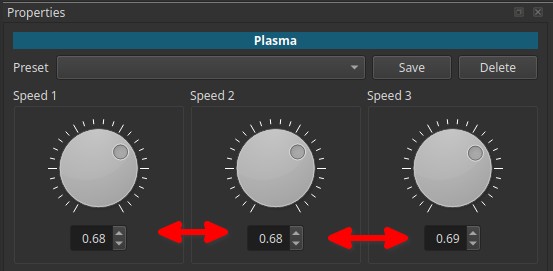
When Speed controls (1, 2, and 3) are set to similar values (with Move controls at high values), the plasma pattern may collapse into a full-frame color cycling effect, where structure largely disappears and the image appears as flashing and smoothly changing colors.
Visual characteristics
- Abstract, organic motion
- Strong dependence on parameter interaction
- No fixed orientation or stable geometry
- Behavior changes qualitatively, not linearly
Historical context
Plasma effects were widely used in:
- Early computer demos (1980s - 1990s)
- Demo scene productions
- Software intros and loading screens
- Low-power real-time graphics demonstrations
They showcased mathematical creativity rather than realism.
Contemporary use
Today, plasma generators are used primarily for stylized and abstract visuals:
- Background textures
- Motion graphics layers
- Retro or demo-scene aesthetics
- Abstract transitions
- Visual fillers or placeholders
They are not used for realism or calibration.
Use with other filters
Plasma is often combined with other filters for creative results:
-
Blend Mode
Overlay plasma on footage for stylized color motion. -
Opacity
Subtle background animation behind titles or graphics. -
Blur
Further smooth gradients or reduce harsh transitions. -
Color Grading / Saturation
Emphasize or mute the vivid colors. -
Crop / Mask
Use plasma only in specific regions.
Usage notes and tips
- Always preview in motion.
- Small parameter changes can have large visual effects.
- Plasma works best as a supporting visual, not a focal subject.
Limitations
- No deterministic control over exact shapes
- Highly sensitive to parameter interaction
- Not suitable for precise motion design
- Single-frame inspection is misleading