Removes a very narrow range of frequencies centered around a selected frequency while leaving the rest of the spectrum largely unchanged.
This filter is designed to eliminate specific, unwanted tones such as hum, buzz, or ringing.
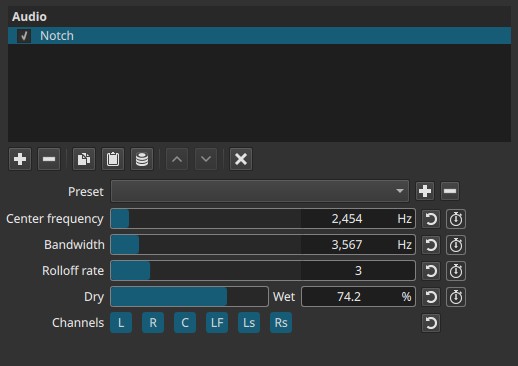
Notch is a frequency-domain filter evaluated continuously over time.
Parameters
Center frequency (5 - 21 600 Hz)
Sets the exact frequency that will be removed.
-
Low values (≈50 - 120 Hz)
Useful for removing electrical hum or low-frequency rumble. -
Mid values (≈300 - 3 000 Hz)
Target problematic resonances in voices or instruments. -
High values (>3 000 Hz)
Remove high-pitched whines or ringing.
Note:
This is the frequency you want to suppress.
Bandwidth (5 - 21 600 Hz)
Controls how wide the removed frequency range is around the center frequency.
-
Low values
Very narrow notch; removes a specific tone. -
High values
Wider removal; affects more surrounding frequencies.
Important note:
Although expressed in Hz, this controls width, not position.
Rolloff rate (1 - 10)
Controls how steeply frequencies transition into and out of the notch.
-
Low values (1 - 3)
Gentle slopes; smoother, less obvious filtering. -
High values (8 - 10)
Steep slopes; precise removal with minimal side effects.
Higher rolloff values make the notch more focused.
Dry → Wet (0.0 - 100.0%)
Controls the mix between the original signal and the notched signal.
-
0.0%
Original audio only. -
50.0%
Partial removal of the target frequency. -
100.0%
Full notch effect.
Allows subtle correction when full removal sounds unnatural.
Keyframes
All four sliders are keyframeable.
Keyframes allow the notch filter to change over time, enabling:
- Sweeping the notch frequency to track a moving hum or whistle
- Gradually reducing or restoring a problematic tone
- Applying the notch only during specific sections of a clip
- Creating automated resonance suppression
Behavior note:
Because the filter operates in the frequency domain, keyframed changes are best evaluated during playback rather than on a single frame.
Channel selection
Determines which audio channels the filter is applied to. Buttons are toggle switches.

Available buttons depend on the project’s audio channel configuration: Settings > Audio Channels
- L — Front Left
- R — Front Right
- C — Center
- LF — Low-Frequency Effects (LFE)
- Ls — Surround Left
- Rs — Surround Right
Note:
Independent filtering per channel requires adding separate instances of the filter.
Auditory characteristics
- Removes a specific tone or resonance
- Minimal impact on overall sound when set narrowly
- Wide settings can make audio sound hollow
- Overuse may reduce naturalness
Recommended use cases
- Removing electrical hum (50/60 Hz)
- Eliminating microphone feedback
- Reducing ringing or resonant tones
- Cleaning up dialogue recordings
- Fixing tonal artifacts without affecting the full mix
Example settings
-
50 Hz hum removal
- Center frequency: 50 Hz
- Bandwidth: narrow
- Rolloff rate: high
- Dry → Wet: 100%
-
Voice resonance reduction
- Center frequency: 500 - 1 000 Hz
- Bandwidth: narrow to medium
- Rolloff rate: medium
- Dry → Wet: 50 - 100%
-
High-pitched whine
- Center frequency: 4 - 8 kHz
- Bandwidth: narrow
- Rolloff rate: high
Usage notes and tips
- Sweep the Center frequency while listening to locate the problem tone.
- Use the narrowest Bandwidth that solves the issue.
- Prefer high Rolloff rate for surgical removal.
- Use Dry → Wet to soften the effect if needed.
Limitations
- Not suitable for broad tonal shaping
- Cannot remove multiple tones at once
- Extreme settings can cause audible artifacts